H9. When Pending (Red) Will Not Clear Because No HTTP Client Timeout Is Set
Diátaxis: How-to · Audience: operators and developers ← Back to contents
If Pending (in-progress) requests stay red and do not fall in the dashboard's Request Viewer and Request Velocity, it is very likely that no timeout is set on the HTTP calls the application makes outward. This chapter covers how to confirm that cause and resolve it by setting timeouts for each kind of HTTP client.
How to read the request viewer and request velocity is in T2; what the widget metrics mean is in R2.1 WAS Charts.
The Symptom — Where It Shows
- Request Viewer: the circular wall in the middle does not fall and stays swollen and red.
- Request Velocity: the Frustrating (red) band only piles up and never drains.
- Transactions are not counted as complete and stay a long time in the "in progress (Pending/Active)" state.
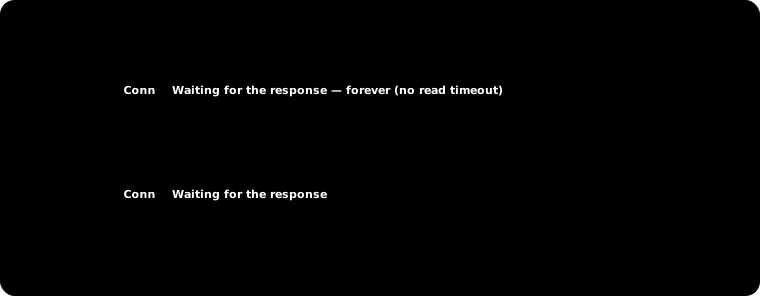
The usual red (a slow response) disappears a moment later as the handling finishes. With no timeout, by contrast, the call hangs forever and the transaction never ends, so the red keeps staying -- that is the difference.
The Cause — No Timeout Means an Unbounded Wait
When the application sends an HTTP request to an external API or an internal service and the other side is slow or does not answer, a call with no timeout waits for the response indefinitely. When that happens:
- The WAS thread handling that request is tied up and not returned.
- The transaction never ends, so the APM keeps showing it as "in progress (Pending)".
- As such calls accumulate, the red in the request viewer and request velocity does not disappear, and in the end even the thread pool can be exhausted.
The heart of the fix is setting both kinds of timeout.
| Timeout | Meaning | Without it |
|---|---|---|
| Connect timeout | The limit on waiting for the TCP connection to be established | An unbounded wait at the connection stage when the target is dead |
| Response/read timeout (read · response) | The limit on waiting for the response (the data) after the request is sent | An unbounded wait when the target gives no response (the most common cause) |
| Connection-acquire timeout (connection-request · lease, when a pool is used) | The limit on waiting to be given a free connection from the pool | An unbounded wait when the pool is exhausted |
Caution The most common mistake is setting only the connect timeout and leaving out the response timeout. Connecting often succeeds quickly while the response never comes, so both have to be set for Pending to clear.
Confirming It with a Thread Dump — Finding the Hung Threads
Whether the Pending (red) really is down to "an HTTP call with no timeout" can be settled with a thread dump.
How to take one -- at left menu ▸ WAS ▸ Troubleshooting ▸ Thread Dump Analysis, choose the instance and press Request. Choosing a dump from the list shows each thread's state and stack in Thread Detail Analysis. (For the full procedure and AI analysis, see T3. Analysing a Cause with AI — Part 3 Thread Dump.)
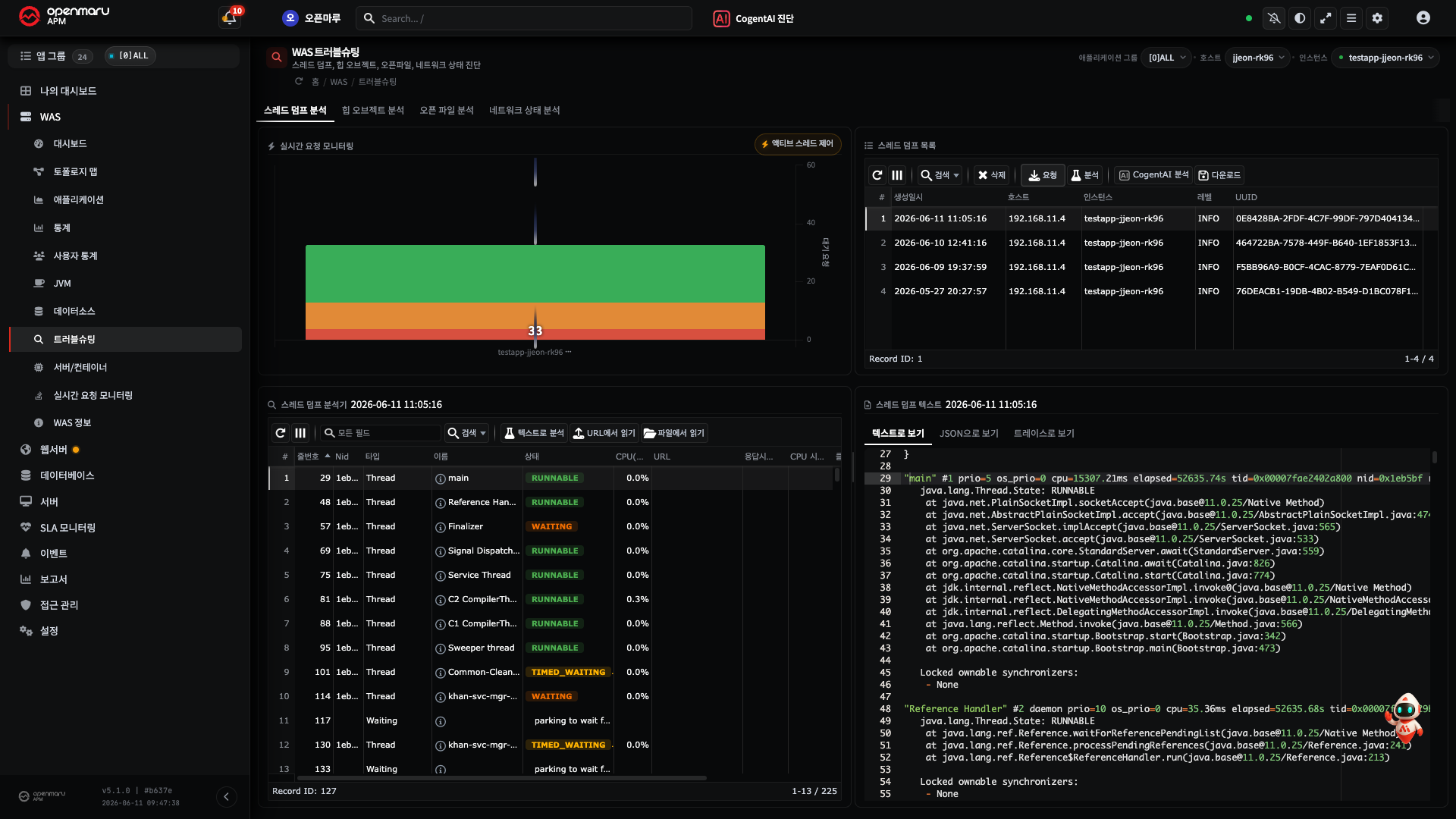
If a request-handling thread (http-nio-…-exec-N on Tomcat) is in the RUNNABLE state and yet
stopped at socketRead0 (reading the socket response) at the bottom, it is hanging while waiting
for a response. For example:
"http-nio-8080-exec-7" #54 daemon prio=5 tid=0x00007f8a... nid=0x3a2 runnable
   java.lang.Thread.State: RUNNABLE
        at java.net.SocketInputStream.socketRead0(Native Method)       <- stopped here (waiting for the response)
        at java.net.SocketInputStream.socketRead(SocketInputStream.java:115)
        at java.net.SocketInputStream.read(SocketInputStream.java:168)
        at java.io.BufferedInputStream.fill(BufferedInputStream.java:246)
        at sun.net.www.http.HttpClient.parseHTTPHeader(HttpClient.java:735)
        at sun.net.www.protocol.http.HttpURLConnection.getInputStream0(HttpURLConnection.java:1535)
        at com.example.PaymentClient.charge(PaymentClient.java:88)      <- our code's outbound call
        at com.example.OrderService.checkout(OrderService.java:54)
        at com.example.OrderController.order(OrderController.java:37)
        ... (servlet filters, dispatcher)
How to read it
- A RUNNABLE thread stopped at
socketRead0(orread) = waiting for a response with no read timeout. (It uses no CPU but the state shows as RUNNABLE -- that is how a network read looks.) - Our code's frames above it (
PaymentClient.charge→OrderController.order) tell you which call is hanging and on what target. - A single dump is enough, judged by that thread's elapsed time. If the elapsed time shown in the
thread dump list and detail is abnormally longer than the usual handling time (a few hundred
milliseconds normally, say, but climbing steadily into tens of seconds or minutes), the thread
stopped at
socketRead0is hanging. Those threads are exactly the Pending (red) in the request viewer and request velocity.
Note The upper part of the stack differs per client but the bottom is the same socket read. For example Apache HttpClient
…SessionInputBufferImpl.streamRead· OkHttpokio.…read-- all of them end atsocketRead0. In asynchronous and NIO styles (java.net.http.HttpClient and the like) the calling thread may instead appear asCompletableFuture.getor a selector wait, but it is the same in that an unbounded wait follows when there is no response timeout.
Note Pressing the CogentAI Analysis button on the top toolbar has the AI pick out the common stacks and the targets of the long-running calls (T3 Step 7). Take the same dump after setting the timeouts and the threads that were hanging end at the limit with a
SocketTimeoutExceptionand no longer appear.
The Fix — Setting Timeouts per HTTP Client
Each unit is milliseconds (ms) or a Duration. The values below are examples; adjust the actual
values to your environment with reference to Recommended Values.
1) HttpURLConnection (built into the JDK · java.net)
Both default to 0 (an unbounded wait), so they must be stated explicitly.
URL url = new URL("https://api.example.com/data");
HttpURLConnection conn = (HttpURLConnection) url.openConnection();
conn.setConnectTimeout(3000); // connect timeout (ms), 0 = unbounded (default)
conn.setReadTimeout(5000);    // response (read) timeout (ms), 0 = unbounded (default)
2) java.net.http.HttpClient (Java 11+)
The connect timeout is set on the client, the response timeout on the request. Both are unbounded when unset.
HttpClient client = HttpClient.newBuilder()
        .connectTimeout(Duration.ofSeconds(3)) // connect timeout
        .build();

HttpRequest request = HttpRequest.newBuilder()
        .uri(URI.create("https://api.example.com/data"))
        .timeout(Duration.ofSeconds(5))        // response timeout (per request)
        .build();
Exceeding the response timeout raises an
HttpTimeoutException.timeout(...)has to be given on every request, so make sure a shared request builder or wrapper does not leave it out.
3) Apache HttpClient (HttpComponents)
It is pool-based, so setting the connection-acquire timeout alongside is recommended.
4.x (the most widely used) -- the unit is ms (int):
RequestConfig config = RequestConfig.custom()
        .setConnectTimeout(3000)           // connect timeout
        .setSocketTimeout(5000)            // response (socket read) timeout
        .setConnectionRequestTimeout(2000) // wait to acquire a connection from the pool
        .build();

CloseableHttpClient client = HttpClients.custom()
        .setDefaultRequestConfig(config)
        .build();
5.x -- uses the Timeout type. The connect and socket timeouts moved to the connection
manager's ConnectionConfig, while the response timeout and connection acquisition stay in
RequestConfig:
ConnectionConfig connConfig = ConnectionConfig.custom()
        .setConnectTimeout(Timeout.ofSeconds(3)) // connect timeout
        .setSocketTimeout(Timeout.ofSeconds(5))  // socket (read) timeout
        .build();

PoolingHttpClientConnectionManager cm = PoolingHttpClientConnectionManagerBuilder.create()
        .setDefaultConnectionConfig(connConfig)
        .build();

RequestConfig reqConfig = RequestConfig.custom()
        .setConnectionRequestTimeout(Timeout.ofSeconds(2)) // acquire a connection from the pool
        .setResponseTimeout(Timeout.ofSeconds(5))          // response timeout
        .build();

CloseableHttpClient client = HttpClients.custom()
        .setConnectionManager(cm)
        .setDefaultRequestConfig(reqConfig)
        .build();
4) OkHttp (Square)
OkHttp defaults connect, read, and write to 10 seconds each (not unbounded), but the whole-call
timeout (callTimeout) defaults to 0 (unbounded). Redirects, interceptors, and retries accumulate,
so the whole thing can grow indefinitely long even with 10 seconds per stage -- specifying
callTimeout as well is recommended.
OkHttpClient client = new OkHttpClient.Builder()
        .connectTimeout(3, TimeUnit.SECONDS) // connect
        .readTimeout(5, TimeUnit.SECONDS)    // response (read)
        .writeTimeout(5, TimeUnit.SECONDS)   // sending the request body (write)
        .callTimeout(10, TimeUnit.SECONDS)   // whole-call limit (recommended)
        .build();
5) Spring RestTemplate
RestTemplate itself has no timeout setter. They have to be set on the request factory
(ClientHttpRequestFactory) and the factory then injected into the RestTemplate.
SimpleClientHttpRequestFactory factory = new SimpleClientHttpRequestFactory();
factory.setConnectTimeout(3000); // connect timeout (ms)
factory.setReadTimeout(5000);    // response timeout (ms)

RestTemplate restTemplate = new RestTemplate(factory); // the factory must be injected
In Spring Boot, RestTemplateBuilder sets it more simply:
@Bean
RestTemplate restTemplate(RestTemplateBuilder builder) {
    return builder
            .setConnectTimeout(Duration.ofSeconds(3))
            .setReadTimeout(Duration.ofSeconds(5))
            .build();
}
Note To control the connection pool and the connection-acquire timeout as well, use
HttpComponentsClientHttpRequestFactory(based on Apache HttpClient) as the request factory and setconnectionRequestTimeoutfrom 3) above alongside.RestClientandWebClientin recent Spring (6 / Boot 3) work on the same principle -- be sure to specify connect and response timeouts there too.
Recommended Values
There is no absolute right answer; base them on the target service's normal response time.
| Timeout | Starting value (example) | The basis for choosing it |
|---|---|---|
| Connect | 1 to 3 s | Short (1 s) on the same network, 2 to 3 s over an external network |
| Response · read | 5 to 10 s | The target's P99 response time plus headroom. Too short and normal requests get cut off |
| Connection acquire (lease) | 1 to 2 s | Fail fast when the pool is exhausted, to prevent hanging |
Note The target's P99 response time can be checked on the request viewer and the response time charts (R2.1). Set the read timeout comfortably above that value -- as long as it is not unbounded, Pending will stop piling up.
Verification — Checking That Pending Clears
- After setting and deploying the timeouts, look again at the dashboard's Request Viewer and Request Velocity.
- Even if the target is slow or dead, the call ends in failure at the timeout and the transaction finishes. → The red disappears within the timeout limit and Pending does not pile up indefinitely.
- Failed calls are now counted as errors, so from here use H6 to trace the slow or failing outbound call itself (the target service's delay or failure).
A timeout is only a safeguard that stops the hanging (Pending); it does not fix the root cause of the target being slow. Once the red has stopped, look separately at why it is slow (the target API, the network, the database).
When It Does Not Work
| Symptom | What to check |
|---|---|
| Pending red persists even with a timeout set | Check whether only one of the two timeouts was set -- usually connect only, with the response (read) timeout left out |
| A pool-based client hangs occasionally | The connection-acquire (connection-request · lease) timeout is unset -- an unbounded wait when the pool is exhausted |
| Intermittent unbounded waits on OkHttp | callTimeout (0 = unbounded by default) is unset -- read alone cannot stop redirects and interceptors accumulating |
| Only the setters were called on RestTemplate and it is unbounded | Check the request factory was injected with new RestTemplate(factory) -- calling the setters without injecting is common |
| Normal requests get cut off after the timeout | The read timeout is too short -- raise it to the target's P99 response time plus headroom |
| The code is scattered and only some places are set | Force the timeout in one place with a shared client bean or factory -- it stops call sites leaving it out |
Related Documents
- H6. Finding the Cause of a Slow Transaction (SQL, Outbound Calls) -- tracing outbound call delays and failures
- H8. Diagnosing Database Connection Pool Exhaustion -- when the same "unbounded wait" happens in the database pool
- T2. Finding and Tracing a Problem from the Dashboard -- judging the red in the request viewer and request velocity
- T3. Analysing a Cause with AI (Thread Dumps) -- taking, reading, and AI-analysing a thread dump
- R2.1 WAS Charts (Request Velocity) -- what the request viewer and request velocity metrics mean