2.2. Installation — plain Linux host
How to install OPENMARU Observability on an ordinary Linux host with Docker Compose.
Overview
OPENMARU Observability runs on an ordinary Linux host without Kubernetes. The server stack starts in one go with Docker Compose, and you deploy a node agent to each host you want to monitor.
Once installation is complete, the node agent collects metrics, logs, traces and profiling data on each host and sends them to the server. There is no need to change application code or install a separate SDK.
This chapter covers the shortest path from installation to seeing the screens. For details such as offline Docker installation in an air-gapped environment, the full list of environment variables, and per-language OpenTelemetry instrumentation, see the installation and operations manual.
Components
The following services run as containers together on a single server host.
| Component | Role | External port |
|---|---|---|
| Server | Processes collected data and serves it to the UI | 8080 |
| UI | The web screens you open in a browser | 80 |
| Keycloak | Handles sign-in (SSO) | 8081 |
| OTel Collector | Receives OpenTelemetry data | 4317, 4318 |
| PostgreSQL | Stores configuration and user information | Internal only |
| ClickHouse | Stores log, trace and profiling data | Internal only |
| VictoriaMetrics | Time-series database that stores metrics | Internal only |
| Cluster Agent | Collects database and AWS RDS instrumentation metrics | Internal only |
The node agent is not part of this stack. You deploy it separately on every host you monitor.
Data flow
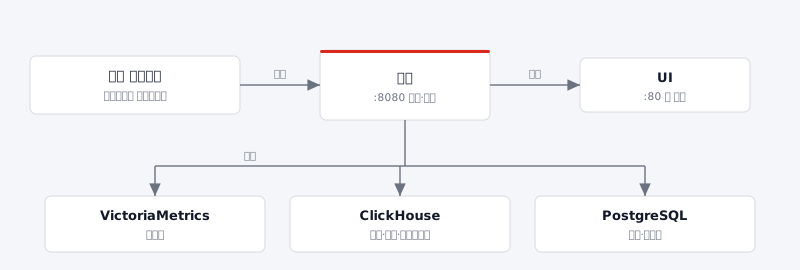
Node agents push data to the server, so the server never needs to connect back to the monitored hosts even when they are spread across different locations.
System requirements
Server host
| Item | Requirement |
|---|---|
| OS | Ordinary Linux (x86_64 or ARM64), one server |
| Runtime | Docker and docker compose v2 |
| Memory | 16 GB or more recommended — the container limits add up to about 13 GB |
| CPU | 16 vCPU or more recommended — the container limits add up to about 8 vCPU |
| Disk | Data accumulates under data/ in the deployment directory, in proportion to how long you retain logs and traces (ClickHouse) |
| Run privileges | Must be run as root |
| SELinux | If Enforcing, access to the data directory is blocked |
Why root is required: the start script hands the directories under
data/to the account each container runs as (chown). Without root this step is skipped, the containers cannot write to the data directory and they exit repeatedly.
SELinux: if it is Enforcing, turn it off with
setenforce 0and setSELINUX=disabledin/etc/selinux/config. If you would rather leave it on, add the:zlabel to the Compose volumes.
Hosts where the node agent is installed
The node agent collects data from the host kernel using eBPF. The requirements below apply to the host operating system, not to a container.
| Item | Requirement |
|---|---|
| Kernel | Linux kernel 4.16 or later — checked at start-up; the agent will not start below this |
| RHEL family | RHEL 8 or later. RHEL, CentOS, Rocky and Alma 7 are not supported — their kernel is 3.10 |
| tracefs | /sys/kernel/debug/tracing or /sys/kernel/tracing must exist |
| Network | Must be able to reach the server's collection port (8080 by default) |
| Deployment unit | One per host you monitor |
Ports
| Port | Purpose |
|---|---|
| 80 | UI access |
| 8080 | Collection port the node agents send data to |
| 8081 | Keycloak admin console |
| 4317, 4318 | OpenTelemetry data ingestion |
Note: if port 8080 is already in use on the host, change
SERVER_HTTP_PORTin.env. The address the node agents point at must use the same port.
Installing the server stack
Copy the deployment directory (observ-server/) to the server host and run it as root.
cd observ-server

# 1) Start — give the server host IP and it is written into .env as the access address.
OBSERV_HOST=10.20.10.5 ./start-observ.sh

# 2) Verify — waits until the server is healthy, then prints the access address.
./verify-observ.sh
start-observ.sh does the following.
- Creates
.envif it does not exist, generating the secrets used for sign-in at random. - Creates the directories under
data/and hands them to the account each container runs as. - Stops with an error if
CHANGE-MEis still present in.env. - Builds the sign-in (Keycloak) configuration and starts all services.
.envis created only once. To set the values again, delete.envand run the script again. If you do not provideOBSERV_HOST, the first IP on the host is detected and used.
Key settings
All configuration lives in a single .env file.
| Variable | Default | Description |
|---|---|---|
UI_HTTP_PORT | 80 | UI access port |
SERVER_HTTP_PORT | 8080 | Collection port the node agents connect to |
KC_HTTP_PORT | 8081 | Keycloak admin console port |
POSTGRES_PASSWORD | openmaru1234 | Configuration database password |
CLICKHOUSE_PASSWORD | 27MefVmNE3 | ClickHouse password |
OPENMARU_OBSERV_API_KEY | bm56xxcb | Project key used to authenticate agents and OpenTelemetry |
SERVER_SECURE_COOKIE | false | Must be false when serving over HTTP. Set true behind an HTTPS proxy |
Caution: always change the default passwords in a production environment. Changing a password in
.envapplies it to both the server and the database.
Management commands
| Command | What it does |
|---|---|
./start-observ.sh | Start everything |
./stop-observ.sh | Stop everything (data is preserved) |
./status-observ.sh | Check service status |
./tail-observ.sh | Follow all logs |
./verify-observ.sh | Check that the server is healthy |
./start-observ-one.sh <service> | Restart a single service (stop and tail take the same form) |
Service names: postgres, clickhouse, victoria-metrics, server, ui, otel-collector, cluster-agent, keycloak
Installing the node agent
Starting the server alone leaves the screens empty. Deploy a node agent to every host you want to monitor.
Copy the deployment directory (observ-node-agent/) to the target host, then:
cd observ-node-agent

# Give the server host address and the rest is configured automatically.
COLLECTOR_HOST=10.20.10.5 ./start-node-agent.sh

# Verify
./verify-node-agent.sh
COLLECTOR_HOST takes the IP address of the server host. If you changed SERVER_HTTP_PORT from its default on the server, point the agent at the same port.
Repeat the same procedure on each host you want to monitor.
The node agent must run against the host kernel, so its container runs with
privilegedrights. Use only images you trust.
Confirming the installation
# 1) Are all services up?
./status-observ.sh

# 2) Server health
curl http://localhost:8080/health

# 3) Are metrics from the node agents arriving?
curl 'http://127.0.0.1:8428/api/v1/query?query=up'
Open http://<server host>/ in a browser and sign in — installation is complete.
Default accounts
| Target | Address | ID | Password |
|---|---|---|---|
| UI | http://<server host>/ | omadm | openmaru12#$ |
| Keycloak admin console | http://<server host>:8081/ | omadm | openmaru12#$ |
The two accounts share an ID but are separate accounts in different realms. Add or change UI users in the openmaru realm of the Keycloak admin console.
Caution: change the password on both accounts in a production environment.
Air-gapped environments
Where images cannot be pulled, move the image bundle as files and install from it.
# After restoring images/ into the deployment directory
./docker-load-image.sh     # Detects the host architecture and registers the images
./start-observ.sh
The node agent deployment directory has a script of the same name. For the offline procedure when Docker itself is missing from the host, see the installation and operations manual.
Upgrading
docker compose pull && ./start-observ.sh
./verify-observ.sh
In an air-gapped environment, bring in the new image bundle, run ./docker-load-image.sh and start. Data remains under data/ in the deployment directory and carries over.
Removal
./stop-observ.sh
To delete the data as well, stop first and then remove data/ from the deployment directory. This cannot be undone, so back up anything you need first. Back up the configuration database with the following command.
docker compose exec postgres pg_dump -U "$POSTGRES_USER" openmaru-observ > pg-backup.sql
Troubleshooting
| Symptom | Cause and action |
|---|---|
Start-up stops with a CHANGE-ME error | A value in .env has not been changed. Replace that line with a production value |
| Containers exit repeatedly with permission errors | You did not run as root, or SELinux is Enforcing. See "System requirements" |
| The server restarts repeatedly | The database passwords in .env do not match. Check with ./tail-observ.sh server |
| The UI and collector do not come up | They are waiting for the server to become healthy. Check the server logs first |
| The screens load but the charts are empty | Check that node agents are deployed and that they point at the right server address |
| A node is missing from the list | Run ./verify-node-agent.sh on that host and check it can reach the server collection port |
| The sign-in screen is broken | The Keycloak login theme files must be present in the deployment directory |
For deeper diagnosis, see the Troubleshooting chapter and the installation and operations manual.
Related documents
- Quick start — the order in which to check your first data after installation
- Dashboard — the first screen you see after installing
- Servers — node status and agent management
- Settings — API keys, alert channels, user management
- Troubleshooting — diagnosing installation and connection problems