1.1. Session Clustering Overview
What Problem Does This Solve
A web application keeps per-user information — login state, shopping cart, partially entered data — in a session. By default that session exists only in the memory of the WAS (Web Application Server) instance that handled the request. This leads to the following problems.
When one WAS instance stops, the sessions it held disappear with it. Users are sent back to the login screen and lose the carts they filled and the data they were entering. Right after an outage those users all reconnect at once, so the load concentrates on the remaining instances.
The same thing happens on every deployment. Rolling out a new version of the application requires restarting instances, and sessions are lost then as well. As a result, deployments get postponed to off-peak hours.
Adding instances does not help as much as it should, because of sessions. Adding a WAS when traffic spikes increases processing capacity, but because sessions are scattered across individual instances, the load balancer must always send the same user to the same instance (sticky sessions). If that instance stops, only those users are affected, and the load is not distributed evenly.
Session replication built into the WAS is not a good alternative. When instances replicate sessions to each other, replication traffic grows as the number of instances grows, and the session data occupies the same heap memory as the application — which leads to out-of-memory (OOM) conditions and long garbage collection (GC) pauses under heavy traffic. Sessions also cannot be shared between different WAS products or between different web applications.
Product Overview
OPENMARU Cluster is a module for session clustering on WAS products such as WebLogic, JEUS, Tomcat, and JBoss EAP. It lets you build the session clustering capability of a WAS on top of In Memory Data Grid (IMDG) technology. No changes to the existing application are required — you add a servlet filter entry to the web.xml file and add the required libraries.
Because the module implements the standard Java EE filter, the application code does not change.
In this document, In Memory Data Grid (IMDG) is shortened to data grid.
When to Use It
If any of the following applies, the product is worth considering.
| Situation | Why it is needed |
|---|---|
| There are periods of concentrated traffic (shopping events, course registration, ticket sales) | Adding instances has limited effect while sessions remain scattered |
| You want to deploy without downtime | Sessions must survive a restart for users to stay logged in |
| Different web applications need to share login state | Users should not have to log in separately to each application |
| You use Apache Tomcat | You need a way to share sessions across heterogeneous WAS products and applications |
| You must prevent one account from being logged in at several places at once | You use the duplicate login prevention feature |
| You need to see how many sessions exist right now and how much memory they use | You check session metrics through MBeans |
Session Clustering Topologies
OPENMARU Cluster can build WAS session clustering in the following two ways. The two can also be combined.
- Using memory inside the WAS
- Building a data grid on separate servers and storing sessions there
Session Clustering Between WAS Instances
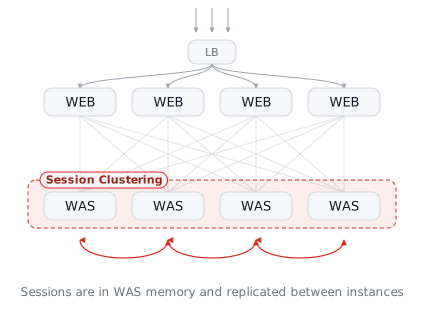
Sessions stay in the memory of the WAS instances, and the instances exchange copies with each other. No separate servers are involved.
It works as follows. When a user logs in, the instance that handled the request becomes the owner of the session (Primary), and one other instance holds a copy (Backup). If the owning instance stops, the instance holding the copy takes over and the session is not lost.
The advantage is that nothing needs to be prepared. You do not have to stand up data grid servers, so server cost and the number of things to manage do not increase. If you have only two or three instances and a modest number of sessions, this is enough.
The cost is that the burden grows with the number of instances. Every time a session is created or changed, traffic flows to keep the copies in sync, and that traffic grows as instances are added. Because session data uses the same heap memory as the application, heavy traffic leaves the application with less memory and lengthens garbage collection (GC) pauses.
There is one more point: replication itself can become unstable at the moment an instance stops. The remaining instances redistribute the departed instance's share among themselves, so replication happens all at once. The moment of failure becomes the moment of highest load.
Session Clustering Between WAS Instances With a Data Grid Store
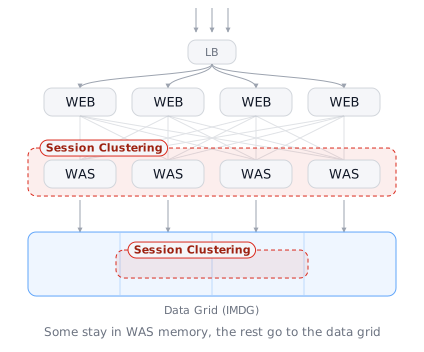
Frequently used sessions stay in WAS memory and the rest are handed to the data grid. This is a combination of the two approaches above.
It works as follows. A session that was just used remains in WAS memory and is read immediately. A session that has not been used for a while moves down to the data grid and is fetched again when it is needed. Because WAS memory only has to hold what is used often, it does not grow large.
The advantage is that you get both speed and scalability. Most requests are served straight from memory and are fast, and as the number of sessions grows the data grid absorbs it, so WAS memory does not hit its limit. Even across different instances or applications, the same session can be seen through the data grid.
The cost is one more thing to manage. You have to stand up and operate data grid servers, and because sessions live in two places — the WAS and the data grid — diagnosing a problem takes one extra step to decide which side to look at.
Data Grid Only as the Session Store
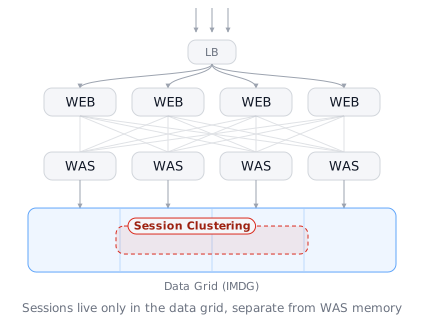
Sessions are not kept in the WAS at all; they are all stored in the data grid. The WAS reads and writes sessions from the data grid on every request.
It works as follows. WAS instances hold no sessions, so the result is the same no matter which instance receives a request. The load balancer does not have to send the same user to the same instance (sticky sessions are not needed), and restarting, adding, or removing instances does not affect sessions.
The advantage is that the WAS and the sessions do not interfere with each other. The memory the application will use can be predicted independently of the number of concurrent users, and when sessions grow you only add data grid nodes. Because you do not have to think about sessions when deploying, zero-downtime deployment becomes easier. Sharing the same session across different WAS products and different web applications is also most natural in this topology.
The cost is one network round trip on every session read and write. So if you put very large objects in the session, or modify the session several times within a single request, response time is affected. The cost of standing up data grid servers and the number of things to manage also increase.
The configuration instructions in this document (Part 2) assume this topology.
Which Topology to Choose
The three topologies above differ in where sessions are kept. The criteria are session volume, number of instances, and whether separate servers are available.
| Session clustering between WAS instances | Combined with a data grid store | Data grid only | |
|---|---|---|---|
| Where sessions live | WAS instance memory | WAS memory + data grid | Data grid |
| Separate servers | Not required | Required | Required |
| When instances are added | Replication traffic grows with them | Small effect | Almost no effect |
| Response speed | Fastest (read straight from memory) | Fast | One network round trip |
| When to use it | Few instances and a modest number of sessions | When you need both speed and scalability | Many sessions and frequent instance scaling |
Most production environments use the third option (data grid only). WAS heap memory and session memory are separated, so application memory usage stays predictable as traffic grows, and sessions are unaffected when instances are added or restarted. The configuration instructions in this document (Part 2) also assume this topology.
When sessions grow and storage runs short, add data grid nodes. Storage can be increased without touching the WAS.
How Many Data Grid Nodes to Deploy
We recommend starting with two or more servers, two instances on each, for four instances in total.
For each session, the data grid keeps the original and a copy on different instances. If any one instance stops, the copy on another instance means the session is not lost.
That is why a single server defeats the purpose of this structure. Even if you run two instances, both are on the same server, so when that server stops the original and the copy disappear together. The servers themselves must be split across two or more machines to survive the loss of one server.
There are two reasons for placing two instances on each server. Restarting or servicing one instance does not remove that server's entire share, and the memory each instance uses (the Java heap) can be divided into a reasonable size so that garbage collection (GC) pauses do not grow long.
What Improves as You Add More
Stability increases as you add instances. Sessions are distributed across more instances, so when one stops, the share the remaining instances take on is smaller. With four instances, the other three divide the share of a failed instance; with eight, the other seven divide it, cutting the burden to less than half. The impact at the moment of failure is that much smaller, and recovery finishes faster.
Storage grows as well. When traffic grows and sessions increase, you add data grid instances without touching the WAS.
| Configuration | If one server stops |
|---|---|
| 1 server (2 instances) | All sessions are lost — not recommended |
| 2 servers (4 instances) | Sessions are preserved, and the remaining server carries the whole load |
| 3 or more servers (6 or more instances) | Sessions are preserved, and the remaining servers divide the load, so the burden per server is smaller |
The actual number depends on session volume, retention time, and the failure scope you need to withstand. Contact your engineer if you need help sizing it.