1. Default Event Configuration
What This Guide Does
It configures the system to tell someone when a problem occurs. APM turns situations such as slow responses, a rising error rate, and resource shortages into events. Events pile up on the console screen, but if nobody is watching the screen there is no way to know. This guide covers how to send those events out through messengers, email, and text messages.
Configuration Has Two Layers
| Layer | What it decides | Where |
|---|---|---|
| Common settings | How often to send alerts, which kinds to exclude, what to put in front of the title | This chapter |
| Channel settings | Where to send them -- Slack, email, SMS, Synology Chat, MS Teams | Chapters 2 to 6 |
The common settings apply to every channel. Read this chapter before attaching a channel.
Which Channel to Choose
| Channel | When to use it | What you need |
|---|---|---|
| Slack | When the team already uses Slack | A Slack workspace, and a webhook or a bot |
| When you want a record and want to send to several people at once | SMTP server details | |
| SMS | When the alert must reach someone even outside screen hours | A contract with a text-message provider (DBMS or REST API) |
| Synology Chat | When a Synology NAS is operated in-house | Synology Chat integration settings |
| MS Teams | When the team uses Microsoft 365 | A Teams channel, and Workflow or Power Automate |
Several channels can be used together. For example, everyday alerts can go to Slack while only critical events go to SMS.
This guide covers where to send alerts. What counts as an event (thresholds and alert policies) is configured in the alert policy chapter of the user guide.
Configuring Events in APM
In the OPENMARU APM console, go to Settings > Monitoring Settings and select the Event Channels
tab to configure the Default event settings. Every channel setting is gathered on this one screen.
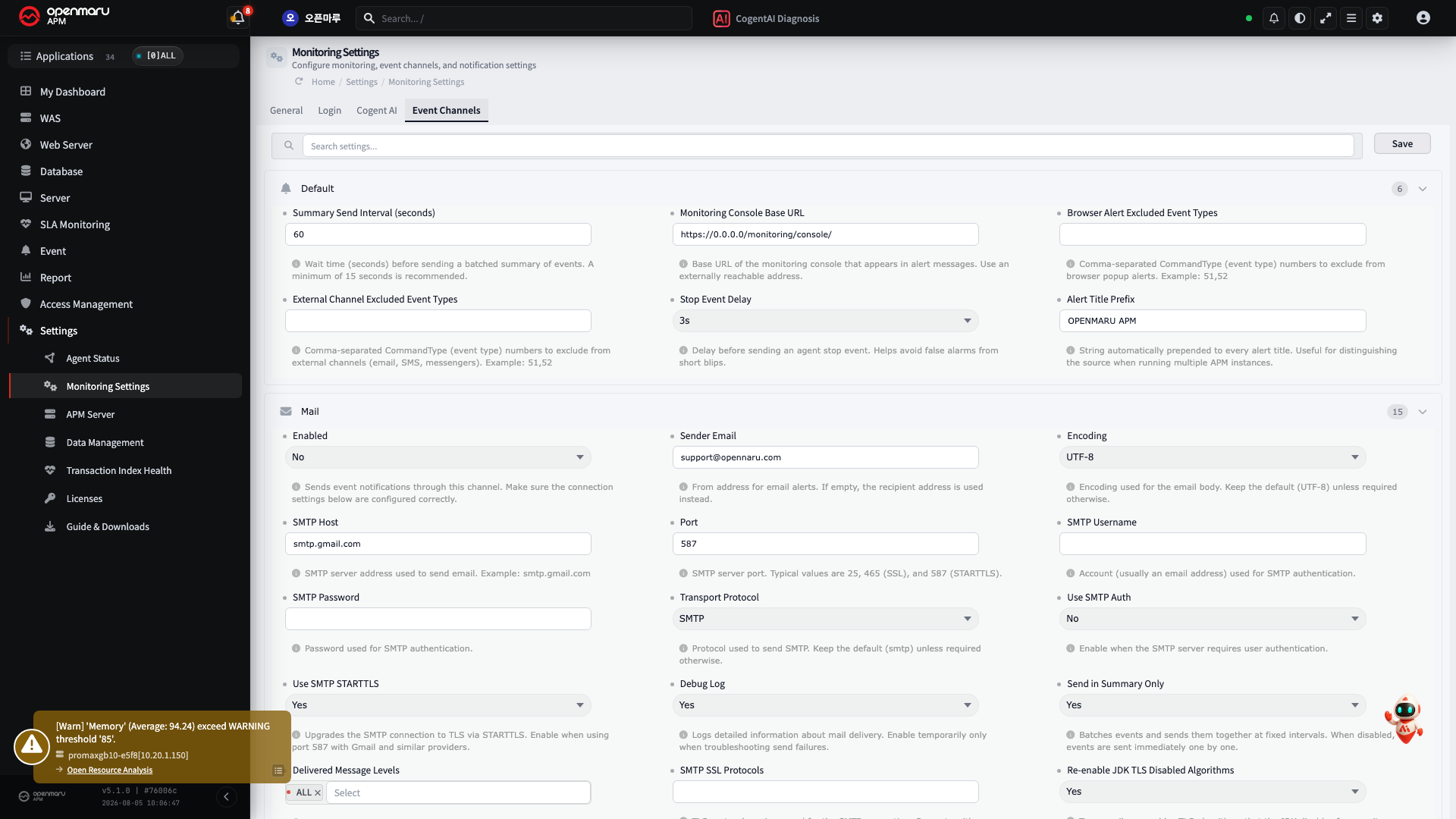
Default Event Configuration Items

| Item | Description | Details |
|---|---|---|
| ① Summary Send Interval (seconds) | The run interval used when the email or Event Processor "send summary only" option is TRUE | - |
| ② Monitoring Console Base URL | The APM access URL shown in templates such as email | - |
| ③ Browser Alert Excluded Event Types | Events excluded from browser alerts | 51: agent start, 52: agent stop, and so on |
| ④ External Channel Excluded Event Types | Events excluded from alerts such as email | 51: agent start, 52: agent stop, and so on |
| ⑤ Stop Event Delay | The delay applied to an agent stop event | Excludes events from a momentary network fault, and excludes the event when the agent restarts with the same PID |
| ⑥ Alert Title Prefix | The server name used in event sends, reports, and so on | - |