4.3. StatefulSets
Overview
The StatefulSets page manages every StatefulSet held on the MCM control plane in one place. A StatefulSet is the workload for applications that need to keep state; it provides a fixed network identity and persistent storage.
What it is for:
- Managing multi-cluster StatefulSets together
- Deploying and scaling stateful applications
- Guaranteeing pod order and uniqueness
- Checking the PropagationPolicy and OverridePolicy
Where StatefulSets are used:
- Databases (MySQL, PostgreSQL, MongoDB, and so on)
- Message queues (Kafka, RabbitMQ, and so on)
- Distributed storage (Cassandra, Elasticsearch, and so on)
- Applications that need to keep state
How the Screen Is Laid Out
The StatefulSets page shows the StatefulSet list as a table.
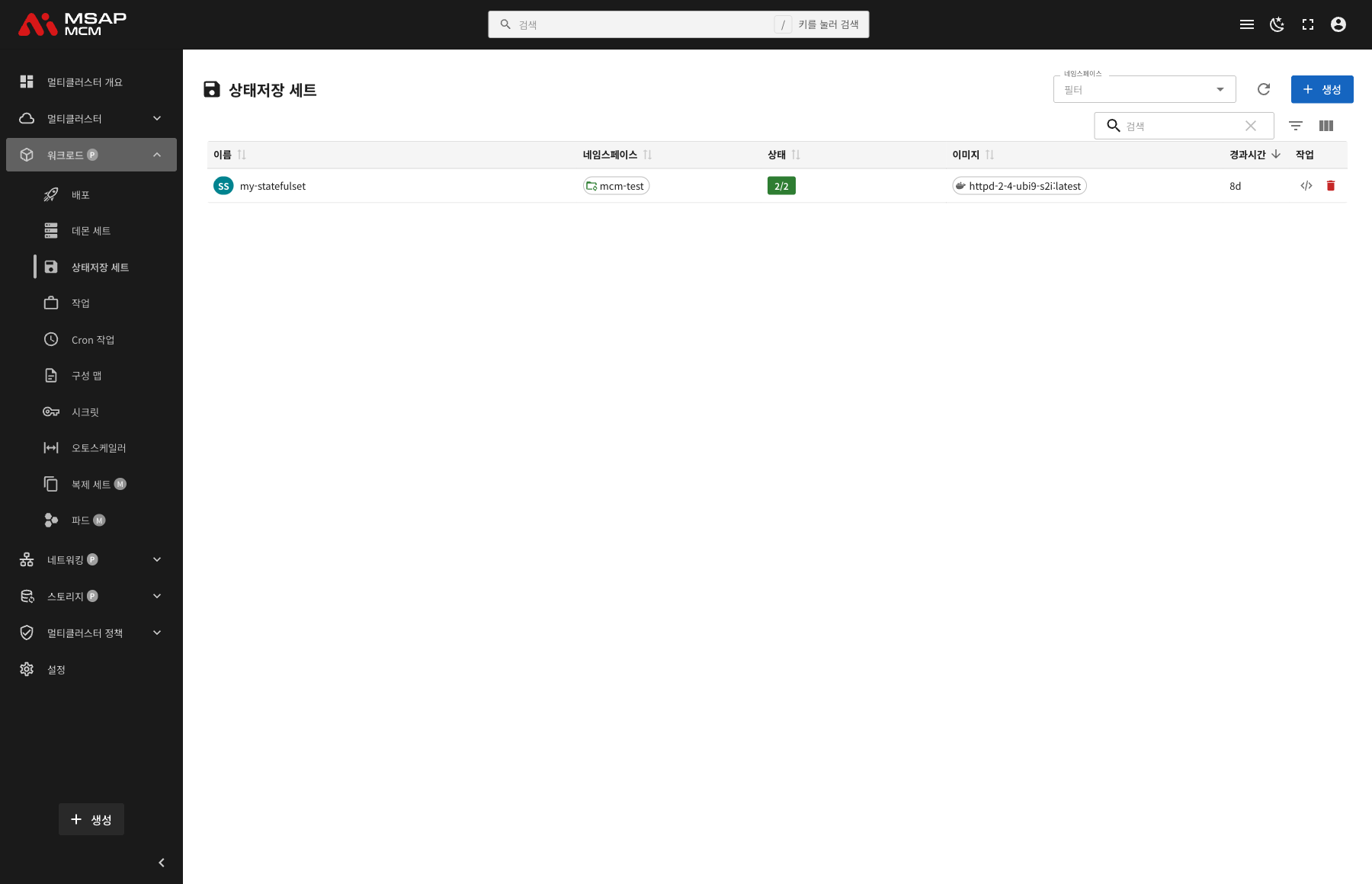
The Elements at the Top of the Page
| Element | Description |
|---|---|
| Namespace filter | Shows only the StatefulSets of a particular namespace |
| Refresh button | Refreshes the StatefulSet list |
| Create button | Opens the dialog for creating a new StatefulSet |
| Search box | Searches by StatefulSet name |
Table Columns
| Column | Description | Sortable |
|---|---|---|
| Name | The StatefulSet name | ✅ |
| Namespace | The namespace the StatefulSet belongs to | ✅ |
| Status | Ready pods / desired pods | ✅ |
| Image | The container image name | ✅ |
| Age | The time since the StatefulSet was created | ✅ |
| Actions | The edit and delete buttons | - |
How Status Is Shown
The Status column is shown as ready / desired:
- 2/2: both replicas are Ready
- 1/2: only 1 of 2 replicas is Ready
StatefulSet Detail
Clicking a StatefulSet row opens the detail panel.
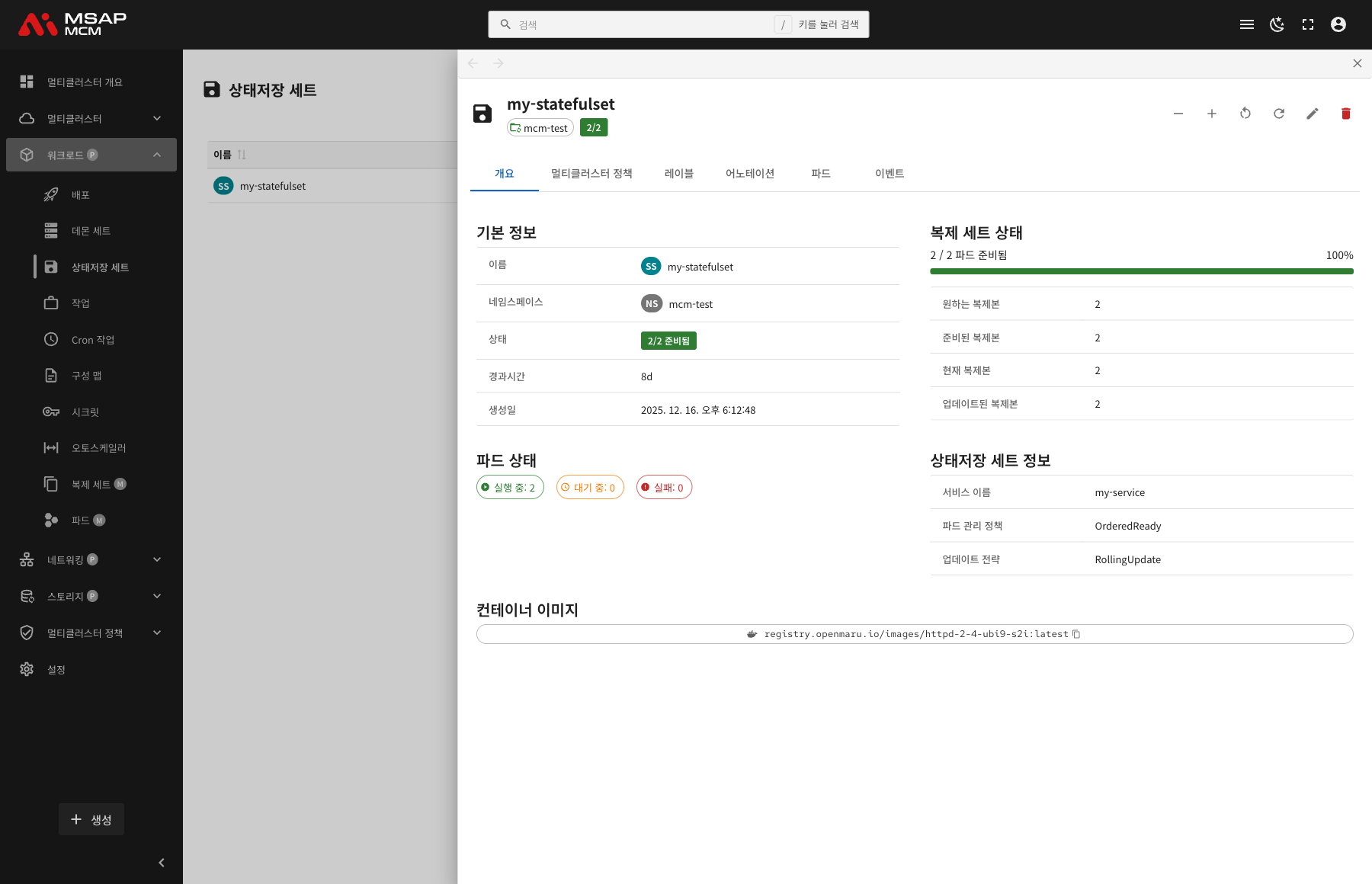
The Detail Panel Header
| Element | Description |
|---|---|
| StatefulSet name | The name of the chosen StatefulSet |
| Namespace | The namespace the StatefulSet belongs to |
| Sync Status | The N/N pod-ready figure |
The Action Buttons
| Button | What it does |
|---|---|
| Scale Down | Lowers the replica count |
| Scale Up | Raises the replica count |
| Restart | Rolling-restarts the StatefulSet |
| Refresh | Refreshes the StatefulSet information |
| Edit | Opens the YAML edit mode |
| Delete | Deletes the StatefulSet |
The Tabs
The Overview Tab
Shows the StatefulSet's basic information, replica state, and the settings particular to a StatefulSet.
Basic information:
| Item | Description |
|---|---|
| Name | The StatefulSet name |
| Namespace | The namespace the StatefulSet belongs to |
| Status | N/N ready |
| Age | The time since creation |
| Created | When the StatefulSet was created |
Replica state:
| Item | Description |
|---|---|
| Pod ready state | N / N pods ready (with a progress bar) |
| Desired Replicas | The replica count that is set |
| Ready Replicas | The number of replicas that are Ready |
| Current Replicas | The number of replicas running now |
| Updated Replicas | The number of replicas updated to the latest version |
Pod state:
The pod state section shows the StatefulSet's pods visually:
- Running: pods working normally
- Pending: pods waiting to be scheduled
- Failed: pods that failed
StatefulSet Info:
Shows the settings particular to a StatefulSet:
| Item | Description |
|---|---|
| Service Name | The headless service name (which provides the stable network identity) |
| Pod Management Policy | OrderedReady or Parallel |
| Update Strategy | RollingUpdate or OnDelete |
Container images:
Shows the list of container images defined on the StatefulSet.
The Multi-Cluster Policies Tab
Shows the multi-cluster policies that apply to the StatefulSet.
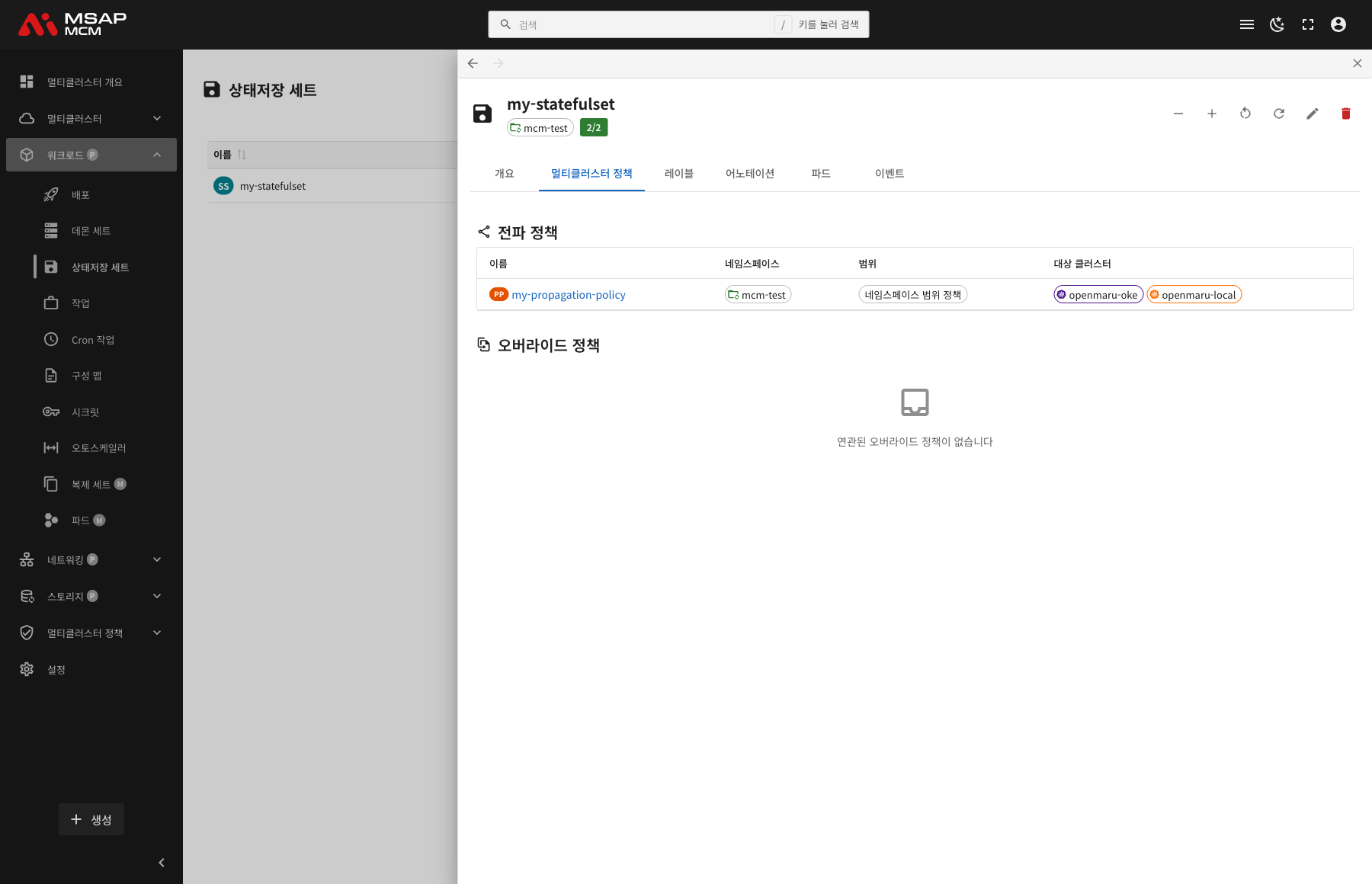
PropagationPolicy:
| Column | Description |
|---|---|
| Name | The PropagationPolicy name |
| Namespace | The namespace the policy belongs to |
| Scope | Namespace-scoped policies / cluster-scoped policies |
| Target Clusters | The list of target clusters |
OverridePolicy:
Shown where there are per-cluster custom settings.
The Labels Tab
Shows the list of Kubernetes labels applied to the StatefulSet.
The Annotations Tab
Shows the list of annotations applied to the StatefulSet.
The Pods Tab
Shows the list of pods running for that StatefulSet.
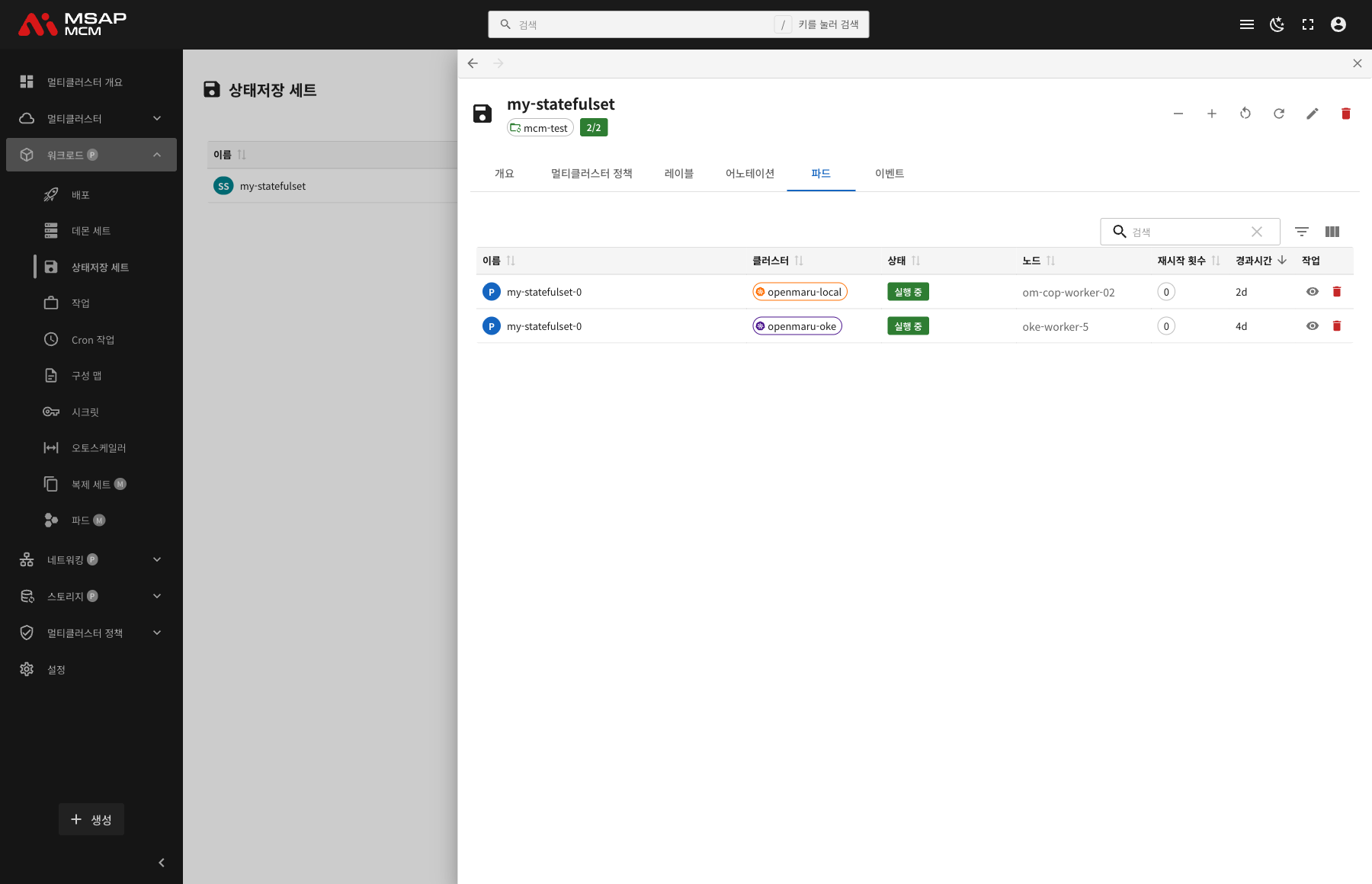
| Column | Description |
|---|---|
| Name | The pod name (my-statefulset-0, my-statefulset-1, for example) |
| Cluster | The cluster the pod is running on |
| Status | The pod state (Running / Pending / Failed and so on) |
| Node | The node the pod is scheduled on |
| Restarts | The pod restart count |
| Age | The time since the pod was created |
| Actions | The view and delete buttons |
Note: StatefulSet pods carry sequential names (my-statefulset-0, my-statefulset-1, for example). Pods of the same name are created on each cluster.
The Events Tab
Shows the Kubernetes events related to the StatefulSet.
Creating a StatefulSet
Creates a new StatefulSet on the MCM control plane.
Fields
| Field | Required | Description |
|---|---|---|
| Name | ✅ | The StatefulSet name |
| Namespace | ✅ | The namespace to deploy into |
| Service Name | ✅ | The headless service name |
| Replicas | ✅ | The initial replica count (default: 1) |
| Container image | ✅ | The container image URL |
| Volume claim template | - | The PersistentVolumeClaim template |
| Ports | - | The container port settings |
| Environment variables | - | The container environment variables |
Editing the YAML
The "Edit YAML" tab lets you write the StatefulSet definition directly.
StatefulSet Operations
Scaling Up and Down
Adjusts the StatefulSet's replica count.
- Choose the StatefulSet
- Press the scale up (▲) or scale down (▼) button
- The replica count rises or falls
Note: StatefulSet scaling happens in order:
- Scaling up: pods are created in the order 0, 1, 2...
- Scaling down: pods are deleted in reverse, ...2, 1, 0
Rolling Restart
Restarts every pod of the StatefulSet in turn.
- Choose the StatefulSet
- Press the "Restart" button in the detail panel
- Press the "Restart" button in the confirmation dialog
The restart proceeds in reverse (from the last pod to the first).
Editing a StatefulSet
- Choose the StatefulSet
- Press the "Edit" button in the detail panel
- Change the StatefulSet definition in the YAML editor
- Press the "Save" button
Deleting a StatefulSet
⚠️ Caution: deleting a StatefulSet does not delete its PersistentVolumeClaims automatically. The PVCs have to be managed separately to preserve the data.
- Choose the StatefulSet to delete
- Press the "Delete" button in the detail panel
- Type the StatefulSet name in the confirmation dialog
- Press the "Delete" button
Worked Examples
Scenario 1: Deploying a Database Across Clusters
- Press the "Create" button
- Enter the StatefulSet details:
- Name:
mysql - Namespace:
database - Service Name:
mysql-headless - Replicas:
3 - Container image:
mysql:8.0
- Name:
- Set the volume claim template:
- Storage class:
standard - Capacity:
10Gi
- Storage class:
- Press the "Create" button
- Name the target clusters with a PropagationPolicy
Scenario 2: Checking StatefulSet Status
- Click the StatefulSet you want to check in the list
- Check the replica state on the Overview tab
- Check the service name and management policy in StatefulSet Info
- Check the pod distribution per cluster on the Pods tab
- Confirm the pod names are sequential (my-statefulset-0, my-statefulset-1)
Scenario 3: Scaling Out
- Choose the StatefulSet to scale out
- Press the "Scale Up" button
- Watch the new pod being created in order (my-statefulset-2, for example)
- The next pod is created only after that one becomes Ready
Scenario 4: A Rolling Update
- Choose the StatefulSet and press "Edit"
- Change the container image version (
mysql:8.0→mysql:8.1, for example) - Press "Save"
- Watch the update proceed in reverse:
- my-statefulset-2 → my-statefulset-1 → my-statefulset-0
- Each pod updates only after the previous one becomes Ready
Scenario 5: Checking the Pods per Cluster
- Choose the StatefulSet
- Click the "Pods" tab
- Check the pod of the same name on each cluster:
- Cluster A: my-statefulset-0
- Cluster B: my-statefulset-0
- Check each pod's node, status, and restart count
Related Concepts
StatefulSet against Deployment
| Trait | StatefulSet | Deployment |
|---|---|---|
| Pod name | Sequential and fixed (app-0, app-1) | Random (app-abc123) |
| Network identity | Stable (a headless service) | Dynamic |
| Storage | Persistent (the PVC is kept) | Ephemeral |
| Order | Creation and deletion order guaranteed | No order |
| Scaling | Sequential | Parallel |
| Where it is used | Databases, stateful apps | Stateless web apps |
Pod Management Policies
OrderedReady (the default):
- Pods are created and deleted in order
- The next pod is created only after the previous one is Ready
- Suited to building a database cluster
Parallel:
- Every pod is created and deleted at once
- Used where order does not matter
- Used where fast scaling is needed
Update Strategies
RollingUpdate (the default):
- Updates the pods in reverse (last to first)
partition: updates only the pods at or above a given index
OnDelete:
- A pod updates only when it is deleted by hand
- Used where complete control is needed
The Headless Service
A StatefulSet is used together with a headless service:
- A service whose ClusterIP is None
- It gives each pod its own DNS name
- For example
mysql-0.mysql-headless.database.svc.cluster.local
Managing PersistentVolumeClaims
A StatefulSet's volume claim template:
- Creates its own PVC per pod
- The PVC is kept when the StatefulSet is deleted (preserving the data)
- The PVC has to be deleted by hand
Next Steps
- Jobs -- managing multi-cluster Jobs
- CronJobs -- managing multi-cluster CronJobs
- PersistentVolumeClaims -- storage management