5.1. Services
Overview
The Services page manages every Service held on the MCM control plane in one place. A Service is the Kubernetes resource that provides a stable network endpoint for a set of pods.
What it is for:
- Managing multi-cluster Services together
- Setting up network communication between applications
- Service discovery and load balancing
- Distributing Services through a PropagationPolicy
Where Services are used:
- Internal communication between pods (ClusterIP)
- Exposing traffic outward (NodePort, LoadBalancer)
- Connecting to an external service (ExternalName)
- Building a microservice architecture
How the Screen Is Laid Out
The Services page shows the Service list as a table.
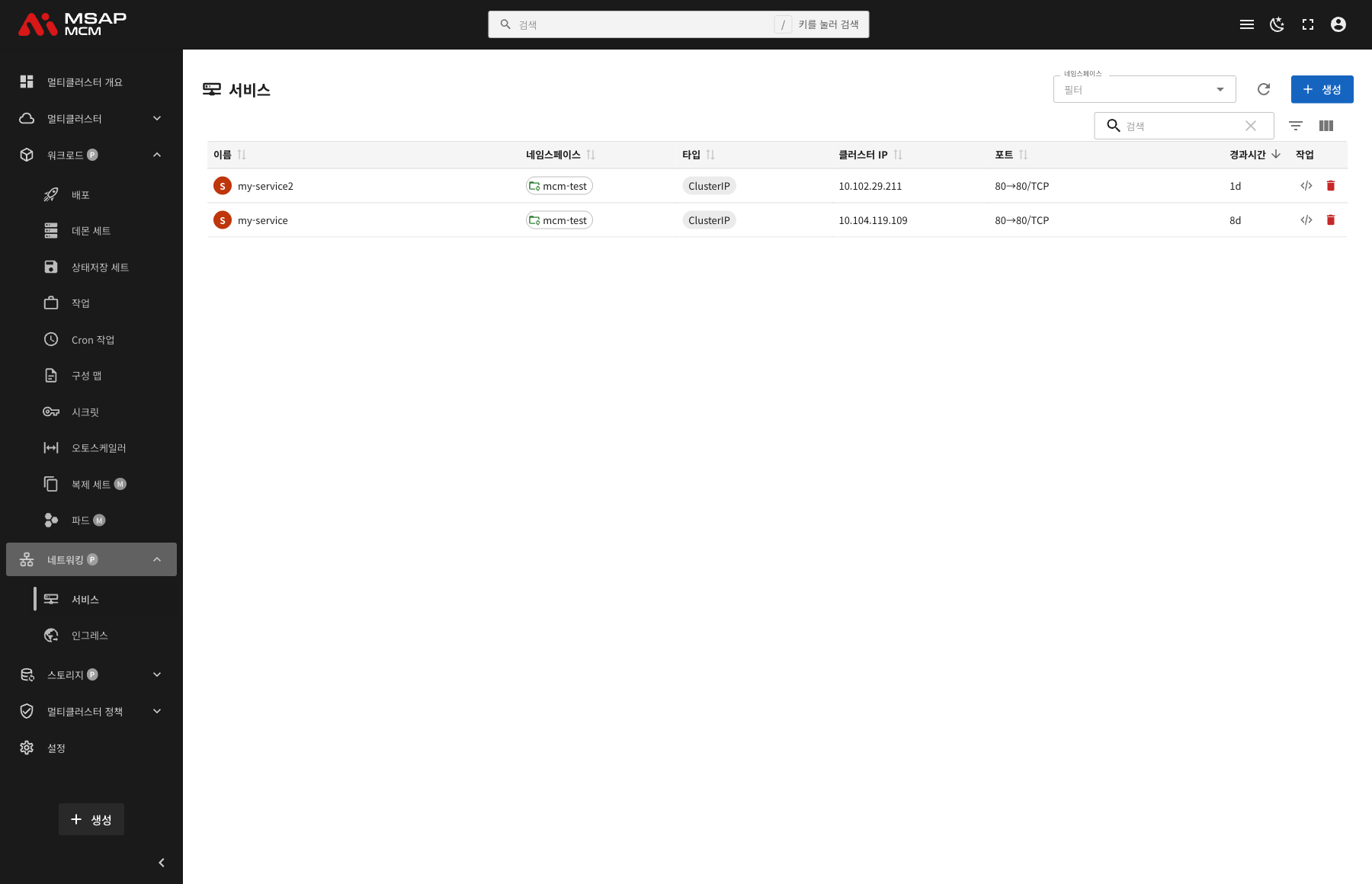
The Elements at the Top of the Page
| Element | Description |
|---|---|
| Namespace filter | Shows only the Services of a particular namespace |
| Refresh button | Refreshes the Service list |
| Create button | Opens the dialog for creating a new Service |
| Search box | Searches by Service name |
Table Columns
| Column | Description | Sortable |
|---|---|---|
| Name | The Service name | ✅ |
| Namespace | The namespace the Service belongs to | ✅ |
| Type | The Service type (ClusterIP/NodePort/LoadBalancer/ExternalName) | ✅ |
| Cluster IP | The in-cluster IP assigned to the Service | ✅ |
| Ports | The port mapping (80→80/TCP, for example) | ✅ |
| Age | The time since the Service was created | ✅ |
| Actions | The edit and delete buttons | - |
Service Types
| Type | Description |
|---|---|
| ClusterIP | Reachable only on the in-cluster IP (the default) |
| NodePort | Reachable from outside on a fixed port of each node |
| LoadBalancer | Reachable from outside through a cloud load balancer |
| ExternalName | Maps to an external DNS name |
How the Ports Are Shown
The Ports column shows the Service's port mapping:
- Format:
[port]→[target port]/[protocol] - For example
80→80/TCP-- Service port 80 goes to pod port 80, over TCP
Service Detail
Clicking a Service row opens the detail panel.
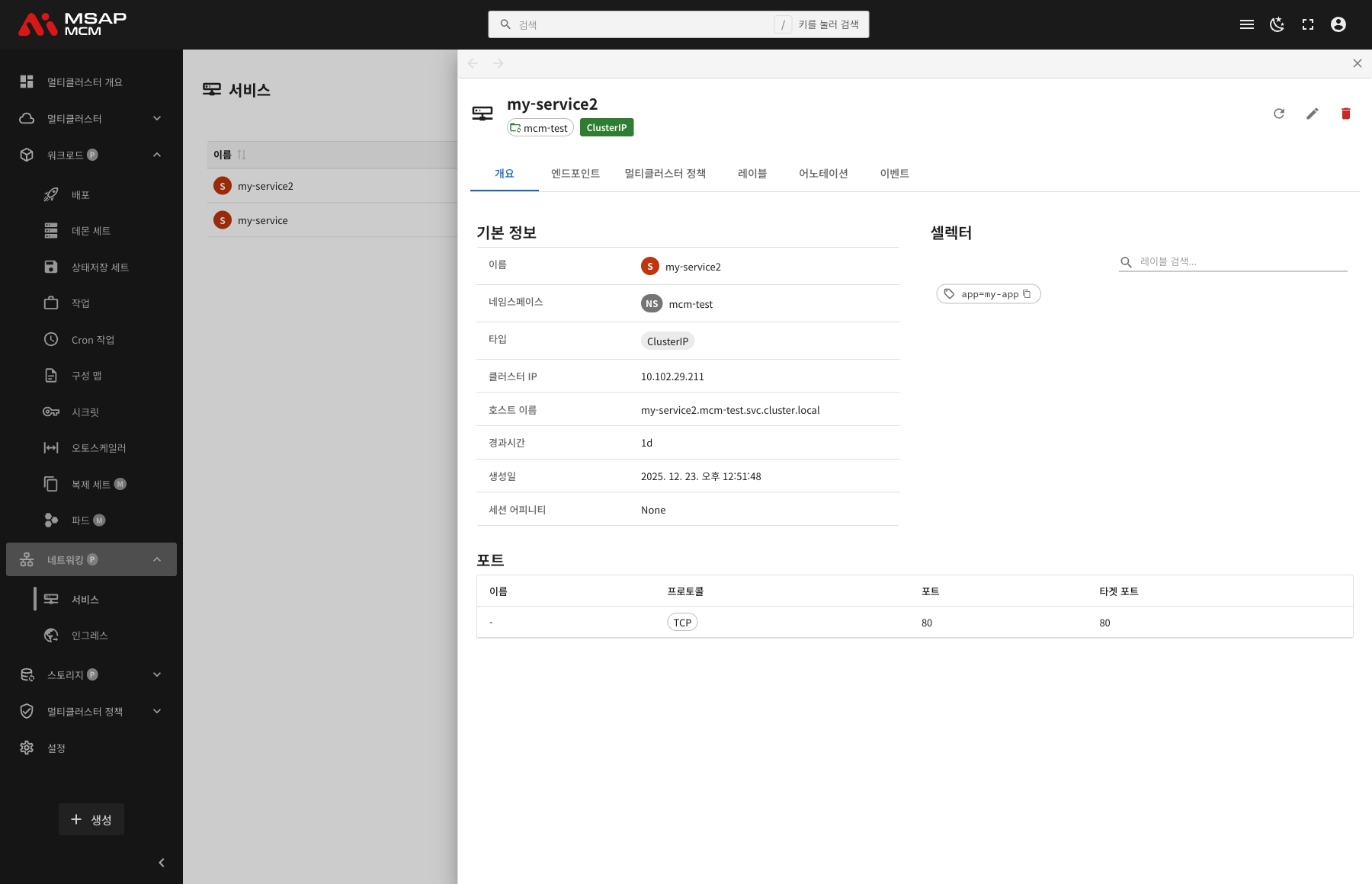
The Detail Panel Header
| Element | Description |
|---|---|
| Service name | The name of the chosen Service |
| Namespace | The namespace the Service belongs to |
| Type | The Service type (ClusterIP, for example) |
The Action Buttons
| Button | What it does |
|---|---|
| Refresh | Refreshes the Service information |
| Edit | Opens the YAML edit mode |
| Delete | Deletes the Service |
The Tabs
The Overview Tab
Shows the Service's basic information, selector, and ports.
Basic information:
| Item | Description |
|---|---|
| Name | The Service name |
| Namespace | The namespace the Service belongs to |
| Type | The Service type |
| Cluster IP | The in-cluster IP assigned |
| Hostname | The Service's DNS name (my-service.namespace.svc.cluster.local, for example) |
| Age | The time since creation |
| Created | When the Service was created |
| Session Affinity | The session stickiness setting (None/ClientIP) |
Selector:
Shows the label selector by which the Service picks the pods to send traffic to:
- Search filters the labels
- The copy button copies a label
Ports:
Shows the port mappings defined on the Service as a table:
| Column | Description |
|---|---|
| Name | The port name (optional) |
| Protocol | The protocol (TCP/UDP) |
| Port | The port the Service exposes |
| Target Port | The pod's actual port |
The Endpoints Tab
Shows the endpoints connected to the Service.
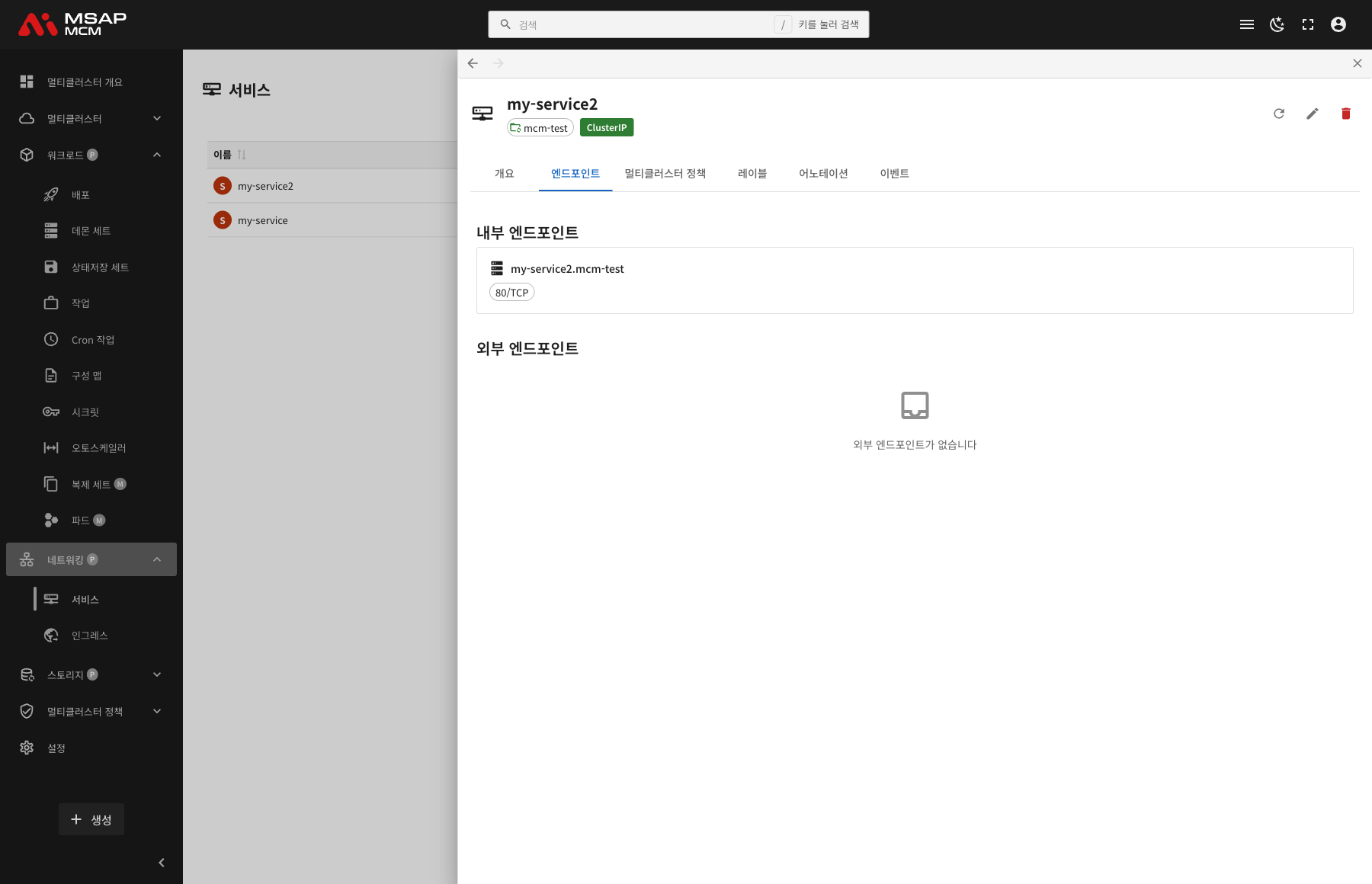
Internal Endpoint:
Shows the endpoint reachable from inside the cluster:
- The DNS name:
[service-name].[namespace] - The port:
[port]/[protocol]
External Endpoints:
Shows the endpoints reachable from outside:
- Shown for the NodePort and LoadBalancer types
- The external IP and port
- Where there is none, the message "No external endpoints" is shown
The Multi-Cluster Policies Tab
Shows the multi-cluster policies that apply to the Service.
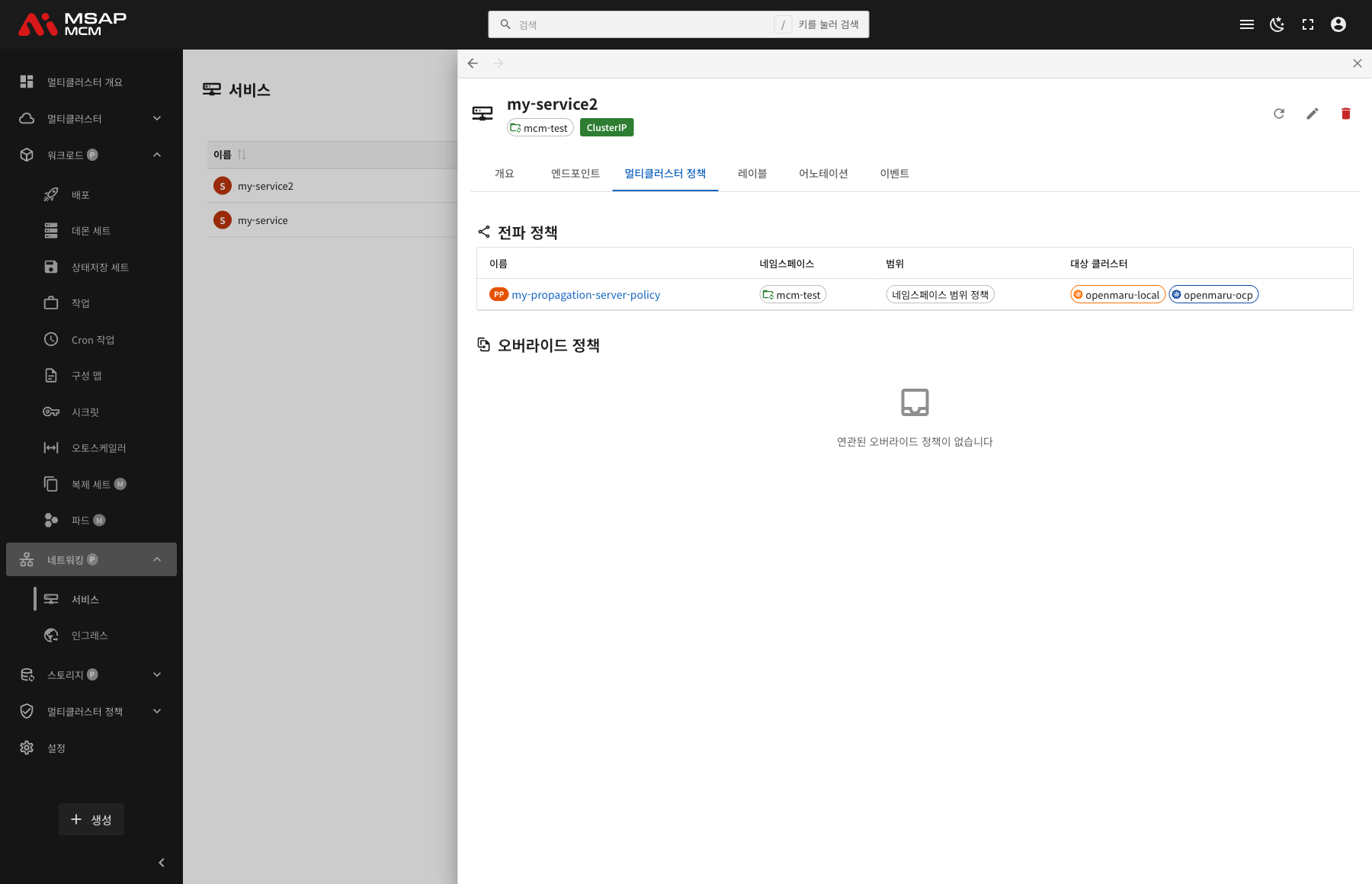
PropagationPolicy:
| Column | Description |
|---|---|
| Name | The PropagationPolicy name |
| Namespace | The namespace the policy belongs to |
| Scope | Namespace-scoped policies / cluster-scoped policies |
| Target Clusters | The list of target clusters |
OverridePolicy:
Shown where there are per-cluster custom settings.
The Labels Tab
Shows the list of Kubernetes labels applied to the Service.
The Annotations Tab
Shows the list of annotations applied to the Service.
The Events Tab
Shows the Kubernetes events related to the Service.
Creating a Service
Creates a new Service on the MCM control plane.
Fields
| Field | Required | Description |
|---|---|---|
| Name | ✅ | The Service name |
| Namespace | ✅ | The namespace to deploy into |
| Type | ✅ | Choose the Service type |
| Selector | ✅ | The labels that pick the target pods |
| Ports | ✅ | The port mapping |
Creating by Service Type
ClusterIP (the default):
apiVersion: v1
kind: Service
metadata:
  name: my-service
  namespace: default
spec:
  type: ClusterIP
  selector:
    app: my-app
  ports:
    - port: 80
      targetPort: 8080
      protocol: TCP
NodePort:
apiVersion: v1
kind: Service
metadata:
  name: my-nodeport-service
  namespace: default
spec:
  type: NodePort
  selector:
    app: my-app
  ports:
    - port: 80
      targetPort: 8080
      nodePort: 30080  # in the range 30000-32767
      protocol: TCP
LoadBalancer:
apiVersion: v1
kind: Service
metadata:
  name: my-loadbalancer-service
  namespace: default
spec:
  type: LoadBalancer
  selector:
    app: my-app
  ports:
    - port: 80
      targetPort: 8080
      protocol: TCP
ExternalName:
apiVersion: v1
kind: Service
metadata:
  name: my-external-service
  namespace: default
spec:
  type: ExternalName
  externalName: external.example.com
Editing the YAML
The "Edit YAML" tab lets you write the Service definition directly.
Service Operations
Editing a Service
- Choose the Service
- Press the "Edit" button in the detail panel
- Change the Service definition in the YAML editor
- Press the "Save" button
Note: a change to a Service reaches the pods it connects at once.
Deleting a Service
⚠️ Caution: deleting a Service makes network access through it impossible. Check what applications depend on it.
- Choose the Service to delete
- Press the "Delete" button in the detail panel
- Type the Service name in the confirmation dialog
- Press the "Delete" button
Worked Examples
Scenario 1: Creating a ClusterIP Service for Internal Communication
- Press the "Create" button
- Enter the Service details:
- Name:
backend-service - Namespace:
production - Type:
ClusterIP - Selector:
app=backend - Ports:
80 → 8080/TCP
- Name:
- Press the "Create" button
- Name the target clusters with a PropagationPolicy
- Reach it from the frontend at
backend-service.production.svc.cluster.local:80
Scenario 2: Creating a LoadBalancer Service for External Exposure
- Press the "Create" button and choose the Edit YAML tab
- Write this YAML:
apiVersion: v1kind: Servicemetadata:name: web-servicenamespace: webspec:type: LoadBalancerselector:app: web-frontendports:- port: 80targetPort: 3000
- Press the "Create" button
- Check the external IP on the Endpoints tab
- Reach the service on that external IP
Scenario 3: Checking a Service's Endpoints
- Click the Service you want to check in the list
- Choose the Endpoints tab
- Check the DNS name under Internal Endpoint
- Check the external access details under External Endpoints (where they apply)
Scenario 4: Deploying a Service Across Clusters
- Create the Service
- Create a PropagationPolicy:
- Resource selector: name the Service
- Target clusters: choose the clusters to deploy to
- Check the "Multi-Cluster Policies" tab in the detail panel
- Confirm the Service has been deployed to the target clusters
Scenario 5: Configuring a Multi-Port Service
- Press the "Create" button and choose the Edit YAML tab
- Write this YAML:
apiVersion: v1kind: Servicemetadata:name: multi-port-servicenamespace: defaultspec:type: ClusterIPselector:app: my-appports:- name: httpport: 80targetPort: 8080- name: httpsport: 443targetPort: 8443- name: metricsport: 9090targetPort: 9090
- Press the "Create" button
- Each port then handles a different kind of traffic
Related Concepts
Comparing the Service Types
| Type | Inside the cluster | From outside | Where it is used |
|---|---|---|---|
| ClusterIP | ✅ | ❌ | Internal microservice communication |
| NodePort | ✅ | ✅ (node IP:port) | Development and test environments |
| LoadBalancer | ✅ | ✅ (the load balancer IP) | Exposing production outward |
| ExternalName | ✅ (DNS) | Not applicable | Connecting to an external service |
Service Discovery
How a Service is found in Kubernetes:
1. By DNS:
[service-name].[namespace].svc.cluster.local
- For example
my-service.production.svc.cluster.local - Within the same namespace,
my-servicealone is enough
2. By environment variable:
MY_SERVICE_SERVICE_HOST=10.0.0.1
MY_SERVICE_SERVICE_PORT=80
The Selector and the Endpoints
A Service picks its pods through the selector:
selector:
  app: my-app
  tier: backend
- Every pod matching the selector becomes an endpoint of the Service
- A pod is included as an endpoint only while it is Ready
- The endpoints update automatically
Session Affinity
Routes requests from the same client to the same pod:
| Option | Description |
|---|---|
| None | Round-robin load balancing (the default) |
| ClientIP | Session stickiness by client IP |
spec:
  sessionAffinity: ClientIP
  sessionAffinityConfig:
    clientIP:
      timeoutSeconds: 10800  # 3 hours
The Headless Service
A Service whose ClusterIP is None:
spec:
  clusterIP: None
  selector:
    app: my-stateful-app
- Gives pod DNS directly, with no load balancing
- Used together with a StatefulSet
- A DNS lookup returns every pod IP
Managing Services Across Clusters
When deploying a Service to several clusters through MCM:
PropagationPolicy:
- Copies the same Service to several clusters
- Chooses the clusters and sets the deployment strategy
OverridePolicy:
- Applies different Service settings per cluster
- For example, a different NodePort range per cluster
Resolving Problems
When the Service cannot be reached:
- Check the selector is right
- Check the target pods are Running
- Check the pods' ports are right
- Check no network policy is blocking the traffic
When it cannot be reached from outside:
- Check the Service type is NodePort or LoadBalancer
- Check the firewall rules
- For a LoadBalancer, check an external IP has been assigned
When the DNS lookup fails:
- Check the CoreDNS pods are working
- Check the Service name and namespace are right
- The DNS form:
[service].[namespace].svc.cluster.local
Next Steps
- Ingresses -- managing multi-cluster Ingresses
- Deployments -- the Deployment a Service connects to
- Propagation Policies -- configuring a PropagationPolicy