7.4. Cluster Certificates
When to Look at This
- When checking certificate expiry during a regular inspection
- When the cluster suddenly becomes unreachable
- When a cluster is approaching one year since installation
What Cluster Certificates Are
These are the certificates used when Kubernetes components communicate with each other.
Inside a cluster, several programs call each other. The kubelet calls the API server, the API server calls etcd, and controllers call the API server. All of this communication is encrypted and mutually authenticated, because not just any program should be able to issue commands to the API server.
Cluster certificates are what that authentication uses.
| Certificate | Where it is used |
|---|---|
| API server | The basis on which other components trust the API server |
| kubelet | The basis on which the API server trusts each node |
| etcd | Authentication for accessing the data store |
| Controller and scheduler | Their identity when connecting to the API server |
These certificates are created automatically when the cluster is installed and are kept as files on each node.
How They Differ From Application Certificates
Their purpose differs from the cert-manager certificates in 7.3.
| Cluster certificates | Application certificates | |
|---|---|---|
| Where they are used | Between Kubernetes components | Between the user's browser and the service |
| Who creates them | The cluster installation tooling | cert-manager |
| Where they are stored | Files on the nodes | Secrets in the cluster |
| Renewal | Performed by operations staff | Automatic |
| On expiry | The cluster stops | The browser warns |
The consequence of expiry differs. An expired application certificate produces a warning on connection but the service keeps running. An expired cluster certificate cuts communication between components and the cluster stops operating.
What Happens When a Certificate Expires
Not everything stops at once. It appears in stages.
| Symptom | Meaning |
|---|---|
| The Console is unreachable | An API server certificate problem |
Nodes turn NotReady | A kubelet certificate problem |
| Deployments are not applied | Controllers cannot reach the API server |
| Pods already running keep operating | Running pods themselves do not depend on the certificates |
The last item matters. Even after expiry, applications already running keep operating. Only new deployments and restarts fail.
That is what makes it hard to notice, and it becomes an outage when a pod terminates and cannot be recovered. This is why you have to check while there are no symptoms.
How the Console Obtains Certificate Information
The certificates are kept as files on each node, not through the cluster API. So the Console cannot read them by calling the API.
For this, COP runs one certificate reader tool on every node. The Console asks that tool and gathers each node's certificate information.
| What to know | Description |
|---|---|
| Queried per node | As many requests go out as there are nodes. With many nodes, the list takes time to appear |
| Some nodes can fail | The rest are shown even if one node does not respond |
| Read-only | This screen only reads. There is no renewal function |
The List Screen
Go to Cluster > Certificates.
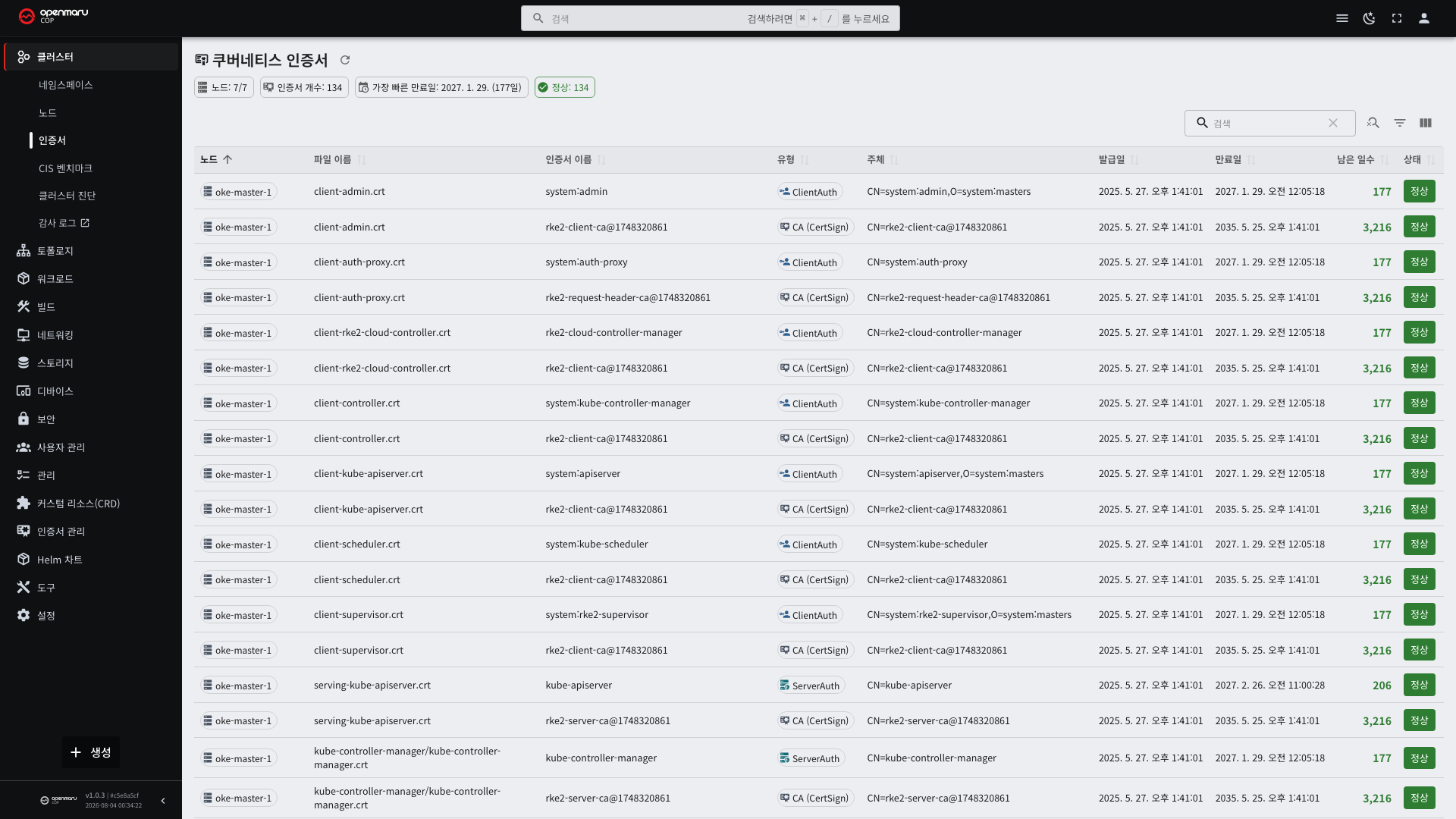
A summary appears at the top of the screen.
| Summary item | Description |
|---|---|
| Certificate count | The total number of certificates |
| Earliest expiry | The soonest expiry time in the cluster |
| Warning · Critical · Expired | Counts by status |
Look at the earliest expiry first. That one value tells you the cluster's overall headroom.
The table shows the following per certificate.
| Column | Description |
|---|---|
| Node | Which node's certificate it is |
| Certificate name | Which component uses it |
| File name | The file stored on the node |
| Issued | The day the certificate was created |
| Expires | The day the validity period ends |
| Remaining | The number of days until expiry |
Node names and certificate types are shown as category chips. They use calm colors so they are distinct from statuses (see 1.2).
Status Criteria
There are four levels based on the remaining period.
| Status | Remaining | Meaning |
|---|---|---|
| Normal | More than 120 days | No action needed |
| Warning | 120 days or fewer | Time to schedule a renewal |
| Critical | 30 days or fewer | Immediate action needed |
| Expired | 0 days or fewer | Already expired |
Warning is set at 120 days because renewal requires planning and approval. The cluster has to be restarted, so scheduling takes time.
Operations staff can adjust these thresholds to suit the environment.
Why You Have to Check Per Node
Each node has its own certificates, and their expiry times differ.
| Situation | Why they differ |
|---|---|
| A node was added later | That node's certificates are valid from the day it was added |
| A node was replaced | Only the replaced node expires later |
| Only some nodes were renewed | Only the renewed nodes are pushed out |
So do not relax on the earliest expiry alone. Review the whole list, or sort by node to check.
When Some Nodes Cannot Be Read
The screen may show a "failed to query some nodes" notice. Those nodes' certificates do not appear in the list.
| Cause | What to check |
|---|---|
The node is NotReady | Cluster > Nodes (see 2.1) |
| The reader tool pod is not up | The list of pods scheduled on that node |
| The node is not responding | Network status |
If a node could not be read, its certificates are unverified. Pass the node names from the notice to operations staff.
How Often to Check
| Point in time | What to do |
|---|---|
| Monthly regular inspection | Check the earliest expiry |
| Warning (within 120 days) | Schedule a renewal |
| Critical (within 30 days) | Act immediately |
| After adding a node | Check the new node's certificate expiry |
| After a cluster upgrade | Confirm they were renewed |
Cluster certificates are usually valid for one year. The dangerous point is around one year after installation, so mark it on the calendar in advance.
Renewal
Certificate renewal requires connecting to the nodes and restarting the cluster, so operations staff perform it. This screen is for checking.
When you find a certificate nearing expiry, pass on the following.
- The certificate name
- The node in question
- The expiry date and the remaining period
Renewal proceeds by restarting the nodes one at a time. Because they are not all taken down at once, the service does not stop.
What Happens During Renewal
| State | Description |
|---|---|
| The cluster API | Does not respond briefly while a management node restarts |
| Console access | Unavailable during that time |
| New deployments and restarts | Unavailable |
| Pods already running | Keep operating |
| Service traffic | Unaffected |
User services do not stop, but management operations are blocked briefly. Set a time that does not collide with deployment schedules.
When renewal finishes, confirm on this screen that the expiry dates have changed. Because nodes are processed one at a time, seeing different expiry dates per node during the work is normal.