6.1. Storage
When to Look at This
- When deploying an application that needs a database or file storage
- When a pod does not move past
Pending - When storage runs short
The Storage Problem of Containers
A container is created from an image, and changes to files inside it disappear along with the container.
| Situation | Files inside the container |
|---|---|
| The application restarts | They disappear |
| The pod moves to another node | They disappear |
| A new version is deployed | They disappear |
This property is intentional. Because any container starts from the same state, deployment is simpler.
But it is a problem when there is data that must persist, as with a database. So storage that lives outside the container is attached inside it.
What a Volume Is
Storage attached to a container is called a volume. Attaching it (mounting) at a particular path in the container means files written at that path are stored on the volume.
There are several kinds of volume.
| Kind | Lifetime | Use |
|---|---|---|
| emptyDir | Disappears with the pod | Exchanging files between containers |
| ConfigMap · Secret | With the configuration | Injecting configuration files (see 3.4) |
| PersistentVolume | Persists independently of the pod | Keeping data |
This chapter covers the third.
Why PV and PVC Are Separated
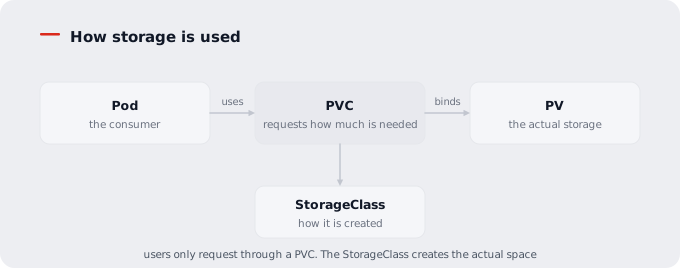
Kubernetes splits storage into two resources.
| Resource | Who handles it | What it holds |
|---|---|---|
| PersistentVolume (PV) | Operations staff | The actual storage. Which area on which storage device |
| PersistentVolumeClaim (PVC) | Application staff | The request. How much is needed |
They are separated because the concerns differ.
The person deploying an application only has to know "10GB is needed". Whether those 10GB are NFS or SAN, and on which path of which server, they do not need to know and should not have to. Because it differs per environment, writing that in would prevent the same deployment definition from being used on another cluster.
Creating a PVC automatically connects a matching PV (binding).
How Storage Is Used
PersistentVolumeClaim
Go to Storage > Persistent Volume Claims.
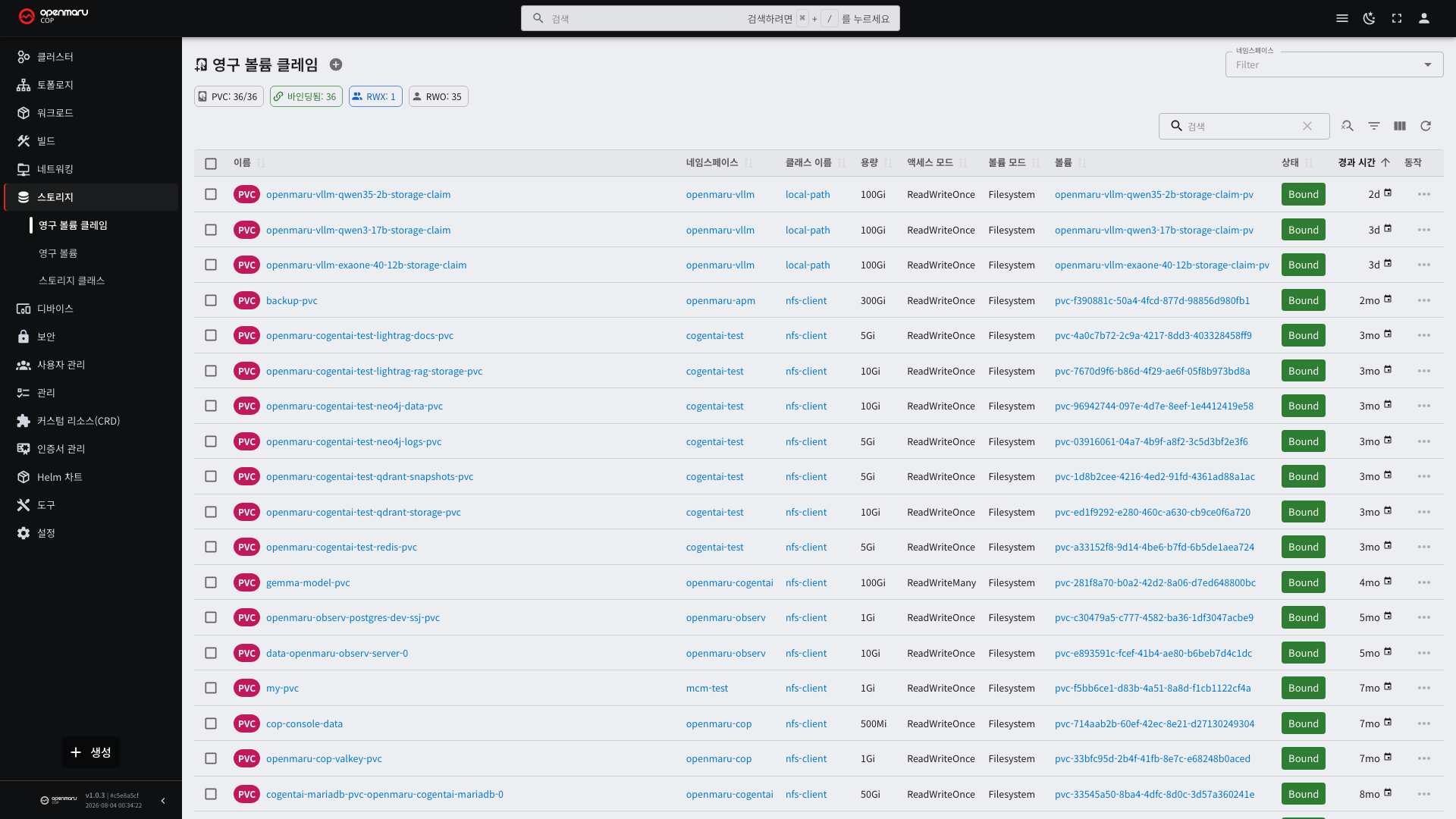
| Column | Description |
|---|---|
| Name | The PVC name |
| Namespace | The namespace it belongs to |
| Status | Bound means connected, Pending means waiting |
| Capacity | The requested size |
| Access modes | Whether several pods can use it at once |
| Storage class | On what basis the space is created |
The detail screen shows which pods are using this PVC. Always check before deleting a PVC.
PVCs are namespace-scoped resources. Pods in other namespaces cannot use them.
Access Modes
| Mode | Meaning | Where it is used |
|---|---|---|
| ReadWriteOnce (RWO) | Read and write from one node only | Databases. The most widely supported |
| ReadOnlyMany (ROX) | Read-only from several nodes | Shared reference data |
| ReadWriteMany (RWX) | Read and write from several nodes | When several pods write the same files |
ReadWriteMany works only on storage that supports it. NFS-family storage does; block storage does not.
Requesting it from a class that does not support it leaves the PVC in Pending.
Pods using a ReadWriteOnce PVC are scheduled on one node only. So to spread replicas across nodes, use a
StatefulSet, which gives each pod its own PVC (see 3.2).
Creating One and Attaching It to a Pod — YAML
Creating a PVC
apiVersion: v1
kind: PersistentVolumeClaim
metadata:
  name: app-data
  namespace: my-app
spec:
  accessModes:
    - ReadWriteOnce
  storageClassName: nfs-client       # the name from the storage class screen
  resources:
    requests:
      storage: 10Gi
| Field | Description |
|---|---|
accessModes | See "Access Modes" above. Only what the storage class supports |
storageClassName | Write the name from the storage class screen exactly. Omitted, the default class is used |
storage | The requested capacity. Gi (giga) · Mi (mega) |
Omitting storageClassName entirely differs from setting it to an empty string (""). Omitted, the default
class is used; empty, no dynamic creation happens and it looks for a pre-created PV. Without one, it stays in
Pending.
Attaching It to a Pod
It has to be written in two places: the volume declaration and the mount.
      containers:
        - name: app
          image: registry.example.com/my-app:1.0
          volumeMounts:
            - name: data              # (2) the name under volumes below
              mountPath: /var/lib/app # attached at this path inside the container
      volumes:
        - name: data                  # (1) the volume the pod will use
          persistentVolumeClaim:
            claimName: app-data       # the PVC name
It Is Written Differently in a StatefulSet
When each replica needs its own storage, you do not create PVCs directly; you use a template.
apiVersion: apps/v1
kind: StatefulSet
metadata:
  name: db
  namespace: my-app
spec:
  serviceName: db
  replicas: 3
  selector:
    matchLabels:
      app: db
  template:
    metadata:
      labels:
        app: db
    spec:
      containers:
        - name: db
          image: registry.example.com/db:1.0
          volumeMounts:
            - name: data
              mountPath: /var/lib/db
  volumeClaimTemplates:               # creates one PVC per replica
    - metadata:
        name: data                    # must match the name in volumeMounts
      spec:
        accessModes: [ReadWriteOnce]
        storageClassName: nfs-client
        resources:
          requests:
            storage: 20Gi
With three replicas, three PVCs are created: data-db-0, data-db-1, and data-db-2. When a pod comes back, it
reconnects to the PVC with the same ordinal — which is how the data is preserved.
Deleting the StatefulSet leaves these PVCs in place. This design protects the data if you delete it by mistake. To really remove them, delete the PVCs separately.
When Capacity Runs Short
If the storage class supports expansion, just raise the capacity and apply again.
spec:
  resources:
    requests:
      storage: 20Gi     # 10Gi to 20Gi
Shrinking is not possible. Only growing. If the class does not support expansion, the apply is rejected and you have to create a new PVC and move the data.
PersistentVolume
This is the actual storage. View them under Storage > Persistent Volumes.
| Status | Meaning |
|---|---|
| Available | Not yet connected to any PVC |
| Bound | Connected to a PVC and in use |
| Released | The PVC was deleted but the space is not yet cleaned up |
| Failed | Cleanup failed |
PVs are cluster-scoped resources. They do not belong to a namespace, so other teams' PVs appear in the list too.
Accumulating Released entries keep occupying storage. Ask operations staff to clean them up.
What a Storage Class Is
It is a configuration defining how storage is created. View them under Storage > Storage Classes.
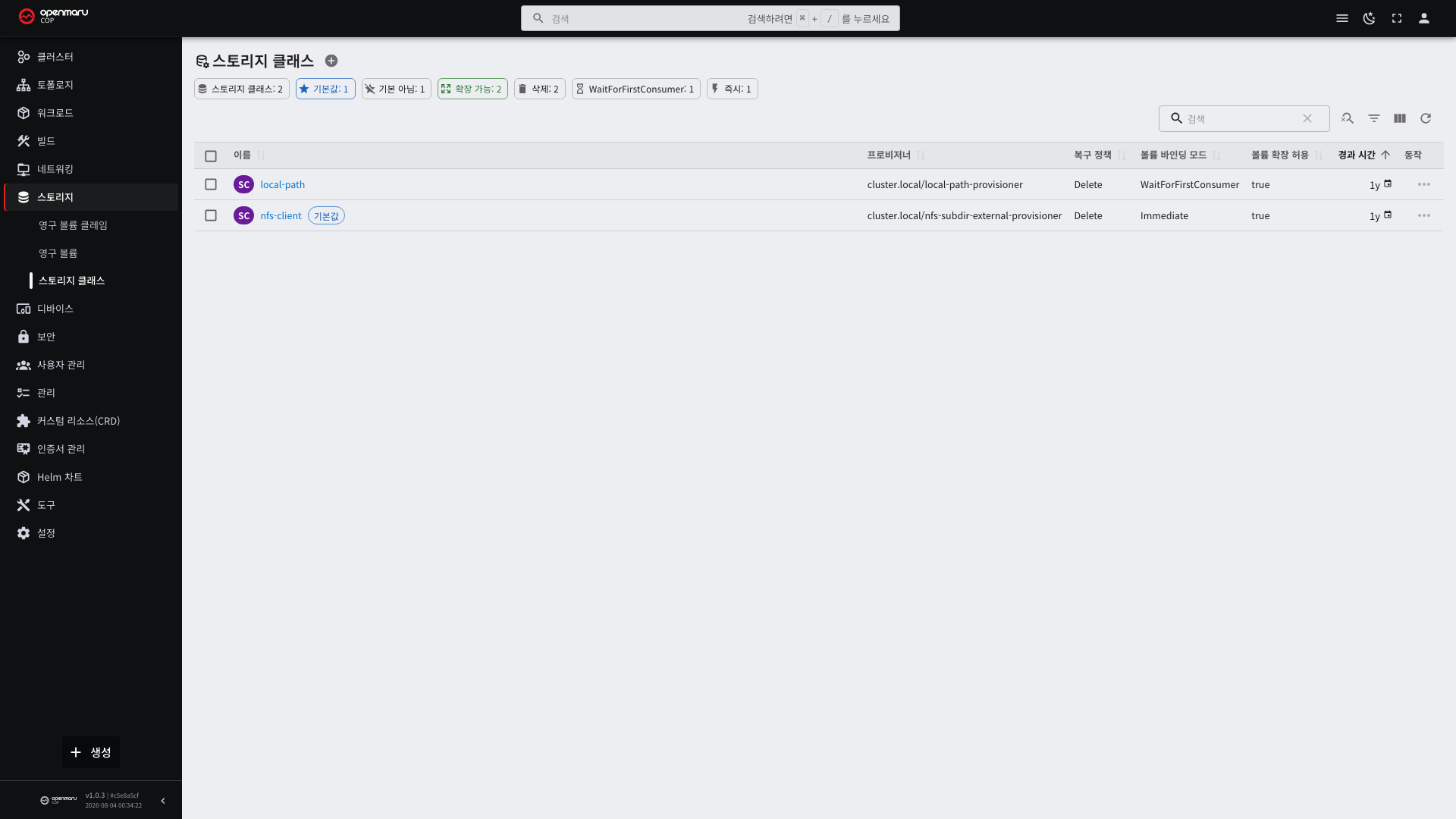
Performance, cost, and features differ by class. Users only have to pick a name.
| Item | Description |
|---|---|
| Provisioner | The component responsible for creating the space |
| Reclaim policy | What to do with the data when the PVC is deleted |
| Volume binding mode | When the actual space is created |
| Default | The class used when a PVC does not name one |
Dynamic Provisioning
In the old approach, operations staff had to create PVs in advance. When a developer created a PVC, a matching one was chosen and connected.
With a storage class, a PV is created automatically the moment a PVC is created. This is called dynamic provisioning.
| Static (the old way) | Dynamic | |
|---|---|---|
| PV preparation | By operators, in advance | Automatic, when needed |
| Size | Chosen from what was prepared | As much as requested |
| Waiting | Waits forever if there is no matching PV | Immediate |
Almost everything is dynamic now. You only create a PVC.
Volume Binding Mode
| Mode | Behavior |
|---|---|
| Immediate | Creates the space as soon as the PVC is created |
| WaitForFirstConsumer | Creates it after the node for the pod has been decided |
With a WaitForFirstConsumer class, a PVC in Pending is normal. It connects when you create the pod.
The reason this mode exists is as follows. When storage exists only on a particular node (local disk), creating the space first confines the pod to that node. If the node has no room, the pod can never start. Deciding pod placement first and creating the space on that node avoids this.
Reclaim Policy
| Policy | When the PVC is deleted |
|---|---|
| Delete | The data disappears with it |
| Retain | The data remains. It has to be cleaned up manually |
Use a Retain class for important data. Deleting a PVC on a Delete class cannot be undone.
Changing a class's reclaim policy later does not apply to PVs already created. Check before creating.
When It Stalls in Pending
| Cause | What to check |
|---|---|
| The storage class name is wrong | Whether it matches a name in the list |
| Not enough capacity left | The free space on the storage |
| The access mode is not supported | Whether the class supports ReadWriteMany |
| The namespace capacity quota was hit | Configuration > Resource Quotas (see 8.1) |
| The volume binding mode is WaitForFirstConsumer | This is normal. It connects when you create the pod |
The cause is recorded in the events on the PVC detail screen. Look there first.
Protecting Your Data
- Check whether any pod is using a PVC before deleting it. You can see this on the detail screen.
- Deleting a Helm release sometimes leaves the PVC and sometimes removes it, so back up important data in advance (see 9.1).
- A PVC can be grown but not shrunk. The class has to support size changes, and no class supports shrinking.
- Kubernetes does not back up for you. Use a separate backup tool or the storage's own snapshot feature.