8.1. Configuration Resources
When to Look at This
- When creating a pod raises a resource limit exceeded error
- When checking the resource ceiling your team can use
- When values are attached even though you did not request resources
- When creating a resource is rejected for an unclear reason
Most settings in this chapter are decided by operations staff. Users look at them to check the current values.
Resource Quotas
This is the ceiling on the resources a namespace can use. Go to Configuration > Resource Quotas.
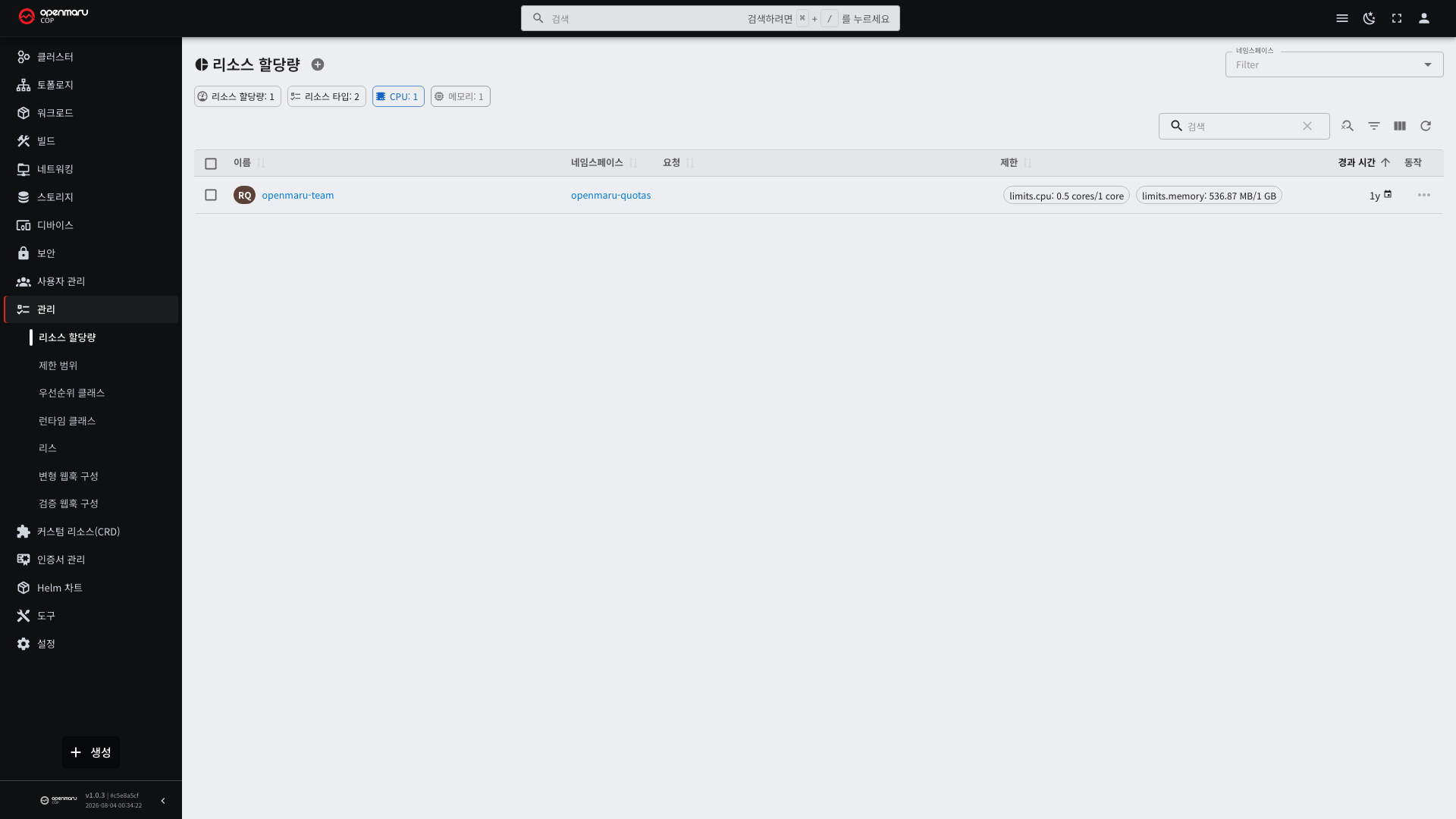
The detail screen shows the current usage and the ceiling per item.
| What is limited | Meaning |
|---|---|
requests.cpu · requests.memory | The sum of what the pods requested |
limits.cpu · limits.memory | The sum of the limits the pods set |
pods | The number of pods |
persistentvolumeclaims | The number of storage claims |
services | The number of Services |
requests.storage | The total requested storage size |
When You Hit a Quota
Reaching the ceiling prevents creating new resources and raises a quota exceeded error.
| Order | What to do |
|---|---|
| 1 | Check on the detail screen which item hit the ceiling |
| 2 | Clean up unused resources (stopped Deployments, old PVCs) |
| 3 | Check whether the pods' resource requests are larger than reality |
| 4 | If it is still short, ask operations staff to adjust the ceiling |
In a namespace with a quota, every pod must have resource requests. Pods without them are not created. If a limit range provides defaults, they are attached automatically.
Builds also run as pods, so hitting a quota prevents builds from starting (see 4.2).
Limit Ranges
This is the range a single pod may request. View them under Configuration > Limit Ranges.
| Item | Description |
|---|---|
| Min | You cannot request less than this |
| Max | You cannot request more than this |
| Default request | The value attached automatically when no request is written |
| Default limit | The value attached automatically when no limit is written |
Their role differs from resource quotas.
| Resource | What it limits |
|---|---|
| Resource quota | The total across the namespace |
| Limit range | The range for one pod |
With defaults configured, pods are created even without requests. However, autoscaling (HPA) computes utilization from the request, so it is better to specify it (see 3.5).
Creating Them — YAML
These two are usually created together by operations staff when handing over a namespace.
Resource Quota
apiVersion: v1
kind: ResourceQuota
metadata:
  name: team-quota
  namespace: my-app
spec:
  hard:
    requests.cpu: "20"
    requests.memory: 40Gi
    limits.cpu: "40"
    limits.memory: 80Gi
    pods: "50"
    persistentvolumeclaims: "10"
    requests.storage: 500Gi
    services.loadbalancers: "2"
Only the items you write are limited. Omitting pods means the pod count is not limited.
Writing requests.cpu means every pod in that namespace must have requests. Pods without them are not created.
That is why a limit range providing defaults is added alongside.
Limit Range
apiVersion: v1
kind: LimitRange
metadata:
  name: team-limits
  namespace: my-app
spec:
  limits:
    - type: Container
      default:                       # attached when no limit is written
        cpu: "1"
        memory: 1Gi
      defaultRequest:                # attached when no request is written
        cpu: 200m
        memory: 256Mi
      min:                           # you cannot request less than this
        cpu: 50m
        memory: 64Mi
      max:                           # you cannot request more than this
        cpu: "4"
        memory: 8Gi
    - type: PersistentVolumeClaim
      min:
        storage: 1Gi
      max:
        storage: 100Gi
| Field | Description |
|---|---|
type | Container · Pod · PersistentVolumeClaim |
default | Attached automatically to containers with no limit written |
defaultRequest | Attached automatically to containers with no request written |
min · max | The allowed range. Outside it, the pod is rejected |
Creating both together is the practical combination. With only a quota, every pod without requests is rejected and users are blocked without knowing why. With a limit range providing defaults, pods start even with nothing written, and the quota controls only the totals.
They do not apply to pods already running. Defaults are attached only to newly created pods.
Priority Classes
These decide which pods to keep first when resources run short. View them under Configuration > Priority Classes.
| Item | Description |
|---|---|
| Value | The higher the number, the higher the priority |
| Default | Whether it applies to pods that do not specify one |
| Preemption policy | Whether to push out lower-priority pods when there is no room |
System components have high values set in advance. Do not give applications values higher than the system's.
Lower-priority pods are evicted when resources run short. An evicted pod tries to be scheduled on another node, but
if the whole cluster is full it stays in Pending.
Runtime Classes
These choose how containers are run. View the registered list under Configuration > Runtime Classes.
Usually only one default is used. Workloads using GPUs sometimes have a separate runtime designated (see 8.3).
Leases
These are the locking mechanism deciding which of several components acts as the leader. View them under Configuration > Leases.
There is nothing for users to handle directly. Refer to them when checking whether a controller is operating
normally. Each node's kubelet also renews a lease, and when renewal stops, that node turns NotReady.
Webhook Configurations
These are settings that inspect or modify values in the middle of creating or editing a resource.
| Kind | What it does | Example |
|---|---|---|
| MutatingWebhookConfiguration | Modifies the request content automatically | Automatic sidecar injection, adding default labels |
| ValidatingWebhookConfiguration | Checks against rules and rejects what does not match | Security policy checks, image source restrictions |
Each has a screen under the Configuration menu. If unexpected values are attached, or a resource is rejected when you create it, check the webhooks registered here.
When a Webhook Rejects a Request
The error message contains the webhook name. Find it in the list by that name and check what it inspects.
| Common rejection reason | Meaning |
|---|---|
| Pod Security violation | The container demands more privilege than the policy allows |
| Image source restriction | The image is from a registry that is not permitted |
| Missing required label | A label the organization requires is absent |
If the pod responsible for a webhook is down, every request may be rejected, or receive no response at all. If you suddenly cannot create anything, suspect this and notify operations staff.