7.1. Access Permissions (RBAC)
When to Look at This
- When you want a team member to see only a particular namespace
- When a "permission denied" error occurs
- When a pod cannot call the cluster API
What RBAC Is
RBAC (Role-Based Access Control) is access control based on roles. Rather than granting permissions per person, you create a role, put permissions in it, and give the role to people.
| Approach | Example | As headcount grows |
|---|---|---|
| Permissions per person | "Kim can view pods, Lee can view pods, ..." | The configuration grows with the number of people |
| Role-based | "The developer role = view pods. Kim and Lee are developers" | You add people to one role |
In Kubernetes, every operation is an API call. Selecting a button in the Console, typing a command, and a pod reading another resource all call the API. RBAC decides whether to allow each of those API calls.
Why It Is Split Into Three Resources
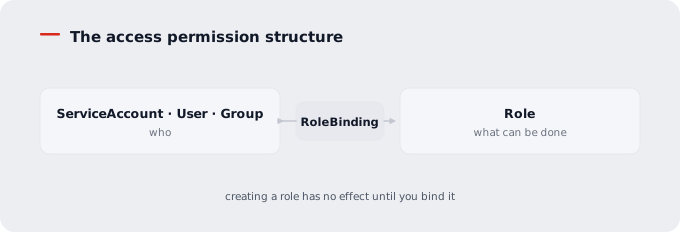
RBAC consists of three resources.
| Resource | What it holds | The question it answers |
|---|---|---|
| Role | What can be done | "What can be done" |
| Subject | User, group, or service account | "Who is it" |
| RoleBinding | The link between the two | "Who can do what" |
Splitting them lets one role be reused for many people, and lets the role stay in place as people change.
Creating a role has no effect until you bind it. Half of all permission problems start here. Creating a role and granting it are different things.
The Access Permission Structure
What a Service Account Is
It is the account a pod uses when calling the cluster API.
People have accounts on an external authentication server (SSO), but pods do not. Since just anyone must not be able to call the API, a separate account for use inside the cluster is provided.
Go to Security > Service Accounts.
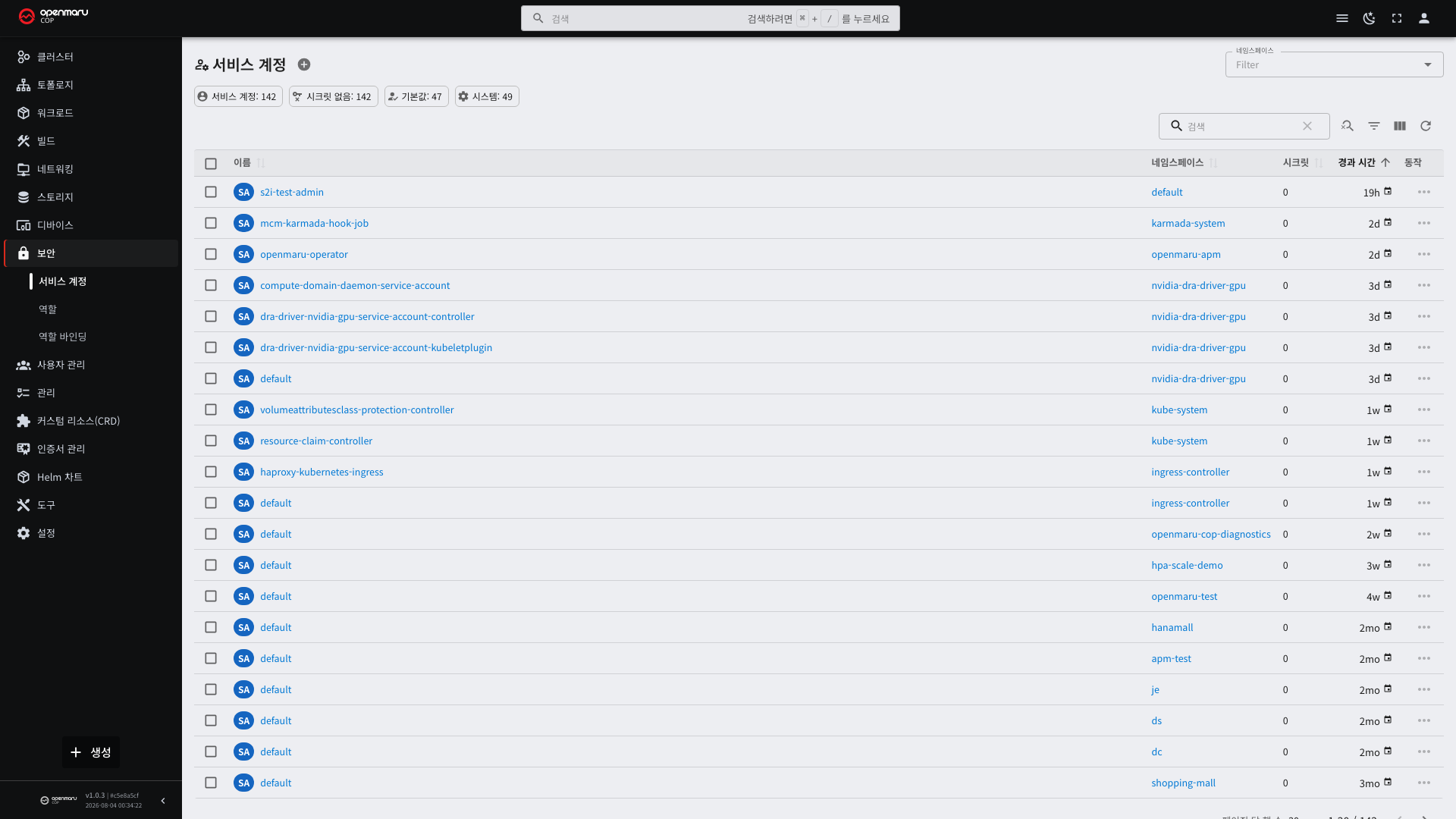
If you specify a service account when creating a pod, that account's authentication token is injected into the pod automatically. Programs inside the pod call the API with that token.
You can check which service account is used on the pod detail screen (see 3.1).
Why Service Accounts Are Used
Most applications never call the cluster API. A web server just does its own work.
But these cases need it.
| Situation | Permission needed |
|---|---|
| Reading the list of other pods to operate | View pods |
| Detecting ConfigMap changes and rereading | View and watch ConfigMaps |
| Adjusting its own replica count | Edit Deployments |
| Operations tools (monitoring, log collection) | View several resources |
Every namespace automatically has a default service account. It is used when a pod does not specify one.
Do not grant permissions to
default. Every pod in that namespace would gain them. Create a dedicated service account for each pod that needs permissions.
What a Role Is
It is a collection of what can be done. It lists "which verbs can be used on which resources".
View them under Security > Roles.
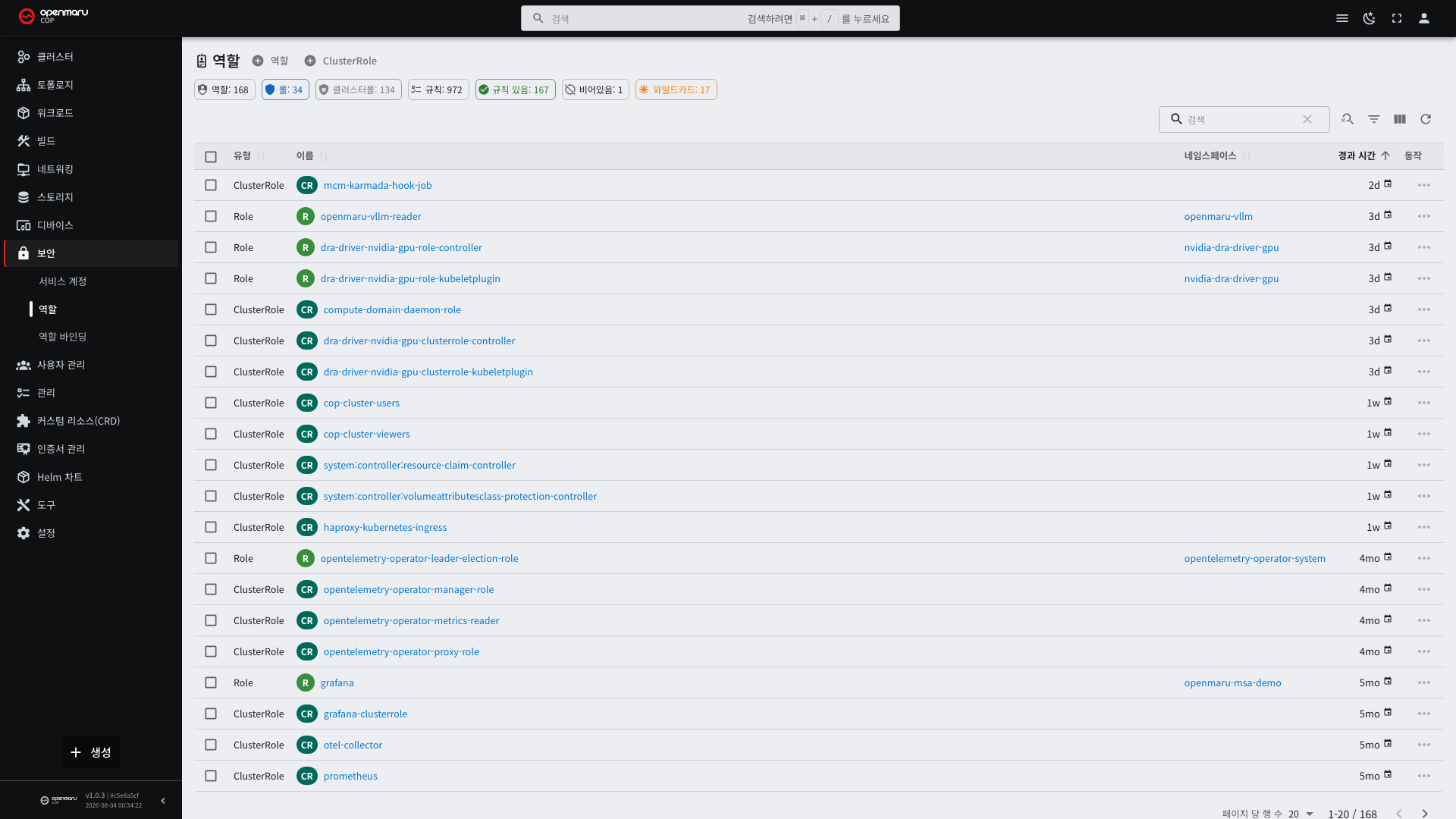
There are two kinds with different scopes.
| Kind | Scope | Characteristic |
|---|---|---|
| Role | Within one namespace only | Created in that namespace |
| ClusterRole | The whole cluster | Does not belong to a namespace |
Resources that do not belong to a namespace, such as nodes and PVs, can only be granted through a ClusterRole.
The Verbs a Role Holds
| Verb | Meaning |
|---|---|
| get | Read one |
| list | Read a list |
| watch | Receive changes in real time |
| create | Create |
| update | Replace wholesale |
| patch | Change part of it |
| delete | Delete |
| deletecollection | Delete several at once |
Viewing a Console screen requires list and watch together. With only get, the list appears empty, because
a list screen reads everything with list and receives changes with watch.
RBAC has no "deny". There is only allow, and anything not allowed is denied automatically. So a setting like "allow everything except this" cannot be expressed.
Pre-Built Roles
The cluster has default ClusterRoles. Check whether one of these is enough before creating a new one.
| Role | Permissions | When to use it |
|---|---|---|
view | Can see most resources. Secrets excluded | People who only need to look |
edit | Can create and edit resources. Permission settings excluded | Application staff |
admin | Everything within the namespace, including permission settings | Team leads |
cluster-admin | Everything across the whole cluster | Operations staff only |
Secrets being excluded from view is intentional. Secrets contain passwords and must not be part of a "look only"
permission.
What a Role Binding Is
It is the link between a role and a subject. View them under Security > Role Bindings.
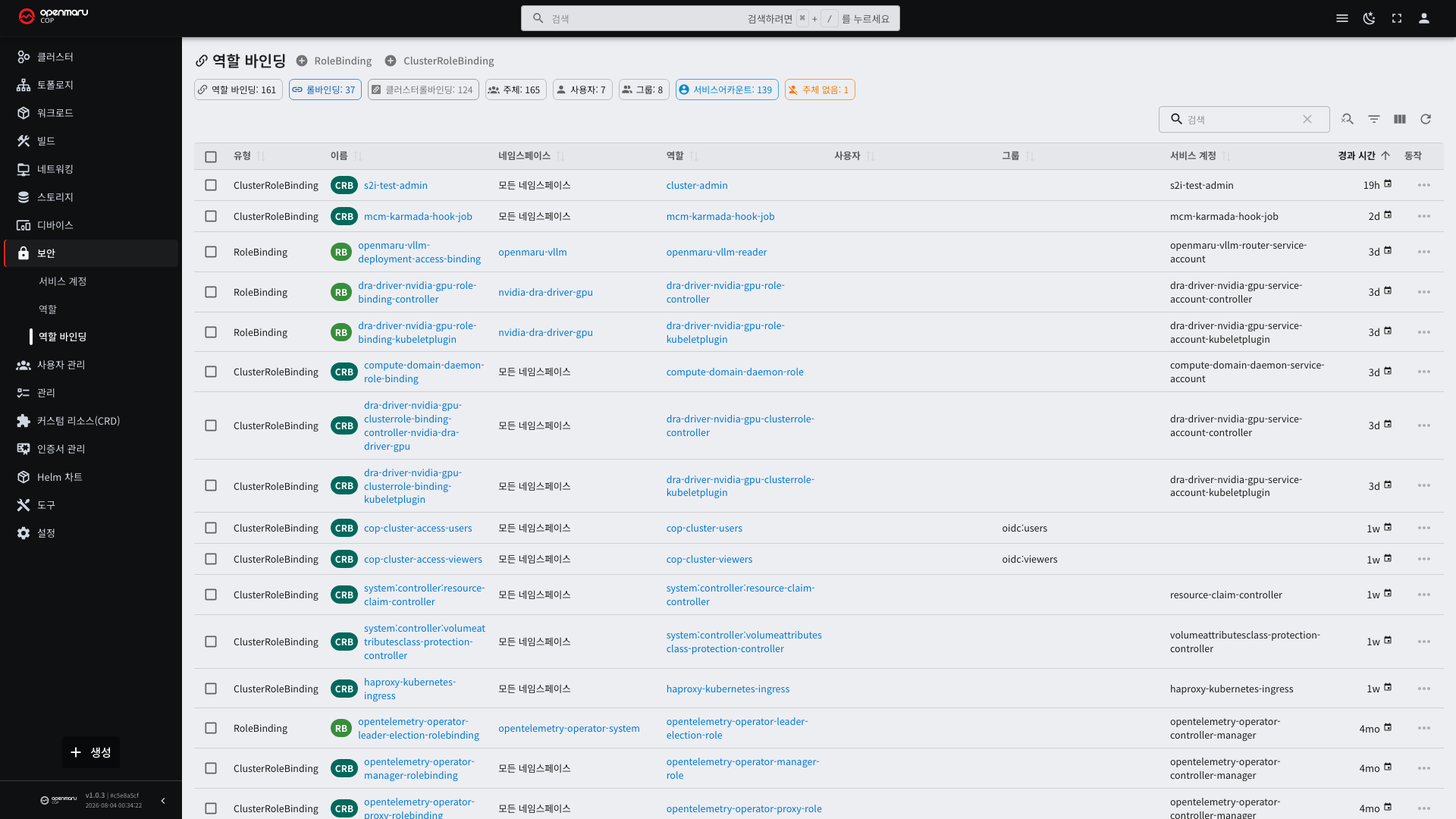
| Kind | Scope |
|---|---|
| RoleBinding | Within one namespace |
| ClusterRoleBinding | The whole cluster |
There are three kinds of subject.
| Kind | Example |
|---|---|
| ServiceAccount | The account a pod uses |
| User | A person's account |
| Group | A grouping of people's accounts (see 7.2) |
Combining Role and ClusterRole
Combining the role and binding kinds gives three cases.
| Role | Binding | Result |
|---|---|---|
| Role | RoleBinding | Within that namespace only |
| ClusterRole | RoleBinding | Within that namespace only |
| ClusterRole | ClusterRoleBinding | The whole cluster |
The second is useful. Defining a ClusterRole such as edit and attaching it per namespace with a RoleBinding gives
one role with a per-namespace scope. You do not have to create the same permission set repeatedly.
The combination of a Role with a ClusterRoleBinding does not exist. A Role belongs to a namespace and cannot be extended cluster-wide.
Creating Them — YAML
Seeing how the three resources connect all at once is the fastest way to understand. Below is a full example creating
an account that only reads pods in the my-app namespace.
1. The Service Account
apiVersion: v1
kind: ServiceAccount
metadata:
  name: log-reader
  namespace: my-app
automountServiceAccountToken: false   # turn it off for pods that do not use the API
2. The Role
apiVersion: rbac.authorization.k8s.io/v1
kind: Role
metadata:
  name: pod-reader
  namespace: my-app
rules:
  - apiGroups: [""]                   # the core group is an empty string
    resources: ["pods", "pods/log"]
    verbs: ["get", "list", "watch"]
| Field | Description |
|---|---|
apiGroups | "" for pods, Services, ConfigMaps and so on; "apps" for Deployments; "rbac.authorization.k8s.io" for roles |
resources | Written in the plural. Attached things such as logs and terminals are pods/log and pods/exec |
verbs | get · list · watch · create · update · patch · delete |
Granting only get makes the list screen appear empty. get is for viewing one when you know its name; viewing
a list requires list. For the screen to refresh live, watch is needed too. Granting all three together is the
baseline for read permission.
3. The Role Binding
Only this makes it take effect. Creating the role without binding it does nothing.
apiVersion: rbac.authorization.k8s.io/v1
kind: RoleBinding
metadata:
  name: log-reader-can-read-pods
  namespace: my-app
subjects:                             # to whom
  - kind: ServiceAccount
    name: log-reader
    namespace: my-app
roleRef:                              # which role
  apiGroup: rbac.authorization.k8s.io
  kind: Role
  name: pod-reader
Granting It to People and Groups
Only the subject kind differs. Users signing in through SSO have a fixed prefix before their name (see 7.2).
subjects:
  - kind: User
    name: "oidc:hong@example.com"
    apiGroup: rbac.authorization.k8s.io
  - kind: Group
    name: "oidc:dev-team"
    apiGroup: rbac.authorization.k8s.io
The prefix and spelling have to be exact. A mistake raises no error; you simply end up with no permission. The surest way to learn the actual name is to check the value that appears in the error message after signing in.
Attaching a Pre-Built Role to a Namespace
Using a pre-built role is simpler than creating a permission set yourself. Attaching a ClusterRole with a RoleBinding makes it effective within that namespace only.
apiVersion: rbac.authorization.k8s.io/v1
kind: RoleBinding
metadata:
  name: dev-team-edit
  namespace: my-app
subjects:
  - kind: Group
    name: "oidc:dev-team"
    apiGroup: rbac.authorization.k8s.io
roleRef:
  apiGroup: rbac.authorization.k8s.io
  kind: ClusterRole                   # takes a cluster role
  name: edit                          # and attaches it at namespace scope
This is the most common approach in practice. Give each team a namespace and create one binding like this for each.
Attaching an Account to a Pod
      spec:
        serviceAccountName: log-reader
        containers:
          - name: app
            image: registry.example.com/my-app:1.0
Without one, the namespace's default account is used.
When You Get a Permission Error
| Order | What to check |
|---|---|
| 1 | Whether a role binding exists for that user or service account |
| 2 | Whether the bound role allows that resource and verb |
| 3 | Whether the binding scope is right (a binding in another namespace has no effect) |
| 4 | If granted through a group, whether the group name is spelled correctly |
| 5 | If the list appears empty, whether list and watch are present |
The Console hides menus you have no permission for. If a menu is not visible, you do not have permission.
Error messages usually state "who tried to do what to which resource and was denied". Read that and add the required verb to the role.
Guidelines for Designing Permissions
- Grant only the minimum needed. For read-only needs,
get,list, andwatchare enough. - Use ClusterRoleBinding only when truly necessary. It affects the whole cluster.
- Grant permissions to people through groups, which makes staffing changes easier to handle (see 7.2).
- Manage Secret read permission separately. It is excluded from the
viewrole by default. - Give
cluster-adminonly to operations staff. With it, all other permission settings can be changed. - Attach service accounts and permissions only to the pods that truly need them.