8.2. Custom Resources
When to Look at This
- When working with a resource that has no standard menu
- When checking resources created by an installed tool
- When seeing which extensions are installed
What a CRD Is
Besides the resources built in from the start, such as pods and Services, Kubernetes can add new resource kinds. A CRD (CustomResourceDefinition) is what defines "a resource of this kind exists, and it has these fields".
Once a CRD is registered, resources of that kind can be handled exactly like pods or Services. They use the same API, the same permission system applies, and they appear on the Console screens.
Most extensions are built this way. They define a resource kind with a CRD and install a program (a controller) that watches those resources and does the actual work.
The Custom Resources COP Uses
| Custom resource | What it does | Chapter |
|---|---|---|
| BuildConfig | The configuration for building images from source | 4.2 |
| Certificate · Issuer | Automatic certificate issuance | 7.3 |
| CronHPA | Time-based pod count adjustment | 3.5 |
These resources have their own dedicated menus, so you do not have to work with them from the CRD screens. Only extensions without a dedicated menu are viewed here.
The CRD List
Go to Custom Resources > Custom Resource Definitions.
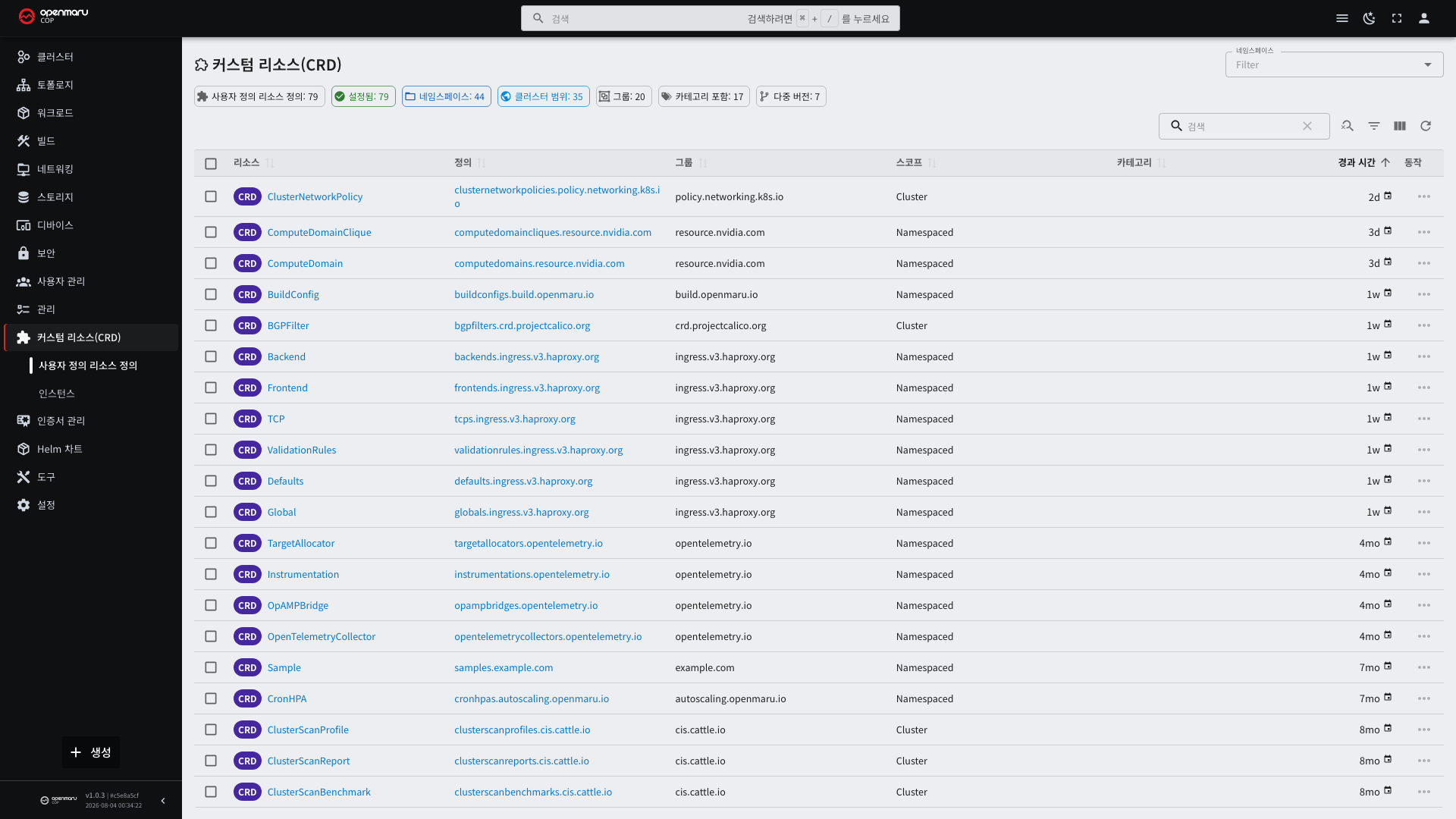
| Column | Description |
|---|---|
| Name | In the form <plural>.<group>. For example, buildconfigs.build.openmaru.io |
| Group | The API group it belongs to. It tells you where it came from |
| Scope | Whether it is namespace-scoped or cluster-scoped |
| Version | The API versions supported |
The group name suggests the origin. cert-manager.io was created by cert-manager, and build.openmaru.io by
COP.
What to Look at on the CRD Detail
Selecting the name shows which fields that kind has (the schema).
| Item | What it tells you |
|---|---|
| Schema | Required fields, and the format and description of each field |
| Versions | Which one is the storage version if there are several |
| Scope | If namespace-scoped, you have to specify a namespace |
| Short names | The abbreviations usable on the command line |
Where a schema exists, the Console reads it and generates an input form automatically. Check here which fields are required and what format the values take.
Viewing Custom Resources
View the resources actually created under Custom Resources > Instances. Choosing a CRD kind shows the list of resources of that kind.
An empty list does not mean the CRD is absent. The kind is defined but none of those resources has been created yet.
How to Work With Them
Custom resources without a dedicated screen are handled as YAML.
| What you want to do | How |
|---|---|
| Inspect | Select a name in the list to see the detail, and view the full content as YAML |
| Edit | Edit the YAML with the edit button |
| Create | Paste YAML from the Create button below the left menu |
Do not edit the status field directly. It is the controller's to fill in, so hand edits soon revert. What users set is the desired state (spec).
If nothing happens after creating one, there is no controller handling that kind. This is the case where only the CRD was installed and the controller is missing; check with operations staff.
Cautions When Deleting
Deleting the CRD itself deletes every resource of that kind along with it. This cannot be undone.
For example, deleting the certificates.cert-manager.io CRD removes every certificate resource in the cluster. Do
not delete CRDs.
When deleting an individual custom resource, also check whether resources it created are deleted with it. Pods and Services created by the controller may be attached to it.