3.6. The parameter confirmation dialog
Choosing values in the dialog that asks you back
Sometimes you send a question and the Parameter confirmation dialog appears.
Please review and modify the following parameters if needed.
Either a value the query needs is missing, or the widget wants to check the value it guessed.
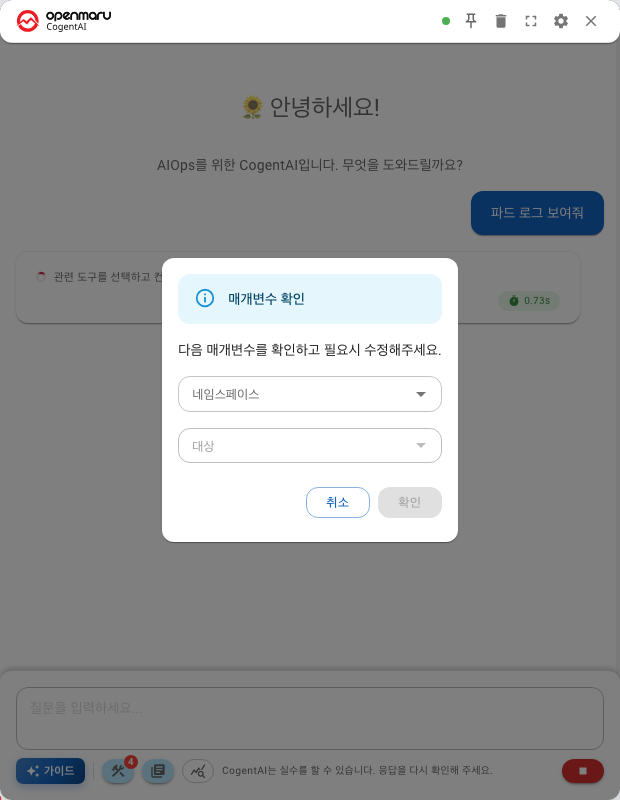
What it asks for
It varies with the question, but usually these.
| Field | What goes in it |
|---|---|
| Namespace | A Kubernetes namespace |
| Application name | A service or application name |
| Instance ID | A WAS instance |
| IP address | A host |
| Kind | The resource kind (Pod, Deployment and so on) |
Values that are already filled in were taken from your question. If they are right, press Confirm as it is.
Why it asks
Because the same name exists in several namespaces, or because your question did not name a subject.
Asking once is better than querying with the wrong value and producing an answer about something else.
How to avoid being asked
Name the subject in the question from the start.
| Ask this | And it asks back for |
|---|---|
"How is <app name> doing?" | Which namespace |
"How is <app name> in <namespace> doing?" | Nothing |
Using the AI buttons on screen hands the subject over automatically, so you are rarely asked back.
If you cancel
Nothing is queried and it ends there. Check the values, correct your question and send it again.
Dangerous request detected
A request for something hard to undo brings up a different dialog.
Dangerous request detected — do you want to continue?
Press Continue if that is what you meant, Cancel if not.
Which words trigger it
These words in a question bring up the dialog.
| Kind | Words |
|---|---|
| Deleting | delete · remove · drop |
| Stopping | stop · kill · terminate |
| Restarting | restart |
Questions about the past do not trigger it
Wording about the past, such as "When was it restarted?", is not treated as a dangerous request.
Phrases like termination time, deleted and was restarted ask about state rather than command anything, so they are exempt.
That is why "Are there any pods that terminated yesterday?" is answered straight away, without a confirmation dialog.
Note that the pod list only holds the last restart time. Pods that are already gone are not returned, so to see a termination history, ask through events: "Show me recent warning events".
It can appear even for read-only questions
The decision is made on the words alone, so the dialog appears even for questions that only read.
"Show me pods with many restarts": this is a query, but
restartbrings up the confirmation dialog
There is nothing to worry about. Press Continue and it runs the query as it is.
If the dialog appears when you did not expect it
Read your question again. A word from the list above may have slipped into something you meant only as a query. Rewording it gets you through without the confirmation.
The reason this confirmation exists is that the widget really can change things (Chapter 101).
Next
- Naming the subject up front — ① Free-form questions
- Asking with buttons — In OPENMARU APM · In COP Console · In Observability
- When something goes wrong — When something goes wrong