1.2. Basic Concepts
Introducing Karmada
Karmada (Kubernetes Armada) is a CNCF incubating project -- an open source system for multi-cluster Kubernetes orchestration.
Architecture Overview
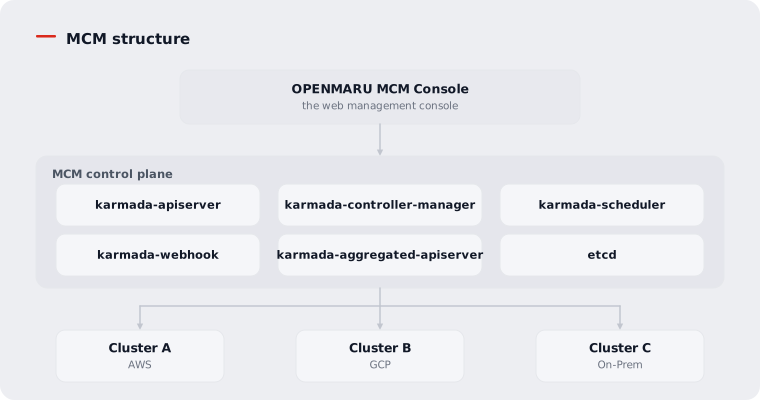
Control Plane Components
karmada-apiserver
- Acts as the front end of the control plane
- A REST endpoint that serves the Karmada and Kubernetes APIs
- Compatible with existing tools such as kubectl
karmada-controller-manager
- Runs the controllers that watch and process Karmada objects
- Talks to the member clusters' API servers to create resources
- The main controllers:
- Cluster Controller: manages the cluster lifecycle
- Policy Controller: processes PropagationPolicy
- Binding Controller: turns a ResourceBinding into Work
- Execution Controller: deploys Work to the member clusters
karmada-scheduler
- Assigns resources to suitable member clusters
- Evaluates cluster constraints and available resources
- Selects and binds the best cluster
karmada-webhook
- The validating and mutating webhooks for API requests
- Mutating webhook: alters objects and sets defaults
- Validating webhook: rejects requests that violate policy
karmada-agent
- Deployed on Pull mode clusters
- Registers the cluster with the control plane
- Synchronises manifests and reports status
Resource Propagation Flow
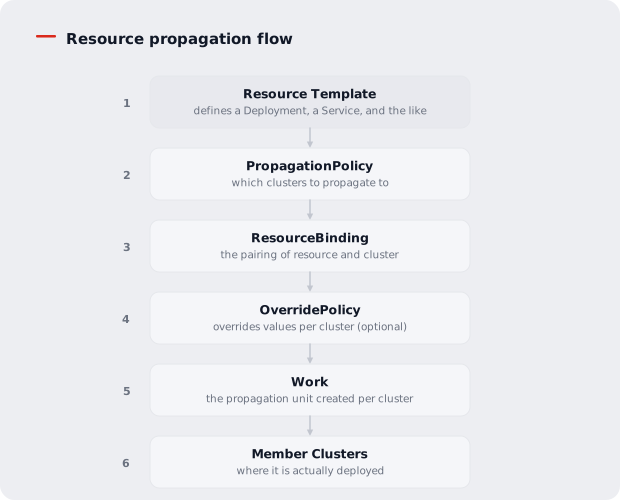
The Core Resource Types
Resource Template
Existing Kubernetes resource definitions are used as they are.
apiVersion: apps/v1
kind: Deployment
metadata:
  name: nginx-deployment
spec:
  replicas: 3
  selector:
    matchLabels:
      app: nginx
  template:
    spec:
      containers:
      - name: nginx
        image: nginx:1.21
PropagationPolicy
Defines which clusters a resource is deployed to.
apiVersion: policy.karmada.io/v1alpha1
kind: PropagationPolicy
metadata:
  name: nginx-propagation
spec:
  resourceSelectors:
    - apiVersion: apps/v1
      kind: Deployment
      name: nginx-deployment
  placement:
    clusterAffinity:
      clusterNames:
        - cluster-a
        - cluster-b
OverridePolicy
Changes resource settings per cluster.
apiVersion: policy.karmada.io/v1alpha1
kind: OverridePolicy
metadata:
  name: nginx-override
spec:
  resourceSelectors:
    - apiVersion: apps/v1
      kind: Deployment
      name: nginx-deployment
  overrideRules:
    - targetCluster:
        clusterNames:
          - cluster-b
      overriders:
        plaintext:
          - path: "/spec/replicas"
            operator: replace
            value: 5
Cluster Registration Modes
Push Mode
- The control plane reaches the member cluster directly
- The cluster credentials are held by the control plane
- Simple to set up, but network reachability is required
Pull Mode
- karmada-agent is deployed on the member cluster
- The agent connects to the control plane and receives work
- Suited to registering clusters behind a firewall
Next Steps
- Login and Authentication -- signing in to OPENMARU MCM
- UI Overview -- understanding the dashboard layout
📖 Note: for more on Karmada, see the official Karmada documentation.