5.2. Ingresses
Overview
The Ingresses page manages every Ingress held on the MCM control plane in one place. An Ingress is the Kubernetes resource that routes HTTP/HTTPS traffic from outside the cluster to services inside it.
What it is for:
- Managing multi-cluster Ingresses together
- Configuring the routing of external HTTP/HTTPS traffic
- Routing by host and by path
- Managing TLS/SSL certificates
- Distributing Ingresses through a PropagationPolicy
Where Ingresses are used:
- Routing traffic by domain
- Routing to microservices by path
- HTTPS termination
- Virtual hosting
- Load balancing
How the Screen Is Laid Out
The Ingresses page shows the Ingress list as a table.
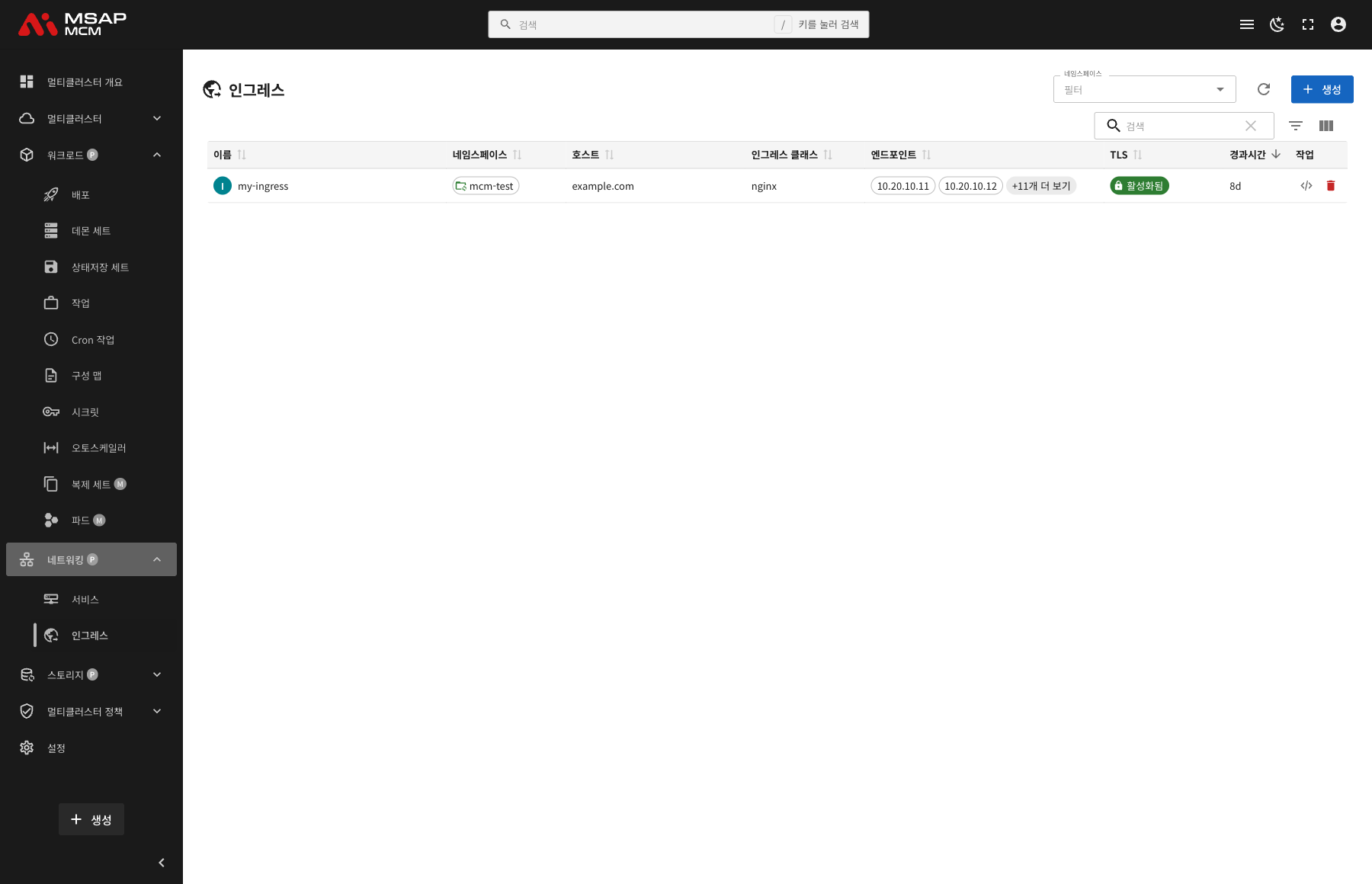
The Elements at the Top of the Page
| Element | Description |
|---|---|
| Namespace filter | Shows only the Ingresses of a particular namespace |
| Refresh button | Refreshes the Ingress list |
| Create button | Opens the dialog for creating a new Ingress |
| Search box | Searches by Ingress name |
Table Columns
| Column | Description | Sortable |
|---|---|---|
| Name | The Ingress name | ✅ |
| Namespace | The namespace the Ingress belongs to | ✅ |
| Hosts | The hostnames traffic is routed for | ✅ |
| Ingress Class | The Ingress controller in use (nginx, for example) | ✅ |
| Endpoints | The list of external IP addresses assigned | ✅ |
| TLS | Whether TLS is enabled | ✅ |
| Age | The time since the Ingress was created | ✅ |
| Actions | The edit and delete buttons | - |
How the TLS State Is Shown
| State | Description | How it is shown |
|---|---|---|
| Enabled | TLS is configured and HTTPS is used | A green icon plus "Enabled" |
| Disabled | TLS is not configured; HTTP only | Shown in grey |
How the Endpoints Are Shown
The Endpoints column shows the external IP addresses assigned:
- The first two IP addresses are shown
- Where there are many, the rest are abbreviated as "+N more"
- For example
10.20.10.11,10.20.10.12,+11 more
Ingress Detail
Clicking an Ingress row opens the detail panel.
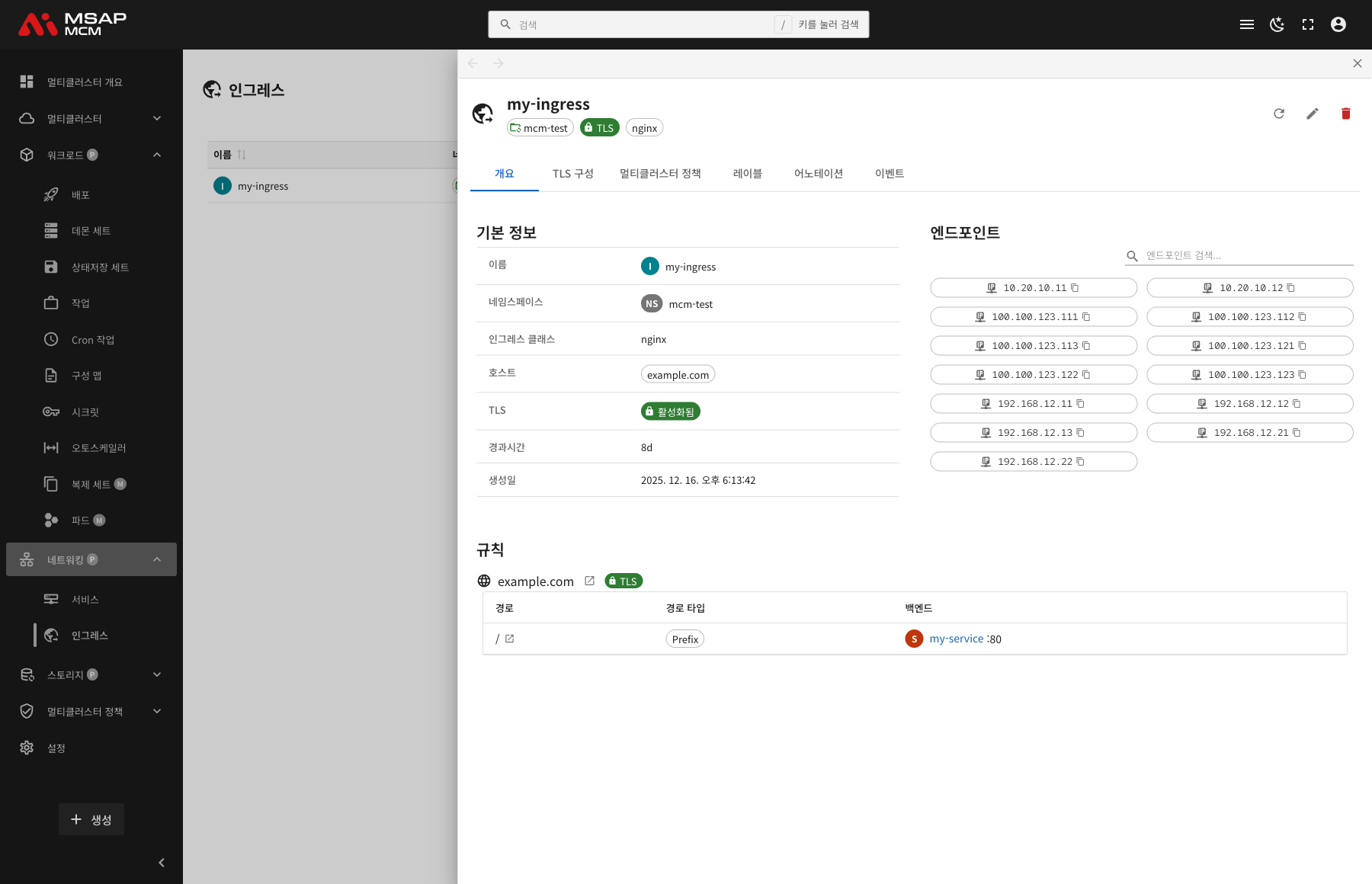
The Detail Panel Header
| Element | Description |
|---|---|
| Ingress name | The name of the chosen Ingress |
| Namespace | The namespace the Ingress belongs to |
| TLS badge | Shown when TLS is enabled |
| Ingress Class | The Ingress controller in use |
The Action Buttons
| Button | What it does |
|---|---|
| Refresh | Refreshes the Ingress information |
| Edit | Opens the YAML edit mode |
| Delete | Deletes the Ingress |
The Tabs
The Overview Tab
Shows the Ingress's basic information, endpoints, and routing rules.
Basic information:
| Item | Description |
|---|---|
| Name | The Ingress name |
| Namespace | The namespace the Ingress belongs to |
| Ingress Class | The Ingress controller in use |
| Hosts | The hostnames traffic is routed for |
| TLS | Whether TLS is enabled |
| Age | The time since creation |
| Created | When the Ingress was created |
Endpoints:
Shows the list of external IP addresses assigned to the Ingress:
- Search filters the IPs
- Each IP address has a copy button
- The various IP addresses per cluster are shown
Rules:
Shows the routing rules per host:
| Element | Description |
|---|---|
| Hostname | The domain traffic is routed for (example.com, for example) |
| TLS badge | Marks TLS as enabled for that host |
| Open in new tab | Opens that host in the browser |
The rules table:
| Column | Description |
|---|---|
| Path | The URL path (/, /api, for example) |
| Path Type | Prefix, Exact, or ImplementationSpecific |
| Backend | The Service:Port to send the traffic to |
The TLS Configuration Tab
Shows the Ingress's TLS/SSL certificate configuration.
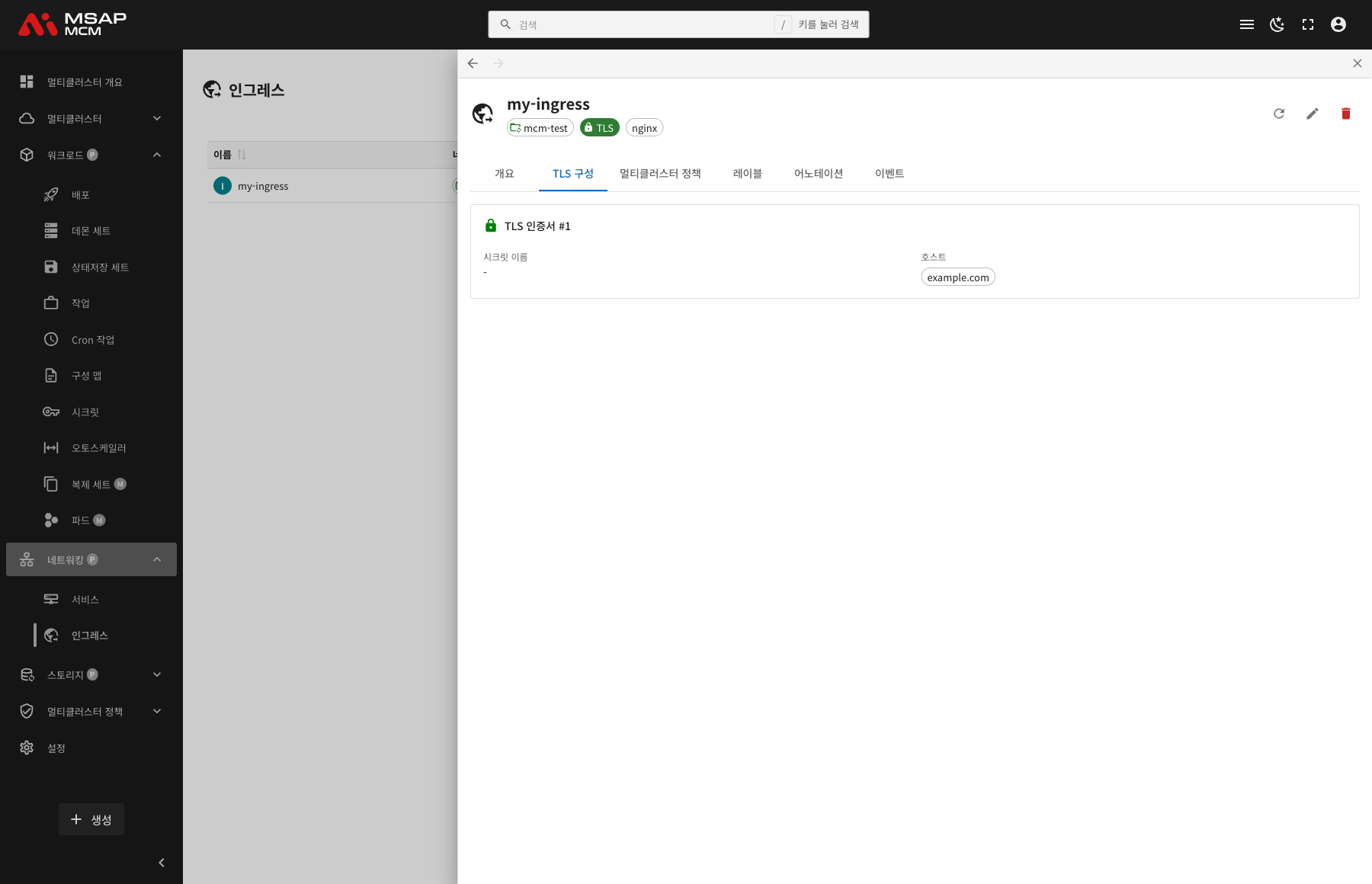
The TLS certificate:
| Item | Description |
|---|---|
| Secret Name | The Secret holding the TLS certificate |
| Hosts | The hostnames the certificate applies to |
Note: the TLS certificate Secret has to be of type
kubernetes.io/tlsand hold thetls.crtandtls.keykeys.
The Multi-Cluster Policies Tab
Shows the multi-cluster policies that apply to the Ingress.
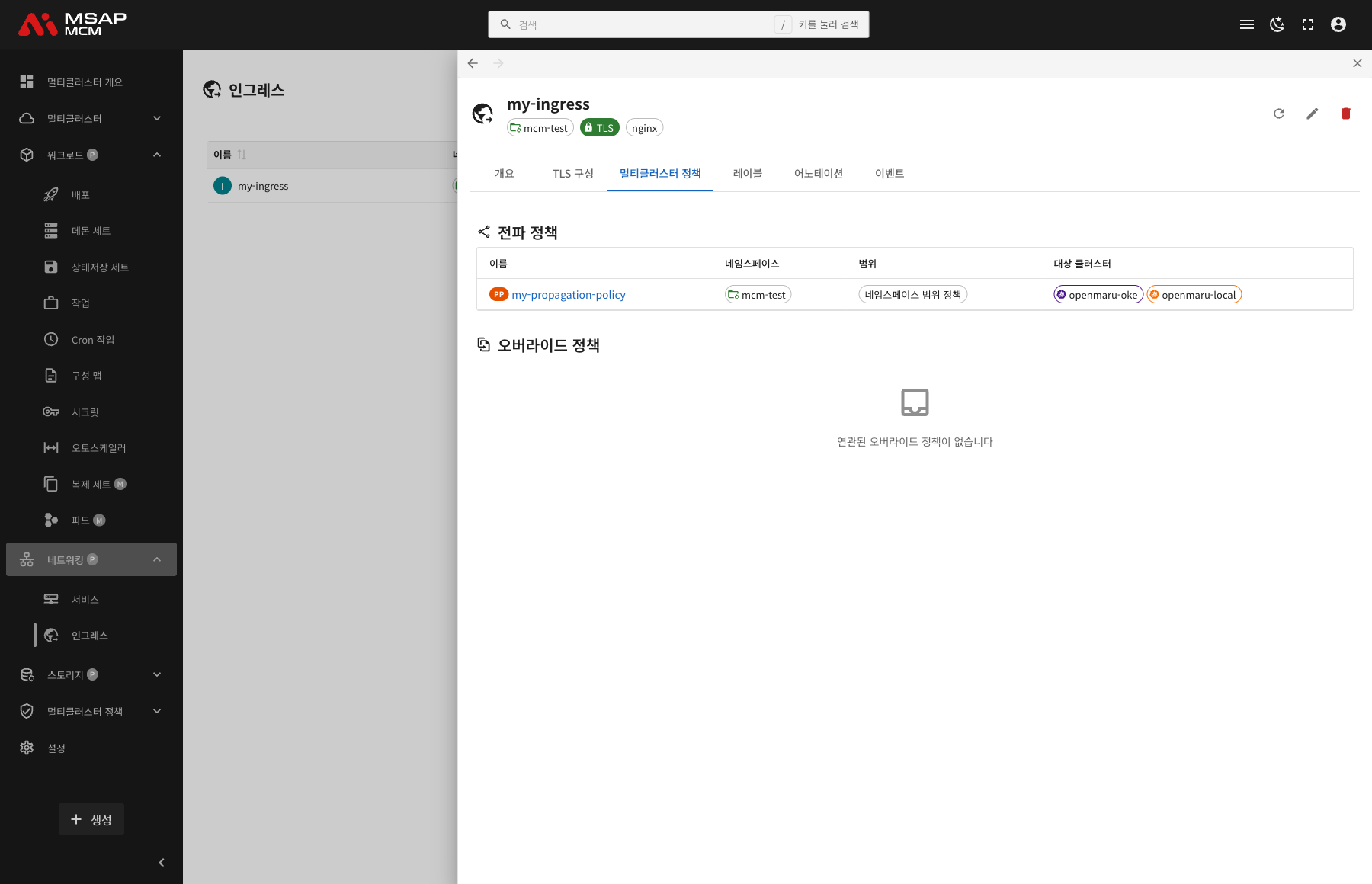
PropagationPolicy:
| Column | Description |
|---|---|
| Name | The PropagationPolicy name |
| Namespace | The namespace the policy belongs to |
| Scope | Namespace-scoped policies / cluster-scoped policies |
| Target Clusters | The list of target clusters |
OverridePolicy:
Shown where there are per-cluster custom settings.
The Labels Tab
Shows the list of Kubernetes labels applied to the Ingress.
The Annotations Tab
Shows the list of annotations applied to the Ingress.
Note: settings particular to an Ingress controller are mostly configured through annotations (nginx.ingress.kubernetes.io/rewrite-target, for example).
The Events Tab
Shows the Kubernetes events related to the Ingress.
Creating an Ingress
Creates a new Ingress on the MCM control plane.
Fields
| Field | Required | Description |
|---|---|---|
| Name | ✅ | The Ingress name |
| Namespace | ✅ | The namespace to deploy into |
| Ingress Class | ✅ | The Ingress controller to use |
| Hosts | ✅ | The hostnames to route for |
| Rules | ✅ | The path-based routing rules |
| TLS | - | The TLS certificate setting (optional) |
Ingress Examples
A basic Ingress:
apiVersion: networking.k8s.io/v1
kind: Ingress
metadata:
  name: my-ingress
  namespace: default
spec:
  ingressClassName: nginx
  rules:
    - host: example.com
      http:
        paths:
          - path: /
            pathType: Prefix
            backend:
              service:
                name: my-service
                port:
                  number: 80
An Ingress with TLS:
apiVersion: networking.k8s.io/v1
kind: Ingress
metadata:
  name: tls-ingress
  namespace: default
spec:
  ingressClassName: nginx
  tls:
    - hosts:
        - example.com
      secretName: tls-secret
  rules:
    - host: example.com
      http:
        paths:
          - path: /
            pathType: Prefix
            backend:
              service:
                name: my-service
                port:
                  number: 80
A multi-path Ingress:
apiVersion: networking.k8s.io/v1
kind: Ingress
metadata:
  name: multi-path-ingress
  namespace: default
  annotations:
    nginx.ingress.kubernetes.io/rewrite-target: /
spec:
  ingressClassName: nginx
  rules:
    - host: example.com
      http:
        paths:
          - path: /api
            pathType: Prefix
            backend:
              service:
                name: api-service
                port:
                  number: 8080
          - path: /web
            pathType: Prefix
            backend:
              service:
                name: web-service
                port:
                  number: 3000
A multi-host Ingress:
apiVersion: networking.k8s.io/v1
kind: Ingress
metadata:
  name: multi-host-ingress
  namespace: default
spec:
  ingressClassName: nginx
  rules:
    - host: api.example.com
      http:
        paths:
          - path: /
            pathType: Prefix
            backend:
              service:
                name: api-service
                port:
                  number: 8080
    - host: web.example.com
      http:
        paths:
          - path: /
            pathType: Prefix
            backend:
              service:
                name: web-service
                port:
                  number: 3000
Editing the YAML
The "Edit YAML" tab lets you write the Ingress definition directly.
Ingress Operations
Editing an Ingress
- Choose the Ingress
- Press the "Edit" button in the detail panel
- Change the Ingress definition in the YAML editor
- Press the "Save" button
Deleting an Ingress
⚠️ Caution: deleting an Ingress makes external access on that domain impossible.
- Choose the Ingress to delete
- Press the "Delete" button in the detail panel
- Type the Ingress name in the confirmation dialog
- Press the "Delete" button
Worked Examples
Scenario 1: Creating a Basic Ingress
- Press the "Create" button
- Enter the Ingress details:
- Name:
web-ingress - Namespace:
production - Ingress Class:
nginx - Host:
www.example.com - Path:
/→web-service:80
- Name:
- Press the "Create" button
- Name the target clusters with a PropagationPolicy
- Point the domain at the Ingress endpoint in DNS
Scenario 2: Setting Up an HTTPS Ingress
- Create the TLS Secret first:
apiVersion: v1kind: Secretmetadata:name: tls-secretnamespace: productiontype: kubernetes.io/tlsdata:tls.crt: <base64-encoded-cert>tls.key: <base64-encoded-key>
- Add the TLS setting when creating the Ingress:
- TLS Secret:
tls-secret - Host:
www.example.com
- TLS Secret:
- Check the certificate on the TLS configuration tab
Scenario 3: Routing Microservices by Path
- Press the "Create" button and choose the Edit YAML tab
- Write the multi-path rules:
/api/*→api-service:8080/auth/*→auth-service:8081/→frontend-service:3000
- Press the "Create" button
- Confirm traffic is routed correctly on each path
Scenario 4: Checking an Ingress's Endpoints
- Click the Ingress you want to check in the list
- Look at the Endpoints section on the Overview tab
- Check the list of external IP addresses assigned
- Use search to find a particular IP if needed
- Copy an IP address with the copy button
Scenario 5: Deploying an Ingress Across Clusters
- Create the Ingress
- Create a PropagationPolicy:
- Resource selector: name the Ingress
- Target clusters: choose the clusters to deploy to
- Check the "Multi-Cluster Policies" tab in the detail panel
- Check the endpoint assigned on each cluster
- Bring them together with a global load balancer or DNS round robin
Related Concepts
The Ingress Controller
The controller that actually acts on an Ingress resource:
| Controller | What it is like |
|---|---|
| nginx | The most widely used, with rich features |
| traefik | Automatic configuration, Let's Encrypt integration |
| haproxy | High performance, enterprise features |
| istio | Service mesh integration |
| kong | API gateway features |
Path Types
| Type | Description | Example |
|---|---|---|
| Prefix | Matches the path prefix | /api matches both /api and /api/v1 |
| Exact | Matches the path exactly | /api matches only /api |
| ImplementationSpecific | Depends on the controller | See the controller's documentation |
TLS/SSL Configuration
To use HTTPS on an Ingress:
-
Create the TLS Secret:
kubectl create secret tls my-tls-secret \--cert=path/to/cert.crt \--key=path/to/cert.key \-n namespace -
Set TLS on the Ingress:
spec:tls:- hosts:- example.comsecretName: my-tls-secret -
Automatic certificate management (cert-manager):
annotations:cert-manager.io/cluster-issuer: letsencrypt-prod
Ingress Annotations
The main annotations of the nginx Ingress controller:
| Annotation | Description |
|---|---|
nginx.ingress.kubernetes.io/rewrite-target | Rewrites the URL |
nginx.ingress.kubernetes.io/ssl-redirect | Redirects to HTTPS |
nginx.ingress.kubernetes.io/proxy-body-size | Limits the request body size |
nginx.ingress.kubernetes.io/proxy-connect-timeout | The connect timeout |
nginx.ingress.kubernetes.io/affinity | Session affinity |
Managing Ingresses Across Clusters
When deploying an Ingress to several clusters through MCM:
PropagationPolicy:
- Copies the same Ingress to several clusters
- Chooses the clusters and sets the deployment strategy
OverridePolicy:
- Applies different Ingress settings per cluster
- For example, a different certificate per cluster
The multi-cluster Ingress pattern:
- Deploy the same Ingress to each cluster
- Spread traffic between clusters with a global load balancer
- Route by region with DNS
Resolving Problems
When the Ingress does not work:
- Check an Ingress controller is installed
- Check the ingressClassName is right
- Check the backend Service exists and is working
- Check the Service's port is right
When TLS does not work:
- Check the TLS Secret exists
- Check the Secret's type is
kubernetes.io/tls - Check the certificate's hostname matches the Ingress host
- Check the certificate has not expired
When it cannot be reached from outside:
- Check the Ingress controller Service is of the LoadBalancer type
- Check an external IP has been assigned
- Check the firewall rules
- Check the DNS settings
Next Steps
- Services -- managing the Service an Ingress connects to
- Secrets -- managing the TLS certificate Secret
- Propagation Policies -- configuring a PropagationPolicy