7.2. Override Policies
Overview
The Override Policies page manages every override policy held on the MCM control plane in one place. An override policy (OverridePolicy) is the core MCM resource that changes a resource's attributes per cluster as it is propagated to the member clusters.
What it is for:
- Customising resource attributes per cluster
- Overriding the container image, command, and arguments
- Adding and changing labels and annotations
- Fine-grained changes through a JSON patch
Where override policies are used:
- Using a different container image registry per cluster
- Setting different environment variables per environment
- Setting different resource requests and limits per cluster
- Applying different labels and annotations per cluster
Policy Scope
Override policies come in two scopes:
| Scope | Resource | Description |
|---|---|---|
| Namespace-scoped | OverridePolicy | Applies to resources within a particular namespace |
| Cluster-scoped | ClusterOverridePolicy | Applies to cluster-wide or namespaced resources |
How the Screen Is Laid Out
The Override Policies page shows the policy list as a table.
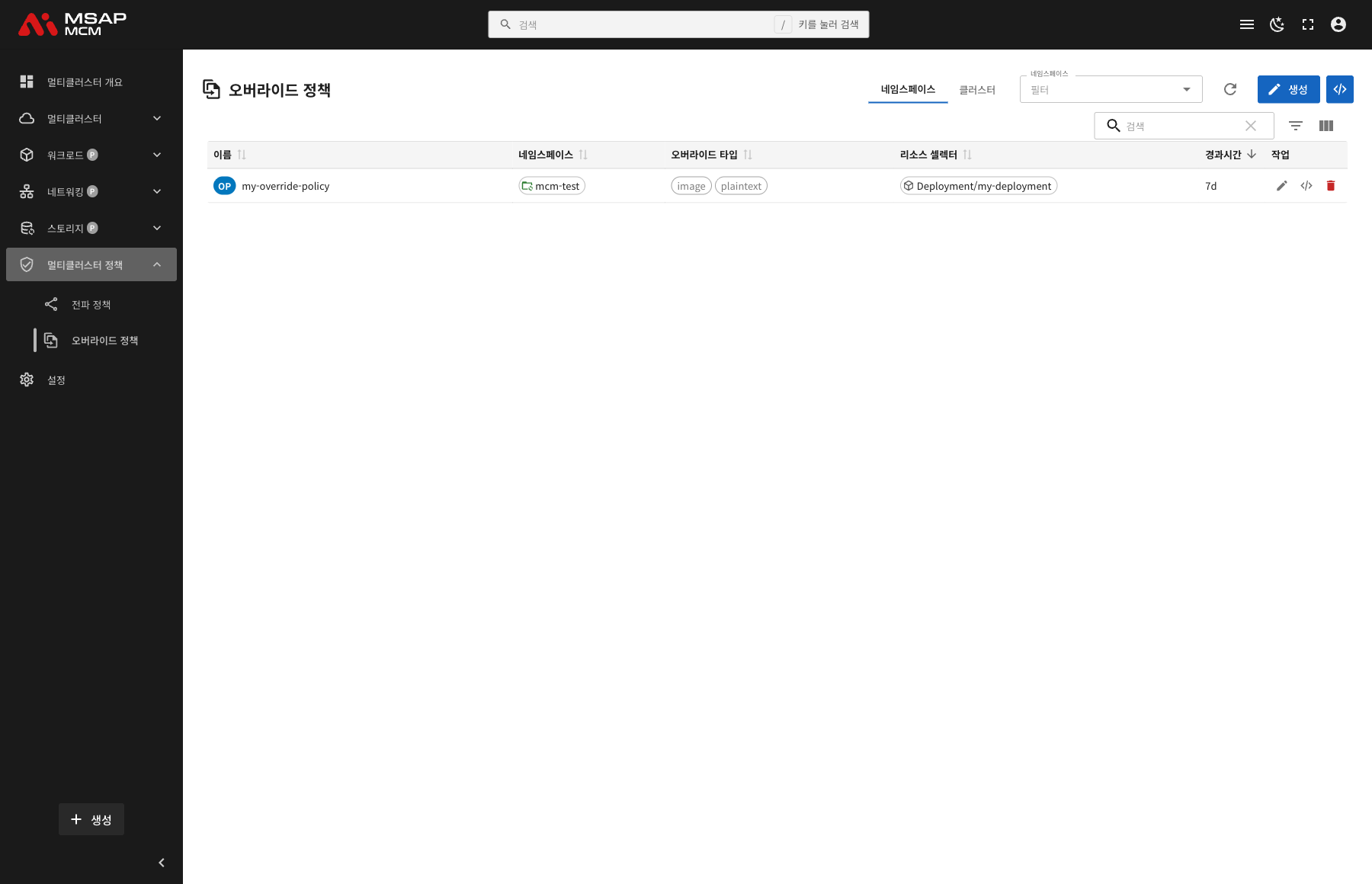
The Elements at the Top of the Page
| Element | Description |
|---|---|
| Scope selector | Chooses namespace-scoped or cluster-scoped policies |
| Namespace filter | Shows only the policies of a particular namespace (namespace scope) |
| Refresh button | Refreshes the policy list |
| Create button | Creates a new override policy |
| Search box | Searches by policy name |
Table Columns (Namespace Scope)
| Column | Description | Sortable |
|---|---|---|
| Name | The policy name (with an OP badge) | ✅ |
| Namespace | The namespace the policy belongs to | ✅ |
| Override Types | The overrider types applied (image, plaintext and so on) | ✅ |
| Resource Selectors | The target resources (kind/name) | ✅ |
| Age | The time since the policy was created | ✅ |
| Actions | The edit, edit, and delete buttons | - |
Table Columns (Cluster Scope)
| Column | Description | Sortable |
|---|---|---|
| Name | The policy name (with a COP badge) | ✅ |
| Override Types | The overrider types applied | ✅ |
| Resource Selectors | The target resources (kind/name) | ✅ |
| Age | The time since the policy was created | ✅ |
| Actions | The edit and delete buttons | - |
Override Policy Detail
Clicking a policy row opens the detail panel.
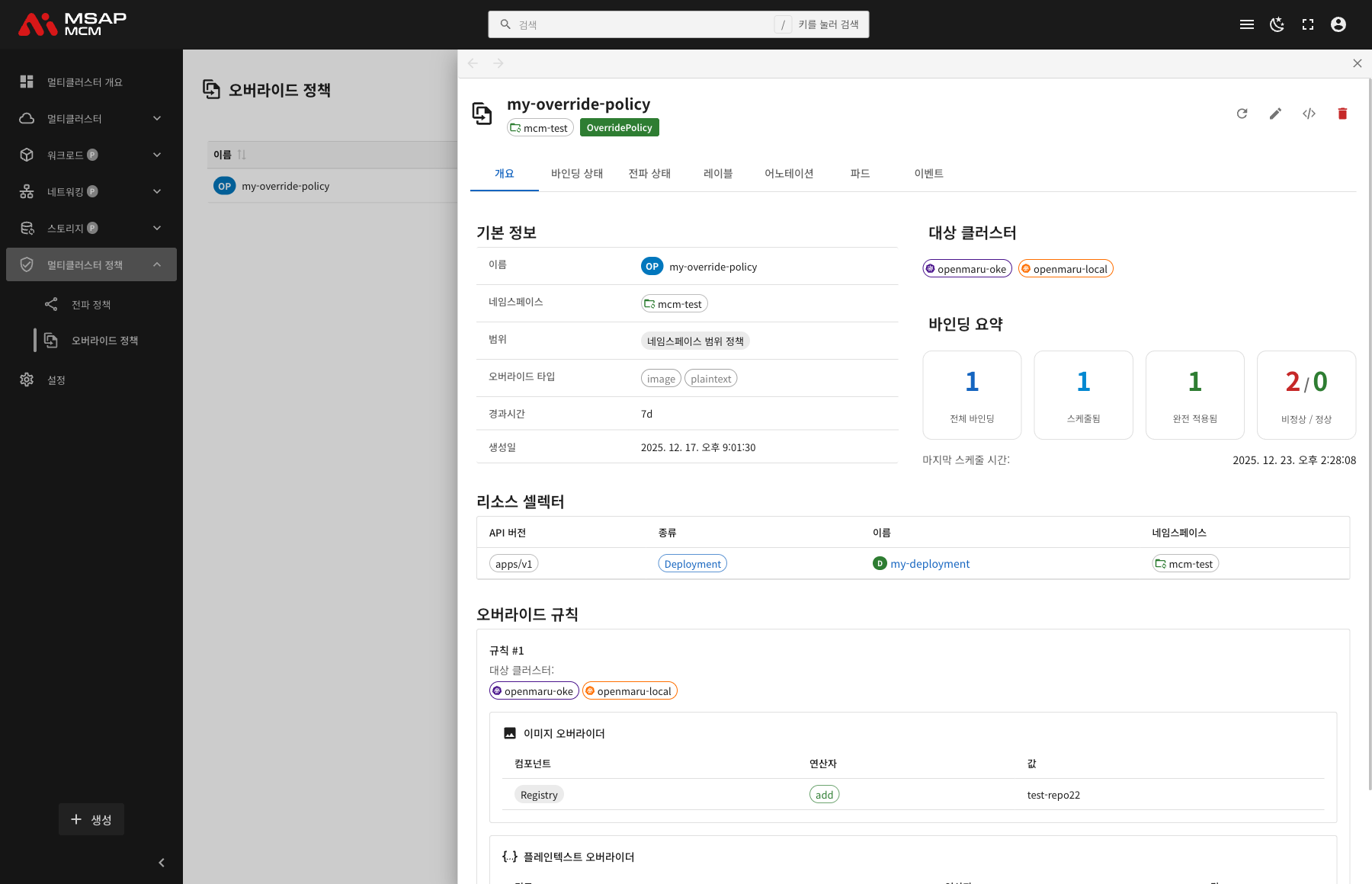
The Detail Panel Header
| Element | Description |
|---|---|
| Policy Name | The name of the chosen policy |
| Namespace | The namespace the policy belongs to |
| Policy type | OverridePolicy / ClusterOverridePolicy |
The Action Buttons
| Button | What it does |
|---|---|
| Refresh | Refreshes the policy information |
| Edit override policy | Edits the policy through the wizard |
| Edit | Opens the YAML edit mode |
| Delete | Deletes the policy |
The Tabs
The Overview Tab
Shows the policy's basic information, resource selectors, and override rules.
Basic information:
| Item | Description |
|---|---|
| Name | The policy name |
| Namespace | The namespace the policy belongs to |
| Scope | Namespace-scoped policies / cluster-scoped policies |
| Age | The time since creation |
| Created | When the policy was created |
Resource Selectors:
Shows the resources the policy applies to, as a table:
| Column | Description |
|---|---|
| API version | The resource API version (apps/v1, for example) |
| Kind | The resource kind (Deployment, for example) |
| Name | The resource name |
| Namespace | The resource namespace |
Override Rules:
Shows the override rules that apply:
| Item | Description |
|---|---|
| Target Clusters | The clusters the override applies to |
| Overrider type | image, command, args, labels, annotations, plaintext, field |
| The overrider | The override settings in detail |
The Binding Status Tab
Shows the resource bindings in detail.
The Propagation Status Tab
Shows the propagation conditions in detail.
The Labels Tab
Shows the list of Kubernetes labels applied to the policy.
The Annotations Tab
Shows the list of annotations applied to the policy.
The Pods Tab
Shows the pods deployed by the policy.
The Events Tab
Shows the Kubernetes events related to the policy.
Creating an Override Policy
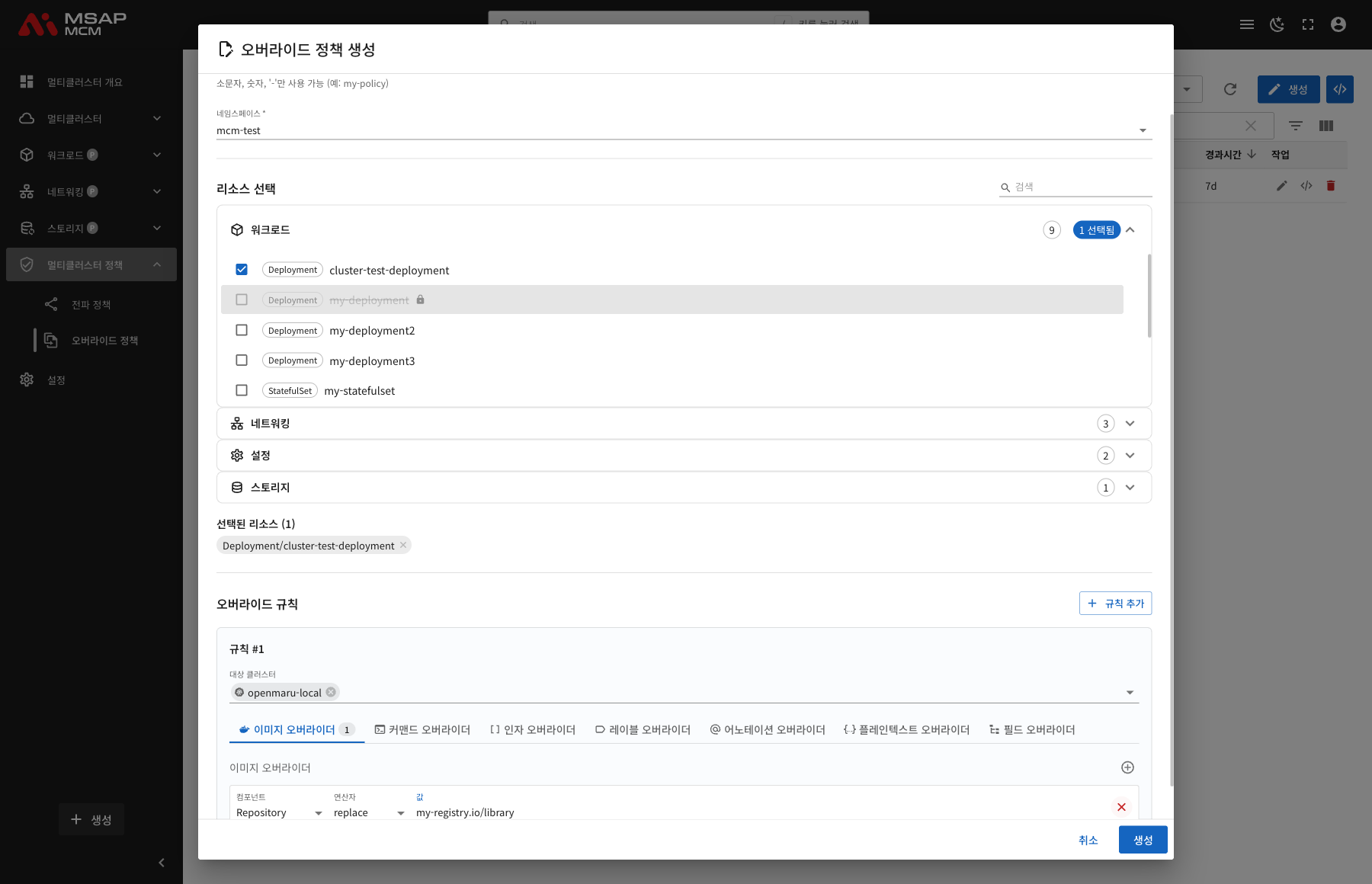
Creates a new override policy. Pressing the "Create" button opens the override policy creation dialog.
Creating an Override Policy Through the Dialog
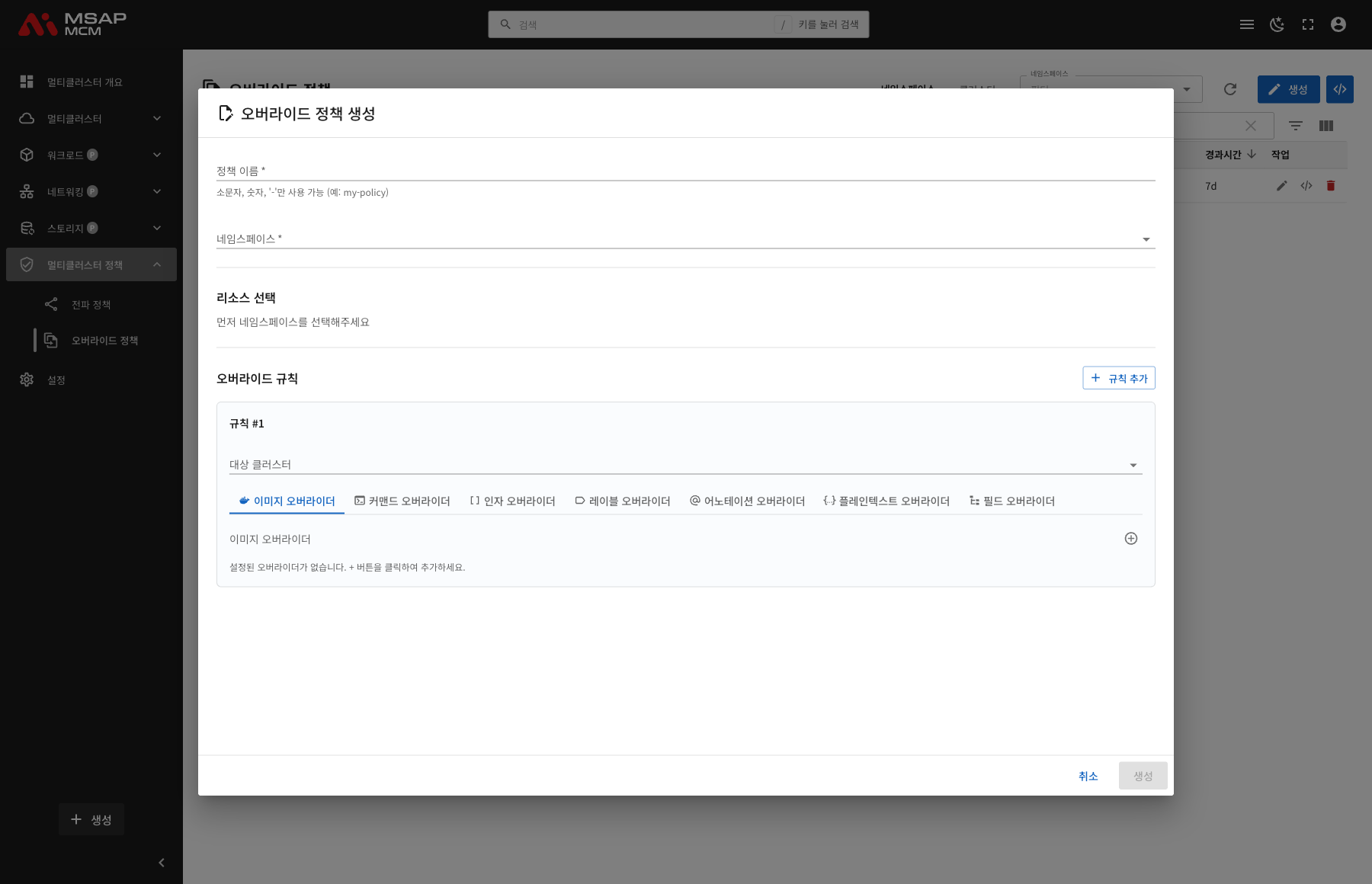
The creation dialog makes it easy to build an override policy through a straightforward interface.
The Parts of the Dialog
| Element | Required | Description |
|---|---|---|
| Policy Name | ✅ | The policy name (lowercase letters, numbers, and '-' only) |
| Namespace | ✅ | Choose the namespace the policy belongs to |
| Resource selection | ✅ | Choose the resources the override applies to |
| Override Rules | ✅ | Define the override rules |
The Resource Selection Panel
Choosing a namespace lists the resources available in it, grouped by category.
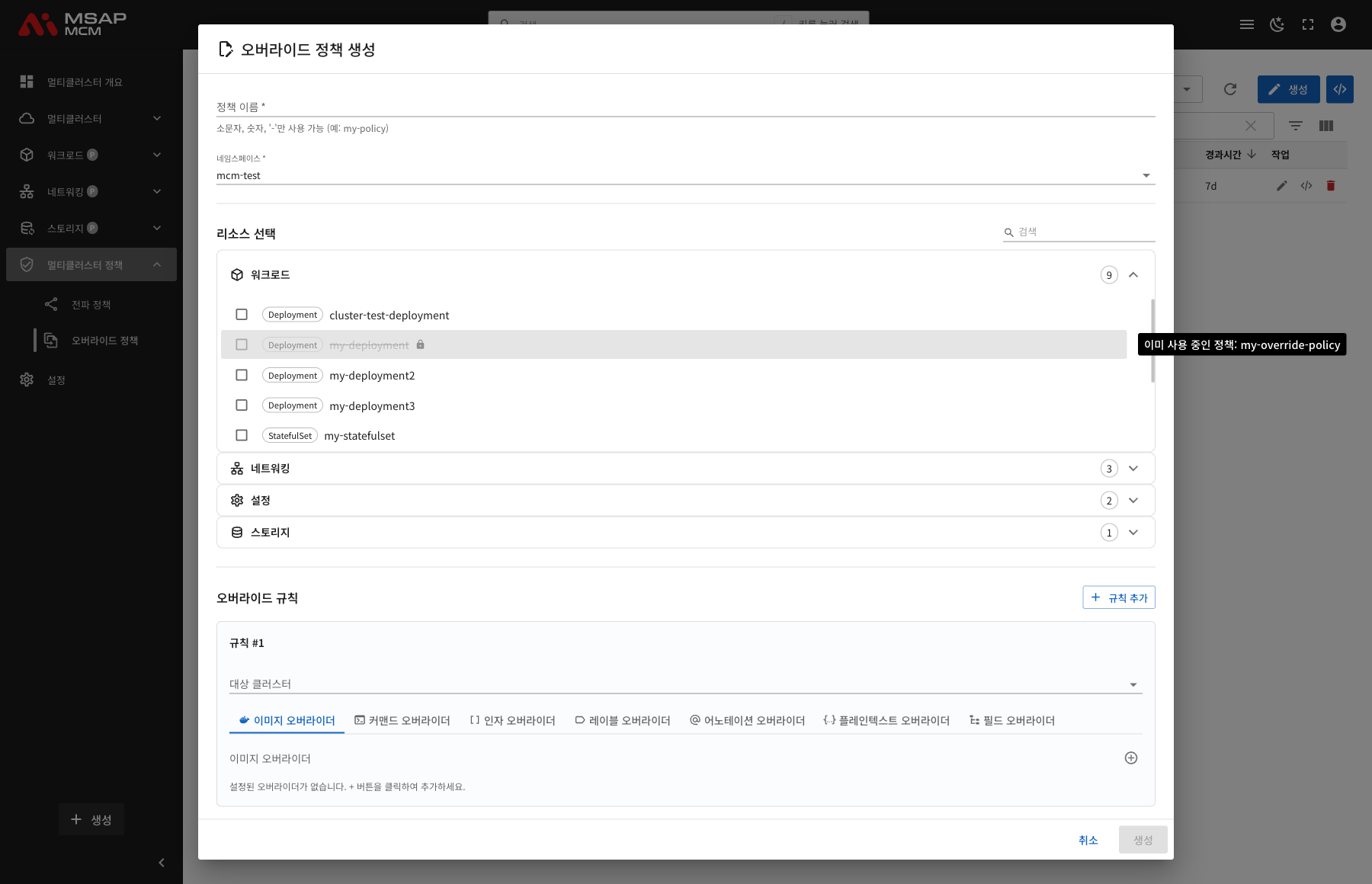
The categories:
- Workloads: Deployment, StatefulSet, DaemonSet, Job, CronJob
- Networking: Service, Ingress
- Configs: ConfigMap, Secret
- Storage: PersistentVolumeClaim
The state of a resource:
- ✅ Selectable: can be chosen with the checkbox
- 🔒 Already in use: a resource used by another policy is disabled, and the name of the policy using it is shown
Setting the Override Rules
An override rule is made up of the target clusters and the overriders.
Target Clusters:
- Choose the clusters the override applies to
- Several clusters can be chosen at once
The overrider tabs:
| Tab | Description | What it is for |
|---|---|---|
| Image Overriders | Overrides the container image | Changing the registry per cluster |
| Command Overriders | Overrides the container command | Changing the start command per cluster |
| Args Overriders | Overrides the container arguments | Changing the arguments per cluster |
| Labels Overriders | Adds and changes labels | Setting labels per cluster |
| Annotations Overriders | Adds and changes annotations | Setting annotations per cluster |
| Plaintext Overriders | Applies a JSON patch | Fine-grained changes to any field |
| Field Overriders | Overrides a field value | Changing a particular field value |
The image overrider settings:
| Field | Description | Example |
|---|---|---|
| Component | The part of the image to override | Repository, Tag, Registry |
| Operator | The override operator | replace, add, remove |
| Value | The override value | my-registry.io/library |
Finishing the Creation
Once every required field is filled in, the "Create" button becomes active.
The panel at the bottom of the dialog:
- Selected Resources: the resources chosen so far, each removable with its X button
- Cancel: closes the dialog and cancels the creation
- Create: creates the override policy (active once every required field is filled in)
💡 Tip: several overrider types can be set at once. Press the + button on each tab to add an overrider.
The Fields at a Glance
| Field | Required | Description |
|---|---|---|
| Name | ✅ | The policy name |
| Namespace | ✅ | The policy's namespace (namespace scope) |
| Resource Selectors | ✅ | Choose the target resources |
| Target Clusters | - | The clusters the override applies to |
| Overriders | ✅ | One or more overrider settings |
OverridePolicy Examples
Overriding the image:
apiVersion: policy.karmada.io/v1alpha1
kind: OverridePolicy
metadata:
  name: image-override-policy
  namespace: default
spec:
  resourceSelectors:
    - apiVersion: apps/v1
      kind: Deployment
      name: my-deployment
  overrideRules:
    - targetCluster:
        clusterNames:
          - cluster1
      overriders:
        imageOverrider:
          - component: Repository
            operator: replace
            value: my-registry.io/library
Adding a label:
apiVersion: policy.karmada.io/v1alpha1
kind: OverridePolicy
metadata:
  name: label-override-policy
  namespace: default
spec:
  resourceSelectors:
    - apiVersion: apps/v1
      kind: Deployment
      name: my-deployment
  overrideRules:
    - targetCluster:
        clusterNames:
          - cluster1
      overriders:
        labelsOverrider:
          - operator: addIfAbsent
            value:
              environment: production
              region: asia
A plaintext override (a JSON patch):
apiVersion: policy.karmada.io/v1alpha1
kind: OverridePolicy
metadata:
  name: plaintext-override-policy
  namespace: default
spec:
  resourceSelectors:
    - apiVersion: apps/v1
      kind: Deployment
      name: my-deployment
  overrideRules:
    - targetCluster:
        clusterNames:
          - cluster1
      overriders:
        plaintextOverrider:
          - path: /spec/replicas
            operator: replace
            value: 5
Overriding the command:
apiVersion: policy.karmada.io/v1alpha1
kind: OverridePolicy
metadata:
  name: command-override-policy
  namespace: default
spec:
  resourceSelectors:
    - apiVersion: apps/v1
      kind: Deployment
      name: my-deployment
  overrideRules:
    - targetCluster:
        clusterNames:
          - cluster1
      overriders:
        commandOverrider:
          - containerName: app
            operator: add
            value:
              - "--log-level=debug"
ClusterOverridePolicy Example
A cluster-scoped override policy:
apiVersion: policy.karmada.io/v1alpha1
kind: ClusterOverridePolicy
metadata:
  name: global-image-override
spec:
  resourceSelectors:
    - apiVersion: apps/v1
      kind: Deployment
  overrideRules:
    - targetCluster:
        clusterNames:
          - cluster1
          - cluster2
      overriders:
        imageOverrider:
          - component: Registry
            operator: replace
            value: private-registry.company.com
Override Policy Operations
Editing an Override Policy
- Choose the policy
- Press "Edit override policy" or "Edit" in the detail panel
- Change the policy in the wizard or the YAML editor
- Press the "Save" button
Deleting an Override Policy
⚠️ Caution: deleting an override policy removes the overrides it applied, and the resources return to their original state.
- Choose the policy to delete
- Press the "Delete" button in the detail panel
- Type the policy name in the confirmation dialog
- Press the "Delete" button
Worked Examples
Scenario 1: Using a Different Image Registry per Cluster
- Press the "Create" button
- Enter the policy details:
- Name:
image-registry-override - Namespace:
production - Resource selection: Deployment/my-app
- Name:
- Set the override rule:
- Target clusters: choose cluster1
- Press + on the Image Overriders tab
- Component: Repository
- Operator: replace
- Value: private-registry.cluster1.local/my-app
- Press the "Create" button
Scenario 2: Setting Environment Variables per Cluster
- Create a new override policy
- Use a plaintext overrider:
path: /spec/template/spec/containers/0/envoperator: addvalue:- name: CLUSTER_NAMEvalue: cluster1
- Save the policy
Scenario 3: Separating Development and Production
-
An override policy for the development cluster:
- Add
environment: developmentwith a labels overrider - Set replicas: 1 with a plaintext overrider
- Add
-
An override policy for the production cluster:
- Add
environment: productionwith a labels overrider - Set replicas: 5 with a plaintext overrider
- Add
Scenario 4: Setting Resource Limits per Cluster
- Create a new override policy
- Set the resource requests and limits with a plaintext overrider:
path: /spec/template/spec/containers/0/resourcesoperator: replacevalue:requests:memory: "256Mi"cpu: "100m"limits:memory: "512Mi"cpu: "500m"
Related Concepts
OverridePolicy against ClusterOverridePolicy
| Trait | OverridePolicy | ClusterOverridePolicy |
|---|---|---|
| Scope | A namespace | The whole cluster |
| What it applies to | Namespaced resources | Cluster and namespaced resources |
| Priority | Lower | Higher |
| Badge | OP | COP |
Overrider Types
| Overrider | Description | Where it is used |
|---|---|---|
| imageOverrider | Changes the container image | Changing the registry or tag |
| commandOverrider | Changes the container command | Changing the start command |
| argsOverrider | Changes the container arguments | Changing the run arguments |
| labelsOverrider | Adds, changes, and removes labels | Labels per cluster |
| annotationsOverrider | Adds, changes, and removes annotations | Annotations per cluster |
| plaintextOverrider | Applies a JSON patch | Any field can be changed |
| fieldOverrider | Changes a field value | Changing a particular field directly |
The Image Overrider Components
| Component | Description | Example |
|---|---|---|
| Registry | The image registry | docker.io, gcr.io |
| Repository | The image repository | library/nginx |
| Tag | The image tag | latest, v1.0.0 |
Overrider Operators
| Operator | Description | Example |
|---|---|---|
| replace | Replaces the existing value with a new one | Changing the image registry |
| add | Adds a value | Adding a command argument |
| remove | Removes a value | Removing an unwanted label |
| addIfAbsent | Adds only where it is absent | Setting a default label |
Plaintext Overrider Paths
It uses the JSON patch path syntax:
| Path | What it points at |
|---|---|
/spec/replicas | The Deployment replica count |
/spec/template/spec/containers/0/image | The first container's image |
/spec/template/spec/containers/0/resources | The first container's resources |
/metadata/labels | The metadata labels |
/metadata/annotations | The metadata annotations |
Resolving Problems
When the override does not apply:
- Check the resource selector is right
- Check the target clusters are chosen correctly
- Check the propagation policy applied first
When overrides conflict:
- A conflict arises when several override policies touch the same field
- Check and adjust the policy priorities
- A ClusterOverridePolicy wins over an OverridePolicy
Problems with an image override:
- Check the image component (Registry, Repository, Tag) is right
- Check the override value is a valid image path
A wrong plaintext overrider path:
- Check the JSON patch path is right
- Check the array index is right (counting from 0)
- Use the add operator where the path does not exist
Next Steps
- Propagation Policies -- configuring a PropagationPolicy
- Deployments -- managing multi-cluster Deployments
- Settings -- user settings