2.3. Reading answers — tables, charts, diagrams
Working with markdown tables, charts, Mermaid diagrams and tree charts
An answer brings more than text with it, and each part is handled slightly differently.
The parts of an answer

1. Reasoning — what it was thinking
CogentAI's thoughts sits collapsed above the answer. Expand it and you can see the reasoning that led to the answer.
Expand it whenever you do not trust an answer. It usually shows you where things went off track.
2. Tables
Metric lists and statistics come back as tables. When there are many columns, the table scrolls sideways within itself, so drag it left and right.
3. Charts
Metric trends, forecast bands and the like are drawn for you.
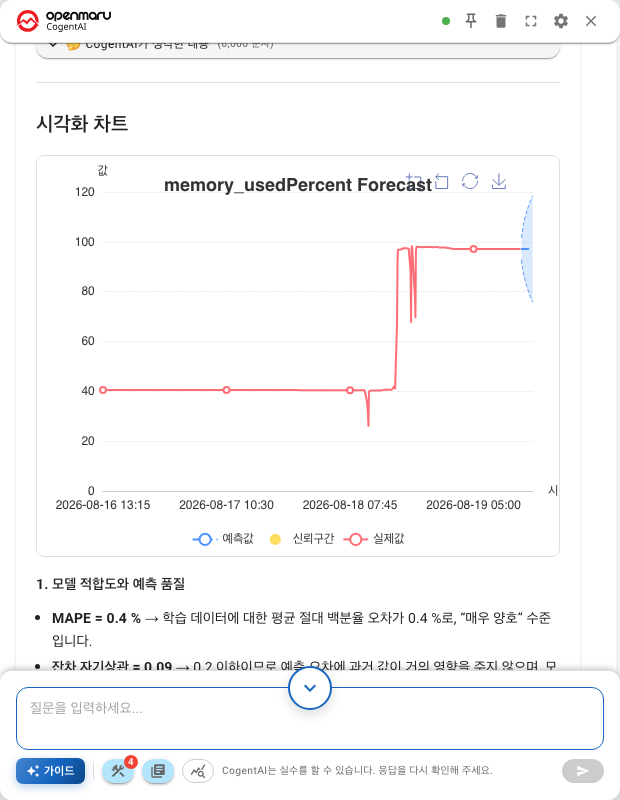
| Action | Result |
|---|---|
| Hover the mouse | The value at that point |
| Click a legend entry | Shows or hides that series |
| Full screen button | A larger view (ESC closes it) |
When series overlap in a small window, full screen is the answer.
4. Tree charts — execution plans
These are the branching diagrams used for query execution plans. They carry buttons the other charts do not have.
| Button | What it does |
|---|---|
| Zoom in · Zoom out | A step at a time |
| Fit to screen | Back to the initial view. Start here if you get lost |
| Expand all | Opens every collapsed branch at once |
| Full screen | A larger view |
Besides the buttons you can drag to pan, zoom with the wheel, and click a node to expand or collapse it.
How to read the values and colours on a node is covered in Reading execution plans and ERDs.
5. Diagrams (Mermaid)
These are table relationship diagrams (ERDs) and structure diagrams.
| Action | Result |
|---|---|
| Drag | Pan |
| Wheel | Zoom in and out around the pointer |
| Reset | Back to a view that fits the screen |
| Full screen | A larger view (ESC closes it) |
Turning the wheel over a diagram zooms the diagram instead of scrolling the conversation. To scroll the conversation, put the pointer outside the diagram.
If the diagram is not drawn and you get "Mermaid rendering error", the source is shown below it as it is. Asking again usually produces a normal result.
What sits under an answer
Copying
There are two buttons.
| Button | What it copies |
|---|---|
| Copy to clipboard | The answer only |
| Copy Q&A | Both — for sharing with someone else |
Response time
You get how long it took, and which stage the time went into.
| Stage | What was happening |
|---|---|
| Security check | Examining the question |
| Document search | Searching the documentation |
| MCP (Model Context Protocol) tools execution | Actually querying metrics and databases |
| Response generation | Writing the answer |
When something feels slow, this tells you where the time went. If the query was the slow part, narrow the time range and ask again.
Scroll to bottom
If you scrolled up while reading a long answer, the Scroll to bottom button brings you back. While a new answer is arriving, the view does not follow it automatically if you are reading further up.
Next
- Execution plans and ERDs in detail — Reading execution plans and ERDs
- How to judge the numbers — Appendix: How to read the results
- Results as a file — Downloading a report