4. SMS Event Configuration
What This Chapter Does
It configures APM events to arrive as text messages. It is used for critical events that have to reach someone even outside the hours when a screen or messenger is being watched.
What is different from other channels -- Slack and email are sent by the APM server directly,
but text messages are relayed by a separate program, khan-event-processor. How a text-message
provider is integrated differs by company, and this program absorbs that difference.

There are two integration methods. Check which one your provider offers and choose one.
| Method | How it sends | When to choose it |
|---|---|---|
| DBMS | Inserts the send record into a table the provider specifies | When the provider uses database integration |
| REST API | Sends an HTTP request to the provider's API | When the provider offers an API |
What you need -- a contract with a text-message provider and its integration details (database
connection details, or an API address and authentication key), plus a server on which to install
khan-event-processor.
Overall Flow
| Step | What you do |
|---|---|
| 1 | Configure the SMS event settings in the APM console |
| 2 | Install khan-event-processor |
| 3 | Configure it for the integration method (DBMS or REST API) |
| 4 | Start the program and confirm with a test send |
Configuring Events in APM
In the OPENMARU APM console, go to Settings > Monitoring Settings and select the Event Channels
tab to configure the SMS event settings. Every channel setting is gathered on this one screen.
SMS Event Configuration Items

| Item | Description |
|---|---|
| ① Enabled | Whether to send events by SMS, set as TRUE or FALSE. e.g. TRUE |
| ② Send in Summary Only | Gathers events and sends them together (FALSE: sends one at a time) |
| ③ Use Bulk User Delivery | Groups by user before sending (not available with the DBMS insert method) |
| ④ Send Info-Level Events | Whether to send general info events that are not in an alert policy |
| ⑤ Info Event Recipient | The user who receives general info events that are not in an alert policy |
| ⑥ Delivered Message Levels | ALL, INFO, WARN, FORECAST, CRITICAL. e.g. select ALL and filter in the "Event Processor" application.properties settings, or the other way round |
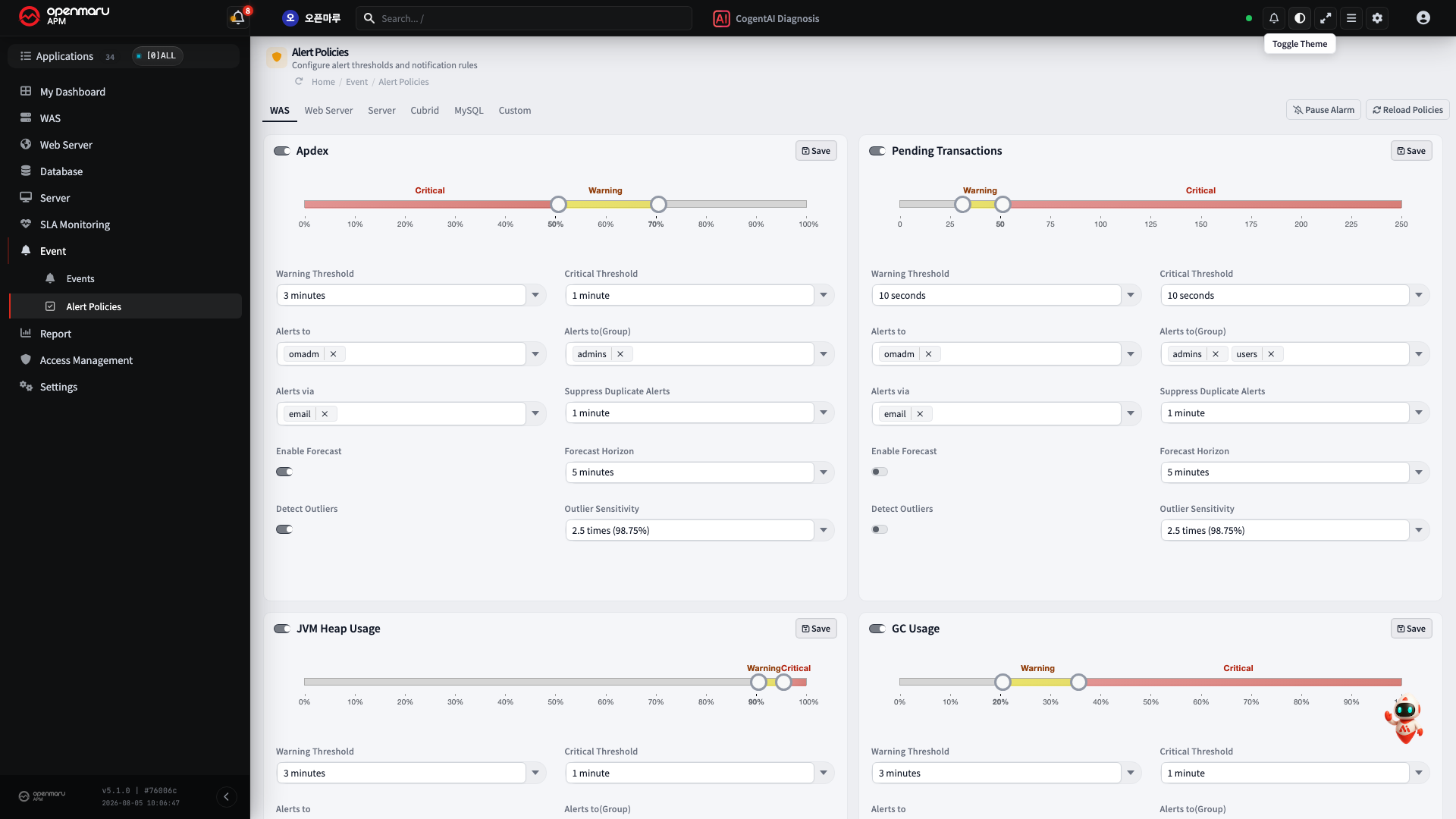
In each alert policy, add "Event Processor" under "Alerts via".
Installing khan-event-processor
What the Program Does
When an event occurs, the APM server puts it on a message queue (RabbitMQ). khan-event-processor
subscribes to that queue and, when a message arrives, converts it into the form the text-message
provider accepts and passes it on.
The structure is the diagram at the start of this chapter, What This Chapter Does.
Why it is kept separate -- every text-message provider receives differently. Some ask you to insert a row into a table they specify; others ask you to call an API. This program absorbs that difference so the APM server does not have to know the provider. That is why it is not sent directly by the APM server the way Slack and email are.
Where to install it -- any server that can reach both RabbitMQ and the text-message provider. It can be on the same machine as the APM server or on a separate one.
Delivery method -- choose whichever the provider offers.
| Method | How it sends | What you need |
|---|---|---|
| DBMS | Inserts the send record into a table the provider specifies | JDBC connection details, the table schema |
| REST API | Sends an HTTP request to the provider's API | The API address, authentication details |
Installation
Unpacking the distribution file (khan-event-processor-<version>-dist.zip) produces this structure.
khan-event-processor/
├── bin/
│   ├── start.sh · kill.sh          start · stop
│   ├── status.sh · tail.sh         check status · view logs
├── config/
│   └── application.properties      ← the file to edit
├── lib/                            executables (do not touch)
└── logs/
The only file to edit is config/application.properties. The next section explains its items.
This program runs on Java. The server it is installed on needs JRE 8 or later; check first with
java -version.
Configuring khan-event-processor
There are two files to edit.
| File | What it decides |
|---|---|
config/application.properties | Queue and database connection details, and the send conditions |
config/spring-context.xml | Which method to send with (DBMS / REST API) |
1) application.properties -- Connection Details and Send Conditions
RabbitMQ connection -- the queue the APM server puts events on. If the values are wrong the program stays up but receives nothing at all.
rabbitmq.host=localhost
rabbitmq.port=5672
rabbitmq.username=khan
rabbitmq.password=<password>
Database connection -- required only for the DBMS method. Skip it for the REST API method.
jdbc.driverClass=org.mariadb.jdbc.Driver
jdbc.url=jdbc:mariadb://localhost:3306/sms
jdbc.user.name=sms
jdbc.user.password=<password>
For Oracle, change it to the following.
jdbc.driverClass=oracle.jdbc.driver.OracleDriver
jdbc.url=jdbc:oracle:thin:@<address>:1521:<SID>
Send conditions
| Item | Default | Description |
|---|---|---|
sms.sendLevels | CRITICAL | Which levels to send by text. Several can be given, comma-separated -- ALL, INFO, WARN, FORECAST, CRITICAL |
sms.ignoreMinutes | 5 | Events older than this many minutes are discarded |
sms.message.length | 200 | The maximum length of the text body. Anything beyond it is cut |
sendLevels makes text messages pour inText messages cost money per message and cannot be taken back. Start with CRITICAL, look at
the actual volume, then widen. Use ALL for testing only.
ignoreMinutes prevents old events that piled up while the program was briefly down from going out
all at once when it comes back.
2) spring-context.xml -- Choosing the Send Method
In the smsEventToDatabase route, leave only what you use and comment out the rest. Oracle is
open by default.
<doTry>
    {/* When using Oracle */}
    <to uri="mybatis:SmsOracleDB.insert?statementType=Insert"/>
    {/* When using MariaDB */}
    {/*<to uri="mybatis:SmsMariaDB.insert?statementType=Insert"/>*/}
    {/* When sending through a REST API */}
    {/*<to uri="direct:sendSMSHttp"/>*/}
For the REST API method, also change the address in the smsEventToHttp route to the value the
provider gave you.
<to uri="http://localhost/send"/> {/* ← to the provider's API address */}
Writing the DBMS Query
Choose the file according to the type of DBMS.
    config/mappers/SMS-MariaDB.xml
    config/mappers/SMS-OracleDB.xml
The DBMS table below is an example; write it to suit the customer's situation using the variables listed afterwards.
    <insert id="insert" parameterType="com.opennaru.khan.monitoring.app.event.SmsEvent">
        <![CDATA[
                INSERT INTO
                SMS_SKTELINK
                (
                        CMP_MSG_ID,
                        CMP_USR_ID,
                        ODR_FG,
                        SMS_GB,
                        USED_CD,
                        MSG_GB,
                        WRT_DTTM,
                        SND_DTTM,
                        SND_PHN_ID,
                        RCV_PHN_ID,
                        CALLBACK,
                        SND_MSG,
                        CMP_SND_DTTM,
                        CMP_RCV_DTTM,
                        REG_SND_DTTM,
                        REG_RCV_DTTM,
                        EXPIRE_VAL,
                        SMS_ST,
                        RSLT_VAL,
                        RSRVD_ID,
                        RSRVD_WD
                )
                VALUES(
                        #{msgId},
                        '00000',
                        '1',
                        '1',
                        '00',
                        'A',
                        TO_CHAR(SYSDATE, 'YYYYMMDDHH24MISS'),
                        TO_CHAR(SYSDATE, 'YYYYMMDDHH24MISS'),
                        '02-1234-1234',
                        #{phoneNumber},
                        '02-1234-1234',
                        #{message},
                        NULL,
                        NULL,
                        NULL,
                        NULL,
                        0,
                        '0',
                        '99',
                        NULL,
                        NULL
                )
        ]]>
    </insert>
Variables Available with the DBMS Method
| Name | Description |
|---|---|
#{msgId} | yyyyMMddHHmmss + "9" + 00001 (sequence) (20 characters) |
#{phoneNumber} | The recipient's number |
#{email} | The email address |
#{subject} | The message subject |
#{message} | The message body (TEXT) |
#{htmlMessage} | The message body (HTML) |
REST API Data Configuration (JSON)
{
   "subject" : "${sms.subject}",
   "contents" : "${sms.message}",
   "html" : "${sms.htmlMessage}",
   "phoneNumber" : "${sms.phoneNumber}",
   "email" : "${sms.email}",
   "sender" :
      {
         "emailAddress" : "knoxportal@samsung.com"
      },
   "smsRecipients" :
      [
#foreach( $phone in $sms.phoneNumbers )
         {
            "address" : "${phone}"
         }#if( $foreach.hasNext ), #end
#end
      ],
   "mailRecipients" :
      [
#foreach( $email in $sms.emails )
         {
            "address" : "${email}"
         }#if( $foreach.hasNext ), #end
#end
      ]
}
Variables Available with the REST API Method
| Name | Description |
|---|---|
${sms.msgId} | yyyyMMddHHmmss + "9" + 00001 (sequence) (20 characters) |
${sms.phoneNumber} | The recipient's number |
${sms.phoneNumbers} | The list of recipient numbers. With bulk user delivery (Gather users) true: passed as an array of users (phoneNumber=null); false: passed per user |
${sms.subject} | The message subject |
${sms.message} | The message body (TEXT) |
${sms.htmlMessage} | The message body (HTML) |
${sms.eventKey.year} | The year, yyyy (4 digits) |
${sms.eventKey.month} | The month, MM (2 digits) |
${sms.eventKey.date} | The day, dd (2 digits) |
${sms.eventKey.hour} | The hour, HH (2 digits) |
${sms.eventKey.minute} | The minute, mm (2 digits) |
${sms.eventKey.second} | The second, ss (2 digits) |
${sms.eventKey.count} | The sequence (5 digits) |
${sms.eventData.created} | The time it occurred (TimeMillis) |
${sms.eventData.level} | The event level |
${sms.eventData.agentType} | The agent type |
${sms.eventData.hostname} | The host name |
${sms.eventData.ipAddress} | The IP address |
${sms.eventData.instanceId} | The instance name |
${sms.eventData.readableMessage} | The message body (excluding the time and agent information) |
${sms.eventData.readableWhere} | The agent information |
Starting and Stopping
    ./start.sh
    ./tail.sh
How to Test
Go to Event > Event List, press the more (⋮) button at the top right of the list, and select
Test Sample Critical Event. One test critical event is sent.
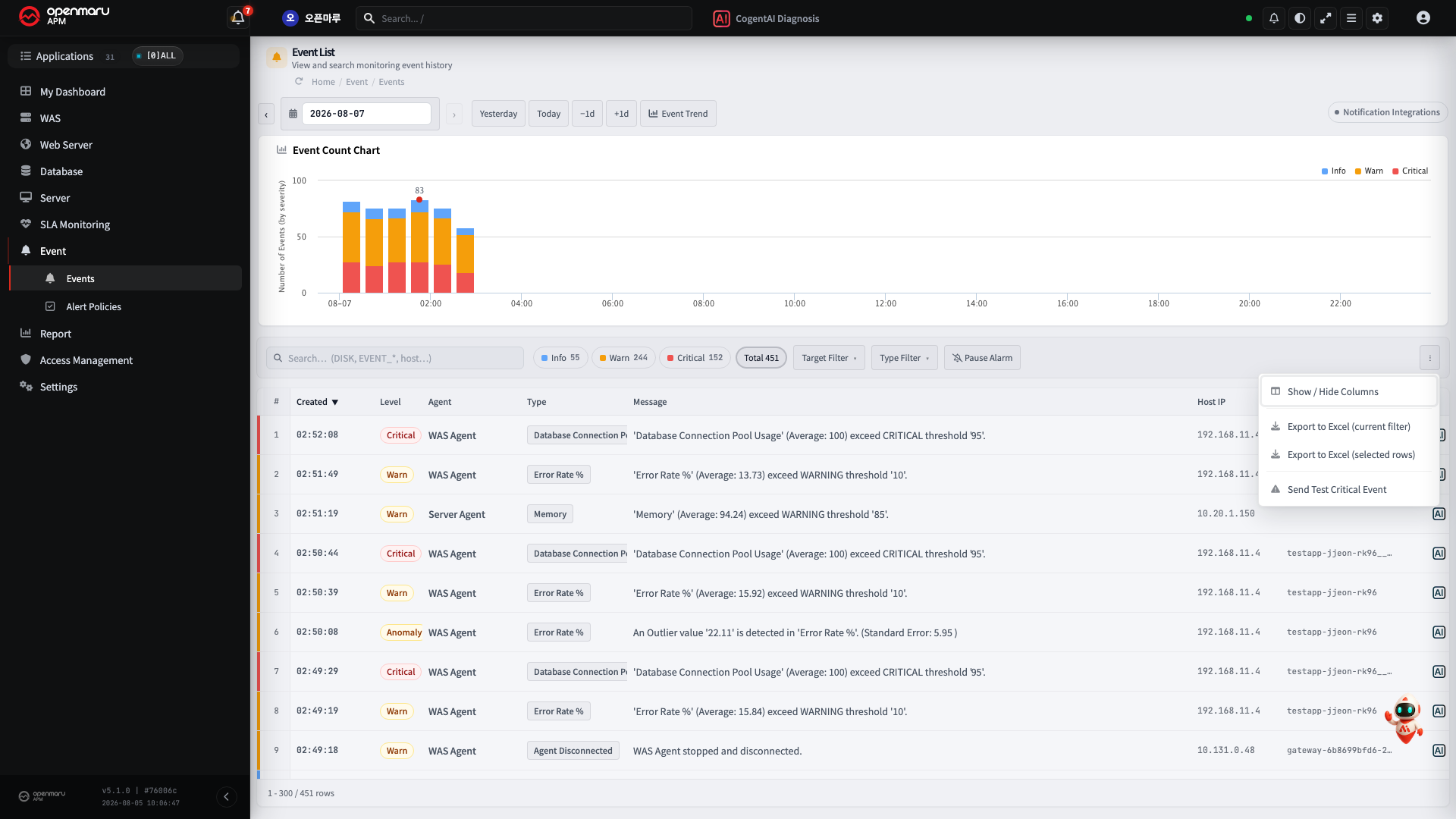
The test event is sent only to the admin account, regardless of the alert policy settings.