3. Email Event Configuration
What This Chapter Does
It configures APM events to arrive by email. Unlike a messenger, a record remains and the alert can go to several people at once, which suits daily summaries and alerts that have to be kept.
What you need -- the SMTP server details for sending mail (address, port, account). Both an in-house mail server and an external mail service can be used.
Once configured -- mail is sent to the addresses you specify when an event occurs. Using the Summary Send Interval in the common settings, alerts can be gathered and sent as a summary rather than one at a time (see chapter 1).
Configuring Events in APM
In the OPENMARU APM console, go to Settings > Monitoring Settings and select the Event Channels
tab to configure the email event settings. Every channel setting is gathered on this one screen.
Email Event Configuration Items
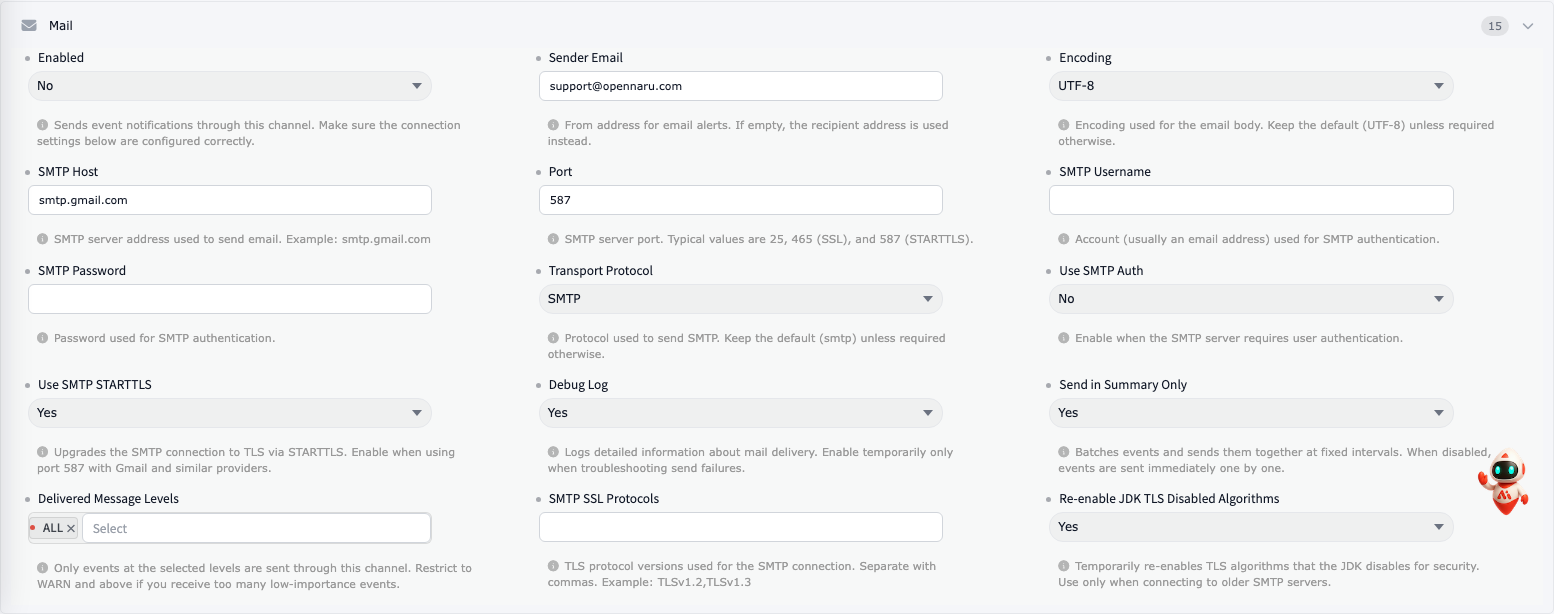
| Item | Description |
|---|---|
| ① Enabled | Whether to send events by mail, set as TRUE or FALSE. e.g. TRUE |
| ② Sender Email | e.g. tester@gmail.com |
| ③ Encoding | Sets the encoding of the mail body. e.g. UTF-8 |
| ④ SMTP Host | Enter the host name or IP address of the SMTP server. e.g. smtp.gmail.com |
| ⑤ Port | Enter the port of the SMTP server. e.g. 587 |
| ⑥ SMTP Username | Enter the user ID for signing in to the SMTP server. e.g. tester@gmail.com |
| ⑦ SMTP Password | Enter the user password for signing in to the SMTP server. e.g. password |
| ⑧ Transport Protocol | Enter the SMTP protocol. e.g. smtp |
| ⑨ Use SMTP Auth | Enter TRUE or FALSE for whether the SMTP server requires user authentication. e.g. TRUE |
| ⑩ Use SMTP STARTTLS | Sets whether to use TLS encryption for SMTP delivery, as TRUE or FALSE. e.g. TRUE |
| ⑪ Debug Log | Sets whether to debug SMTP mail delivery, as TRUE or FALSE. e.g. TRUE |
| ⑫ Send in Summary Only | Sets whether to send in summary form, as TRUE or FALSE. e.g. TRUE |
| ⑬ Delivered Message Levels | The error level value. e.g. ALL |
| ⑭ SMTP SSL Protocols | e.g. TLSv1.2,TLSv1.3 -- specifies the TLS connection version. For Gmail, specify TLSv1.2 as of July 2022. |
| ⑮ Re-enable JDK TLS Disabled Algorithms | e.g. FALSE. Set it to true when the SMTP server runs at TLS 1.1 or below. |