2.1. System Architecture
Physical Architecture
OPENMARU COP routes user traffic into the cluster through an external load balancer. The overall configuration is as follows.
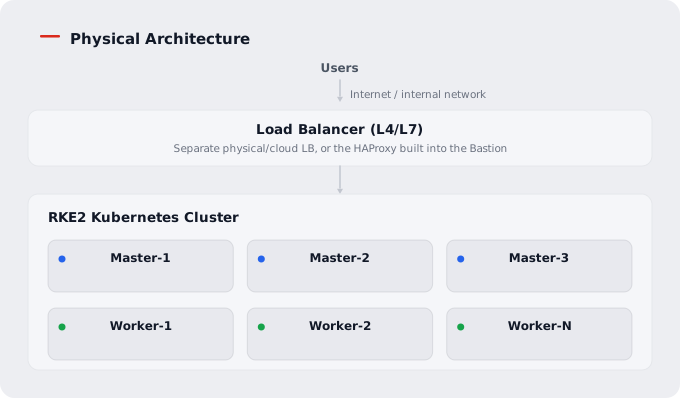
Layers
| Layer | Components | Role |
|---|---|---|
| Access layer | Load balancer (L4/L7) | Entry point for external traffic, TLS termination, Kubernetes API proxy |
| Management layer | Bastion | Installation automation, DevOps tools, NFS storage hosting |
| Control plane | 3 Master nodes | API server, etcd, controller manager, scheduler |
| Data plane | N Worker nodes | Running the application workloads (pods) |
| Infra layer (optional) | Infra nodes | Dedicated to infrastructure workloads such as monitoring and CI/CD (configured in the Enterprise architecture) |
| Storage layer | NFS / Local Path Provisioner | Dynamic volume provisioning |
⚠️ Note: In a production environment, a separate physical or cloud L4/L7 load balancer is the default. The HAProxy built into the Bastion is a component used in environments that have no separate load balancer, or during initial installation. If you use the Bastion HAProxy in production as it is, note that the Bastion is physically a single server, so a failure makes it a single point of failure (SPOF) that takes down cluster API access and the entire service entry point.
Bastion Server Configuration
The Bastion server is the central management server hosting installation and operations management and the DevOps tools. It consists of the following services.
| Service | Role | Port | Execution |
|---|---|---|---|
| Docker Engine | Container runtime | - | systemd |
| DNS (BIND) | Internal DNS service | 53 | systemd |
| NFS Server | Shared storage (/data/nfsshare) | 2049 | systemd |
| Chrony | Time synchronization | 123 | systemd |
| HAProxy | Load balancer | 6443, 443, 80 | systemd |
| GitLab | Source code management | 1080, 1022 | Docker |
| Jenkins | CI server | 18080, 18022 | Docker |
| Harbor | Container registry | 8443 | Docker |
| Nexus | Artifact repository | 8081 | Docker |
| ChartMuseum | Helm chart repository | 8181 | Docker |
| MariaDB | Database for sample application testing | 3306 | Docker |
Ansible automation tooling is also installed on the Bastion, making it the point from which configuration, upgrade, and operations work is run against every node in the cluster.
RKE2 Cluster Configuration
The Kubernetes cluster of OPENMARU COP is based on the RKE2 distribution and is divided into a control plane and a data plane.
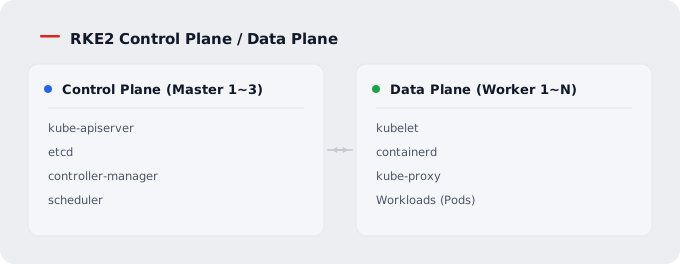
| Item | Value |
|---|---|
| Distribution | RKE2 |
| CNI | Canal (Calico + Flannel) |
| Security profile | CIS benchmark |
| Container runtime | containerd |
| Image GC thresholds | High 80% / Low 60% |
Namespace Structure
| Namespace | Purpose |
|---|---|
kube-system | Kubernetes system components |
openmaru-cop | OPENMARU COP Console |
openmaru-sso | Keycloak SSO, LLDAP |
openmaru-observ | MSAP Observability (metrics, logs, alerts) |
openmaru-apm | MSAP APM |
cert-manager | Certificate management |
argocd | ArgoCD GitOps deployment |
nfs-provisioner | NFS dynamic provisioning |
local-path-storage | Local Path dynamic provisioning |
gpu-operator | NVIDIA GPU Operator (when GPU nodes are configured) |
openmaru-cronhpa | CronHPA controller |
openmaru-vllm | vLLM/CogentAI (when AI/GPU workloads are configured) |
Network Topology
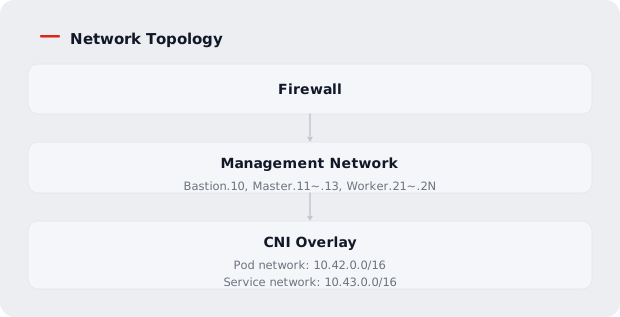
The Ingress processing path is as follows.
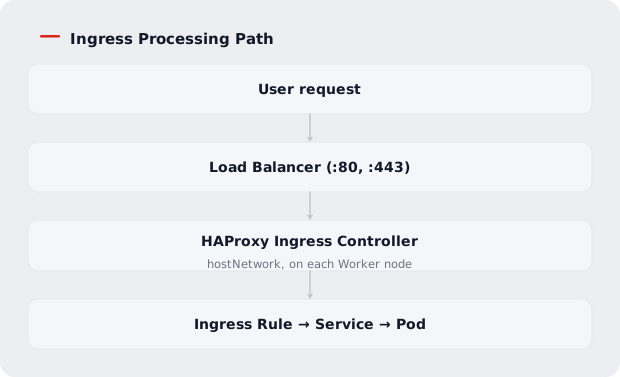
ℹ️ Note: OPENMARU COP uses the HAProxy Ingress Controller by default as the in-cluster Ingress controller. The NGINX Ingress Controller can also be selected as an option, but the community
ingress-nginxproject has reached end of maintenance (no new releases or security patches after March 2026), so the default HAProxy Ingress Controller is recommended unless there is a particular reason to do otherwise.
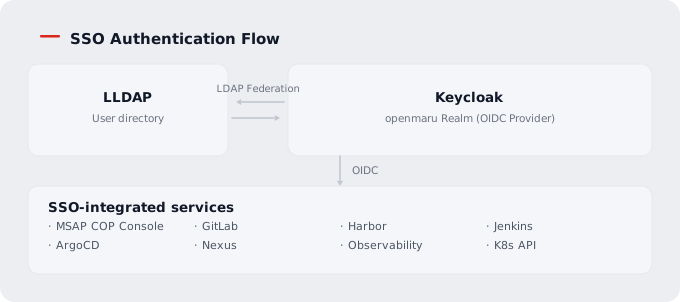
SSO authentication follows this flow.
High Availability (HA) Architecture
- Load balancer: Health-check-based load distribution to the API servers (
:6443) of the Master nodes, round-robin - etcd: With 3 Master nodes, based on the Raft consensus algorithm; quorum is 2 of 3, tolerating the failure of at most 1 node
- etcd backup: A scheduled automatic snapshot backup must be configured. For the actual backup execution and retention procedure, refer to 5.1. Troubleshooting Guide - Restoring from a Master Backup (etcd).
Impact by Failure Scenario
| Scenario | Impact |
|---|---|
| 2 or more Master nodes fail at once | Quorum is lost and cluster control stops (application pods keep running, but new deployments and changes are not possible) |
| 1 Master node fails | Quorum is kept and the cluster operates normally (handled automatically by HA) |
| A Worker node fails | If the pods on that node were Ready, they are rescheduled automatically (some delay is possible depending on PDBs and spare resources); application availability may be affected temporarily |
| The Bastion fails | (When the built-in Bastion HAProxy is used as the load balancer) The cluster API and the entire service entry point become unreachable. The DevOps tools hosted on the Bastion -- GitLab, Jenkins, Harbor, Nexus -- also stop (no new builds or deployments, though applications already running keep running) |
⚠️ Caution: Master nodes must always be configured in an odd number (3, 5, and so on), and at least 2 must stay healthy for the cluster to operate normally.