4. Agent Configuration per WAS Type
What This Chapter Does
It covers how to actually put the agent from chapter 3 into the startup options of each WAS product.
Why It Differs per Product
What has to be added is the same on every product.
-javaagent:<path to the agent jar>          # attaches the agent to the JVM
-Dkhan.config.file=<configuration file name>   # says which configuration to use (when there are several instances)
What differs is where the option is written. Each WAS product reads its startup options from a different file and a different variable.
| Product | Where to write it | Variable |
|---|---|---|
| Spring Boot | The run command or the startup script | JAVA_OPTS |
| Tomcat | bin/setenv.sh | CATALINA_OPTS or JAVA_OPTS |
| JBoss EAP / WildFly (standalone) | bin/standalone.conf | JAVA_OPTS |
| JBoss EAP / WildFly (domain) | domain.xml, host-slave.xml | <jvm-options> |
| WebLogic | setDomainEnv.sh or the startup script | JAVA_OPTIONS |
| JEUS | JEUSMain.xml, domain.xml | <command-option>, <jvm-option> |
| Jetty | start.ini or the startup script | JAVA_OPTIONS |
| Resin | conf/resin.xml | <jvm-arg> |
If finding it is unclear, look in the script or configuration file that currently starts the WAS
for a JVM option already there, such as -Xmx. Next to it is where the agent options go.
What to Observe Everywhere
- Write paths as absolute paths. A relative path depends on the directory the WAS starts from.
- Options are read only at startup. The WAS has to be restarted after editing for them to apply.
- Java 9 and later need extra options. Add Extra Options for Java 9 and Later at the end of this chapter as well.
- Do not add
-noverifyor-Xverify:none. They appeared in older guidance but are not needed now, and the JVM can terminate abnormally in production (see chapter 6).
Straight to Your Product
| Product | Section | What to watch for |
|---|---|---|
| Spring Boot | The run command | -javaagent goes before -jar |
| JBoss EAP 6/7 standalone | standalone.conf | The three log manager options are required |
| JBoss EAP 6/7 domain | domain.xml, host-slave.xml | XML, not a script |
| WildFly 14 | standalone.conf | Java 11 uses -Xbootclasspath/a |
| JBoss EAP 5.x | run.conf | The simplest configuration |
| Tomcat | catalina.sh or setenv.sh | One or the other -- putting it in both attaches it twice |
| WebLogic | setDomainEnv.sh | The variable is JAVA_OPTIONS |
| JEUS 6 | JEUSMain.xml | Without the JMX option, data sources are not visible |
| JEUS 7/8 | domain.xml | The tag is <jvm-option> |
| Jetty 9 | jetty.sh | The variable is JAVA_OPTIONS |
| Resin 4.x | conf/resin.xml | In XML, because of the watchdog |
Each section runs the file to edit → what to watch for → the example. Change the paths and configuration file names in the examples to suit your environment.
How to Check after Configuring
After restarting the WAS, look at the JVM options actually attached. Even when written into a
file, it is common for another script to overwrite JAVA_OPTS and make them disappear.
$ ps -ef | grep java
If -javaagent:…khan-agent…jar appears in the output, it is attached. If it does not, check whether
the place you wrote the option is actually read on the startup path.
If the option is there but nothing appears in the console, it is a connection problem -- check
khan.host and khan.port in khan-agent.conf, and the firewall
(see chapter 3).
Spring Boot
The file to edit -- the startup script that runs the application (or the java -jar run command
if there is none). Spring Boot has no separate WAS configuration file, so it is attached directly
to the run command.
What to watch for -- -javaagent must come before -jar. Putting it after passes it as an
application argument rather than a JVM option and the agent does not attach.
When running as a container, it can also be given through the JAVA_TOOL_OPTIONS environment
variable -- see chapter 5, Installing on Containers and Kubernetes.
KHAN_AGENT_FILE=$(ls /data/test/tomcat/servers/khan-agent/khan-agent*.jar | sort -Vr | head -n 1)
export AGENT_OPTS=" -javaagent:$KHAN_AGENT_FILE "
#export AGENT_OPTS=" -javaagent:/svc/test/khan-agent/khan-agent.jar "
export AGENT_OPTS="$AGENT_OPTS -Dkhan.config.file=khan-agent-test11.conf"
export JAVA_OPTS="$AGENT_OPTS $JAVA_OPTS"

java -jar $JAVA_OPTS openmaru-dashboard-server-5.1.0.jar
JBoss EAP 6.x and 7.x Standalone Mode
The file to edit -- anywhere JVM options are read at startup. There are three common places.
| Place | When |
|---|---|
bin/standalone.conf | When using the default JBoss configuration as it is |
A site startup script such as env.sh | When the site keeps its own startup script. The example below is this approach |
start.sh | The script that reads the env.sh above and actually starts it -- it passes JAVA_OPTS |
The example gathers the options in env.sh and has start.sh pass them as JAVA_OPTS.
If you use only standalone.conf, merge the content of the two examples into that file.
Why the configuration is complicated -- JBoss uses its own log manager (JBoss LogManager), and
the agent is loaded first at JVM start, touching classes before the log manager does. Left as
that, it stops during startup with a LogManager error. So the following three are added together.
| Option | What it does |
|---|---|
-Djava.util.logging.manager=…LogManager | Pins the JBoss log manager as the one to use |
-Xbootclasspath/p:…jboss-logmanager*.jar | Makes that log manager be read before the agent |
-Djboss.modules.system.pkgs=… | Excludes the agent packages from JBoss module isolation |
jboss.modules.system.pkgs has to list both com.opennaru.khan.agent and org.jboss.logmanager.
Missing either one produces a ClassNotFoundException.
With JBoss EAP, the JBoss LogManager has to be configured.
Register the com.opennaru.khan.agent and org.jboss.logmanager packages in jboss.modules.system.pkgs.
- env.sh (6.x)
export AGENT_OPTS=" -javaagent:/svc/test/khan-agent/khan-agent.jar "
#export AGENT_OPTS=" -javaagent:$(getKhanAgentPath :/svc/test/khan-agent) "
export AGENT_OPTS="$AGENT_OPTS -Dkhan.config.file=khan-agent-test11.conf"

export JAVA_OPTS="$JAVA_OPTS -Djava.util.logging.manager=org.jboss.logmanager.LogManager"
export JBOSS_LOGMANAGER_DIR="$JBOSS_HOME/modules/system/layers/base/org/jboss/logmanager/main"
export JBOSS_LOGMANAGER_JAR=`cd "$JBOSS_LOGMANAGER_DIR" && ls -1 *.jar`
#export JBOSS_LOGMANAGER_JAR=$(getLogmanagerPath "$JBOSS_HOME")

export JAVA_OPTS="$JAVA_OPTS -Xbootclasspath/p:$JBOSS_LOGMANAGER_DIR/$JBOSS_LOGMANAGER_JAR"
export JAVA_OPTS=" $JAVA_OPTS -Djboss.modules.system.pkgs=org.jboss.byteman,com.opennaru.khan.agent,org.github.jamm,org.jboss.logmanager"
- env.sh (7.x)
## the order of each option below matters
export AGENT_OPTS=" -javaagent:/home/icfcgw/khan-agent/khan-agent-5.1.0.jar "
export AGENT_OPTS="$AGENT_OPTS -Dkhan.config.file=khan-agent-icfcgw.conf "

## when JBoss EAP has been patched, search under $JBOSS_HOME/modules/system/layers/base/.overlays/
## take care not to confuse it with log4j-jboss-logmanager
export JAVA_OPTS="$JAVA_OPTS -Djava.util.logging.manager=org.jboss.logmanager.LogManager "
export JBOSS_LOGMANAGER_DIR="$JBOSS_HOME/modules/system/layers/base/org/jboss/logmanager/main"
export JBOSS_LOGMANAGER_JAR=cd "$JBOSS_LOGMANAGER_DIR" && ls -1 *.jar
export JBOSS_WILDFLY_COMMON_DIR="$JBOSS_HOME/modules/system/layers/base/org/wildfly/common/main"
export JBOSS_WILDFLY_COMMON_JAR=cd "$JBOSS_WILDFLY_COMMON_DIR" && ls -1 *.jar

export JAVA_OPTS="$JAVA_OPTS -Xbootclasspath/p:$JBOSS_LOGMANAGER_DIR/$JBOSS_LOGMANAGER_JAR:$JBOSS_WILDFLY_COMMON_DIR/$JBOSS_WILDFLY_COMMON_JAR"
export JAVA_OPTS="$JAVA_OPTS -Djboss.modules.system.pkgs=org.jboss.byteman,com.opennaru.khan.agent,org.github.jamm,\
org.jboss.logmanager,org.wildfly.common.net.HostName"

## required for Java 11 and later
export JAVA_OPTS=" $JAVA_OPTS -Dsun.util.logging.disableCallerCheck=true "

export JAVA_OPTS="$AGENT_OPTS $JAVA_OPTS"
※ When using the getKhanAgentPath and getLogmanagerPath functions, include function.sh (see below)
- start.sh
export JAVA_OPTS="$AGENT_OPTS $JAVA_OPTS"
- standalone***.xml**
<datasource jndi-name="{{ jndi_name }}" pool-name="{{ pool_name }}" enabled="true" use-ccm="true" statistics-enabled="true">
JBoss EAP 6.x and 7.x Domain Mode
The files to edit -- domain.xml and host-slave.xml (or host.xml).
How it differs from standalone -- in domain mode the server instances are started by the domain controller. Options written in a startup script are not passed to each instance, so they have to be written in XML.
| File | What goes in it |
|---|---|
domain.xml | The system properties common to the whole domain (log manager, module isolation exclusions) |
host-slave.xml | The values that differ per instance -- the -javaagent path and khan.config.file |
With several instances, give each server in host-slave.xml a different khan.config.file to
split the configuration files. That is what makes the instances distinguishable in the console.
When using domain mode, the startup options have to be set in the XML files.
- env.sh
export JAVA_OPTS=" $JAVA_OPTS -Djboss.modules.system.pkgs=org.jboss.byteman,com.opennaru.khan.agent,org.github.jamm,org.jboss.logmanager"
....
export JBOSS_LOGMANAGER_DIR="$JBOSS_HOME/modules/system/layers/base/org/jboss/logmanager/main"
export JBOSS_LOGMANAGER_JAR=`cd "$JBOSS_LOGMANAGER_DIR" && ls -1 *.jar`

export JAVA_OPTS=" $JAVA_OPTS -DJBOSS_LOGMANAGER=$JBOSS_LOGMANAGER_DIR/$JBOSS_LOGMANAGER_JAR "
- domain.xml
  <system-properties>
    {/* IPv4 is not required, but setting this helps avoid unintended use of IPv6 */}
    <property name="java.net.preferIPv4Stack" value="true"/>

    <property name="java.util.logging.manager" value="org.jboss.logmanager.LogManager" boot-time="true"/>
    <property name="jboss.modules.system.pkgs" value="org.jboss.byteman,com.opennaru.khan.agent,org.github.jamm,org.jboss.logmanager" boot-time="true"/>
  </system-properties>
  ...
  <datasource jndi-name="{{ jndi_name }}" pool-name="{{ pool_name }}" enabled="true" use-ccm="true" statistics-enabled="true">
  ...
- host-slave.xml
      <server name="test11" auto-start="true">
    <jvm name="default">
      <jvm-options>
        <option value="-Xbootclasspath/p:${JBOSS_LOGMANAGER}"/>
        <option value="-javaagent:/svc/test/khan-agent/khan-agent.jar"/>
        <option value="-Xloggc:/svc/log/slave/test11/gclog/gc_${DATE}.log"/>
        <option value="-XX:HeapDumpPath=/svc/log/slave/test11/heapdump"/>
      </jvm-options>
    </jvm>
    <system-properties>
      <property name="jboss.node.name" value="test11"/>
      <property name="khan.config.file" value="khan-agent-test11.conf"/>
WildFly 14 (Java 11)
The file to edit -- the same as JBoss EAP standalone. The example below is also an env.sh +
start.sh arrangement; if you use only standalone.conf, merge the content into it. To see data
source statistics, edit standalone-xxx.xml as well.
How it differs from JBoss EAP -- from Java 11, -Xbootclasspath/p is gone, so
-Xbootclasspath/a is used. WildFly also has a separate org.wildfly.common module, whose JAR
has to be specified as well.
Always add -Dsun.util.logging.disableCallerCheck=true. Without it, startup becomes considerably
slower while log callers are checked.
WildFly 14 running on Java 11 needs the JBoss LogManager configured.
Register the com.opennaru.khan.agent and org.jboss.logmanager packages in jboss.modules.system.pkgs. The JBoss logging JAR files also have to be specified with the -Xbootclasspath/a option, and the -Dsun.util.logging.disableCallerCheck=true option specified.
- env.sh
export AGENT_OPTS=" -javaagent:/svc/test/khan-agent/khan-agent.jar "
#export AGENT_OPTS=" -javaagent:$(getKhanAgentPath :/svc/test/khan-agent) "
export AGENT_OPTS="$AGENT_OPTS -Dkhan.config.file=khan-agent-test11.conf"

export JAVA_OPTS="$JAVA_OPTS -Djava.util.logging.manager=org.jboss.logmanager.LogManager"
export JBOSS_LOGMANAGER_DIR="$JBOSS_HOME/modules/system/layers/base/org/jboss/logmanager/main"
export JBOSS_LOGMANAGER_JAR=`cd "$JBOSS_LOGMANAGER_DIR" && ls -1 *.jar`
export JBOSS_WILDFLY_COMMON_DIR="$JBOSS_HOME/modules/system/layers/base/org/wildfly/common/main"
export JBOSS_WILDFLY_COMMON_JAR=`cd "$JBOSS_WILDFLY_COMMON_DIR" && ls -1 *.jar`

export JAVA_OPTS=" -Xbootclasspath/a:$JBOSS_LOGMANAGER_DIR/$JBOSS_LOGMANAGER_JAR:$JBOSS_WILDFLY_COMMON_DIR/$JBOSS_WILDFLY_COMMON_JAR $JAVA_OPTS"
export JAVA_OPTS=" -Dsun.util.logging.disableCallerCheck=true $JAVA_OPTS"

export JAVA_OPTS=" $JAVA_OPTS -Djboss.modules.system.pkgs=org.jboss.byteman,com.opennaru.khan.agent,org.github.jamm,org.jboss.logmanager"
- start.sh
export JAVA_OPTS="$AGENT_OPTS $JAVA_OPTS"
- standalone-xxx.xml
<datasource jndi-name="{{ jndi_name }}" pool-name="{{ pool_name }}" enabled="true" use-ccm="true" statistics-enabled="true">
JBoss EAP 5.x
The file to edit -- bin/run.conf or the startup script (the example below).
5.x has no module isolation structure, so its configuration is simpler than 6.x and later. The log manager options are not needed either.
Add the following settings to JAVA_OPTS at startup.
JAVA_OPTS=%JAVA_OPTS% -Djboss.platform.mbeanserver
JAVA_OPTS=%JAVA_OPTS% -Djavax.management.builder.initial=org.jboss.system.server.jmx.MBeanServerBuilderImpl

JAVA_OPTS=" $JAVA_OPTS -javaagent:/svc/test/khan-agent/khan-agent.jar "
JAVA_OPTS=" $JAVA_OPTS -Dkhan.config.file=khan-agent-test11.conf"
Tomcat
The file to edit -- bin/catalina.sh or bin/setenv.sh. Only one of the two.
| When | |
|---|---|
Directly in catalina.sh | When you want to keep the current arrangement. The example is this approach |
Separated into setenv.sh | When you plan to upgrade Tomcat -- catalina.sh is overwritten on upgrade but setenv.sh survives |
setenv.sh does not exist by default, and creating it makes catalina.sh read it automatically at
startup. The content is the same as the example below; only the file name differs.
Choosing the variable -- CATALINA_OPTS is recommended. JAVA_OPTS also applies to
shutdown.sh, so the agent attaches once more on shutdown.
Putting It Directly in catalina.sh
Open catalina.sh and add the following after the comment block at the very top. Putting it in
the middle or at the end risks the variable being overwritten further down.
export AGENT_OPTS=" -javaagent:/svc/test/khan-agent/khan-agent.jar "
#export AGENT_OPTS=" -javaagent:$(getKhanAgentPath :/svc/test/khan-agent) "
export AGENT_OPTS="$AGENT_OPTS -Dkhan.config.file=khan-agent-test11.conf"
#export AGENT_OPTS="$AGENT_OPTS -Dcom.sun.management.jmxremote"
export CATALINA_OPTS="$AGENT_OPTS $CATALINA_OPTS"
Separating It into setenv.sh
Create bin/setenv.sh and put the same content in it. It has to be given execute permission.
$ vi $CATALINA_HOME/bin/setenv.sh      # put the content above in it as it is
$ chmod +x $CATALINA_HOME/bin/setenv.sh
catalina.sh is left alone. If you already put it in catalina.sh, delete that line and move it --
having it in both attaches the option twice.
※ When using the getKhanAgentPath function, include function.sh (see below)
WebLogic
The file to edit -- startWebLogic.sh (the example below) or bin/setDomainEnv.sh.
Putting it in setDomainEnv.sh applies it to every server in that domain.
The variable name differs -- WebLogic uses JAVA_OPTIONS (not JAVA_OPTS).
To see data sources as well, the JMX settings in the section below have to be added. Without them, transactions are visible but the connection pool state is empty.
For WebLogic, add the following settings to the startWebLogic.sh file.
- startWebLogic.sh
export AGENT_OPTS="-javaagent:/svc/test/khan-agent/khan-agent.jar "
export AGENT_OPTS="$AGENT_OPTS -Dkhan.config.file=khan-agent-test11.conf "

DOMAIN_HOME="/svc/test/weblogic/wls1211/user_projects/domains/base_domain"

JAVA_OPTIONS=" $JAVA_OPTIONS $AGENT_OPTS -Djavax.management.builder.initial=weblogic.management.jmx.mbeanserver.WLSMBeanServerBuilder"
export JAVA_OPTIONS
To monitor information about WebLogic data sources, the following configuration is required.
Domain -> Configuration -> General -> select Platform MBean Server Enabled and Platform MBean Server Used
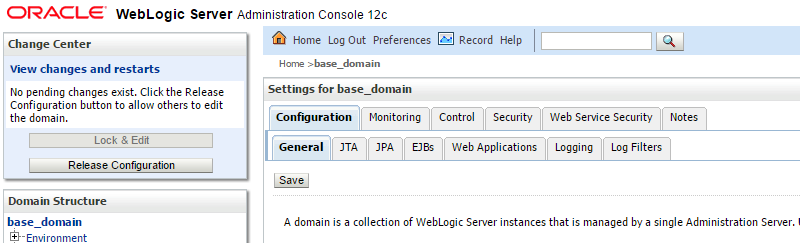

Configuring it as above adds the following to config.xml.
<jmx>
  <platform-m-bean-server-enabled>true</platform-m-bean-server-enabled>
  <platform-m-bean-server-used>true</platform-m-bean-server-used>
</jmx>
The following option has to be added to the startup options.
-Djavax.management.builder.initial=weblogic.management.jmx.mbeanserver.WLSMBeanServerBuilder
JEUS 6
The file to edit -- <command-option> in JEUSMain.xml.
JEUS is written in XML -- the engine container is started by the JEUS manager, so options written in a startup script are not passed on.
To see data sources and web sessions as well, -Djeus.jmx.usePlatformMBeanServer=true has to be
added.
- JEUSMain.xml
      <engine-container>
        <name>container1</name>
        <id>22</id>
        <base-port>22001</base-port>
 <command-option>-XX:MaxPermSize=128m -Xms256m -Xmx512m -javaagent:/svc/test/khan-agent/khan-agent.jar -Dkhan.config.file=khan-agent-test11.conf -Djeus.jmx.usePlatformMBeanServer=true -Djeus.ejb.enable.configDeleteOption=true -Djeus.container.name=example_container1</command-option>
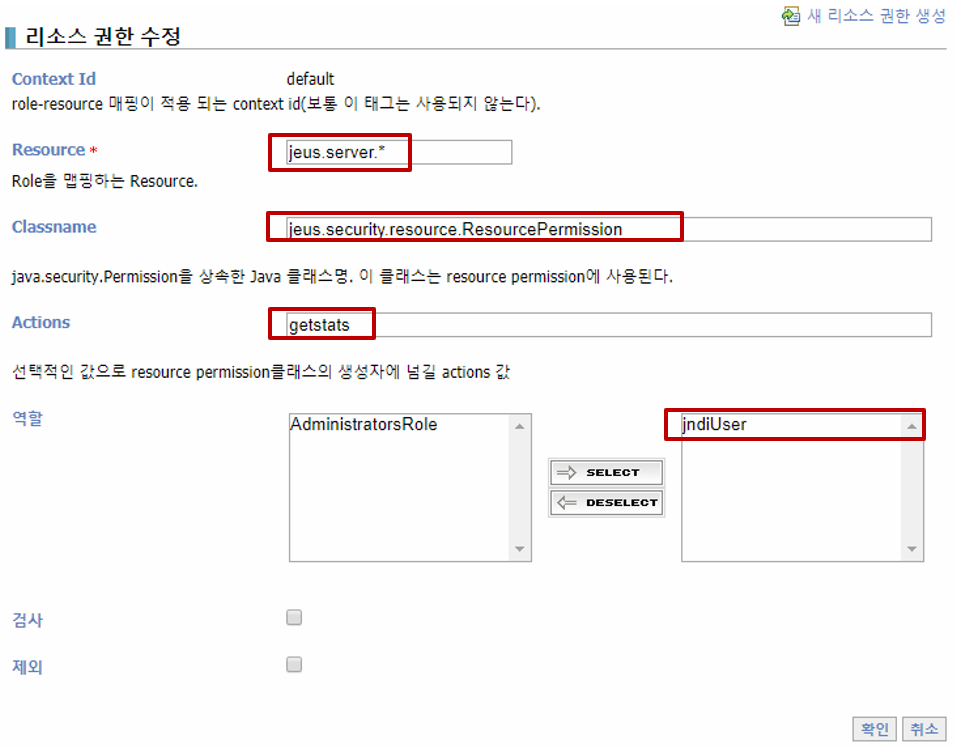
To monitor JEUS data sources and the web session count, the -Djeus.jmx.usePlatformMBeanServer=true option has to be used.
For web session count monitoring, the following also has to be configured in the JEUS admin console by clicking the 'Create new resource permission' button under "JEUS Manager Resources -> Security -> SYSTEM_DOMAIN -> Policies".
JEUS 7/8
The file to edit -- <jvm-option> in domain.xml.
How it differs from JEUS 6 -- the configuration file changed from JEUSMain.xml to domain.xml,
and the tag from <command-option> to <jvm-option>. It is written per server (instance).
Here too, -Djeus.jmx.usePlatformMBeanServer=true is the prerequisite for collecting data sources
and the web session count.
- domain.xml
        <jvm-config>
      <jvm-option>-Xmx1024m -XX:MaxPermSize=128m</jvm-option>
 <jvm-option>-javaagent:/svc/test/khan-agent/khan-agent.jar -Dkhan.config.file=khan-agent-test11.conf -Djeus.jmx.usePlatformMBeanServer=true</jvm-option>
    </jvm-config>
To monitor JEUS data sources and the web session count, the -Djeus.jmx.usePlatformMBeanServer=true option has to be used.
For web session count monitoring, the following also has to be configured in the JEUS admin console by clicking the 'Add' button under 'Resource Permissions' at the bottom of "Security -> Accounts & Policies Management -> policies".
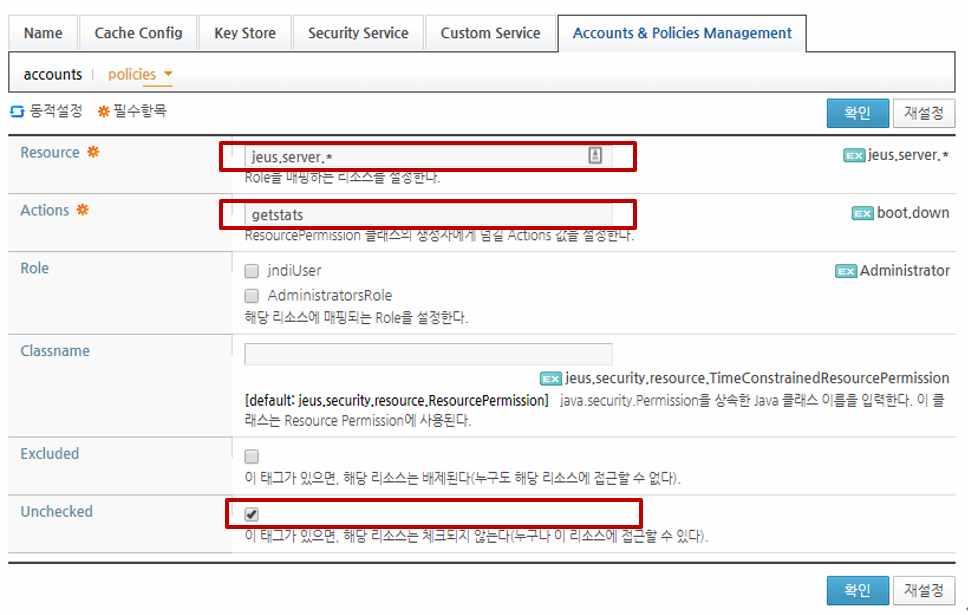
Configuring it as above adds the part in bold below to the jeus_domain/config/security/SYSTEM_DOMAIN/policies.xml file.
        <resource-permissions>
      <context-id>default</context-id>
      <resource-permission>
        <role>AdministratorsRole</role>
        <resource>jeus.*</resource>
        <actions>*</actions>
        <classname>jeus.security.resource.ResourcePermission</classname>
      </resource-permission>
      <resource-permission>
        <role>jndiUser</role>
        <resource>jeus.jndi.*</resource>
        <actions>lookup</actions>
        <classname>jeus.security.resource.ResourcePermission</classname>
      </resource-permission>
      <resource-permission>
        <resource>jeus.server.*</resource>
        <actions>getstats</actions>
        <classname>jeus.security.resource.ResourcePermission</classname>
        <unchecked/>
      </resource-permission>
    </resource-permissions>
Jetty 9
The file to edit -- bin/jetty.sh (the example below) or start.ini.
The variable name -- like WebLogic, Jetty uses JAVA_OPTIONS.
- jetty.sh
export AGENT_OPTS=" -javaagent:/svc/test/khan-agent/khan-agent.jar "
export AGENT_OPTS="$AGENT_OPTS -Dkhan.config.file=khan-agent3.conf"

export JAVA_OPTIONS="$AGENT_OPTS $JAVA_OPTIONS"
Resin 4.x
The file to edit -- <jvm-arg> in conf/resin.xml, or conf/resin.properties
(the example below shows both).
It is written in XML -- in Resin a watchdog process starts the actual JVM, so shell environment variables are not passed on.
- conf/resin.properties or resin.xml
jvm_args : -Xmx1024m -XX:MaxPermSize=256m -javaagent:/svc/test/khan-agent/khan-agent.jar -Dkhan.config.file=khan-agent3.conf
- conf/cluster-default.xml
      <server-default>
    <jvm-arg-line>${jvm_args}</jvm-arg-line>
    <jvm-mode>${jvm_mode}</jvm-mode>
Configuring function.sh for Agent File Version Management
When upgrading the agent JAR file, there has to be a way for the WAS to use the latest version the next time it starts. The function.sh file is a script that makes the latest version of the agent JAR file be used.
When setting javaagent, configure it using the getKhanAgentPath function as below.
. ./function.sh

export AGENT_OPTS=" -javaagent:$(getKhanAgentPath :/svc/test/khan-agent) "
Configuring it this way by specifying the agent file's directory loads the last jar file listed in that directory's current.version text file.
/svc/test/khan-agent/khan-agent.jar

/svc/test/khan-agent/current.version
- The content of the function.sh file
#!/bin/sh

function getKhanAgentPath() {
  local KHAN_AGENT_PATH=$1

  for file in $(cat $KHAN_AGENT_PATH/current.version); do
    KHAN_AGENT_FILE="$file"
  done

  echo "$KHAN_AGENT_PATH/$KHAN_AGENT_FILE"
}

function listjars {
  FILES=$(ls $1*.jar)
  echo ${FILES}

}

function getLogmanagerPath {

  JBOSS_HOME=$1
  OVERLAYS_PATH="$JBOSS_HOME/modules/system/layers/base"

  OVERLAYS_PATH="$JBOSS_HOME/modules/system/layers/base/.overlays"
  MODULES_SOURCE_PATHS=("$JBOSS_HOME/modules/system/layers/base" "$JBOSS_HOME")

  if [ -f "$OVERLAYS_PATH/.overlays" ]; then
    for layer in $(tac $OVERLAYS_PATH/.overlays); do
      MODULES_SOURCE_PATHS=("$OVERLAYS_PATH/$layer" $\{MODULES_SOURCE_PATHS[@]})
    done
  fi
  name="org/jboss/logmanager/main/"

  for source_dir in "$\{MODULES_SOURCE_PATHS[@]}"; do
    if [ -d "$source_dir/$\{name}" ]; then
      files="$(listjars $source_dir/$\{name})"

      if [ -n "$files" ]; then
        echo "$files" | sed -e "s/^[ \t]*//" | sed -e "s| |:|g" | sed -e ":a;N;$!ba;s|\n|:|g"
        return
      fi
    else
      files="$(compgen -G "$source_dir/$\{name}*.jar")"

      if [ -n "$files" ]; then
        echo "$\{files[0]}"
        return
      fi
    fi
  done

  echo "Could not find any jar for the $name path, aborting"
  exit 1
}
Extra Options for Java 9 and Later
KHAN agent 5.1.0-11.2 and later do not need these options. The agent opens the
java.base/java.lang package itself when it starts.
If you use a version before 5.1.0-11.2, add the options below to the startup options.
The --add-opens option is used from Java 9 onwards to bypass the module system's access control.
Without these options, on Java 17 and later the thread stack and the last SQL of in-progress transactions are empty.
export AGENT_OPTS="$AGENT_OPTS --add-opens=java.base/java.lang=ALL-UNNAMED "
export AGENT_OPTS="$AGENT_OPTS --add-opens=java.base/java.math=ALL-UNNAMED "
export AGENT_OPTS="$AGENT_OPTS --add-opens=java.base/java.util=ALL-UNNAMED "
export AGENT_OPTS="$AGENT_OPTS --add-opens=java.base/java.util.concurrent=ALL-UNNAMED "
export AGENT_OPTS="$AGENT_OPTS --add-opens=java.base/java.net=ALL-UNNAMED "
export AGENT_OPTS="$AGENT_OPTS --add-opens=java.base/java.text=ALL-UNNAMED "
export AGENT_OPTS="$AGENT_OPTS --add-opens=java.sql/java.sql=ALL-UNNAMED "
export AGENT_OPTS="$AGENT_OPTS --add-opens=java.net.http/jdk.internal.net.http=ALL-UNNAMED "
export AGENT_OPTS="$AGENT_OPTS --add-opens=java.net.http/java.net.http=ALL-UNNAMED "