3. Installing the WAS Agent
What This Chapter Does
The WAS agent collects what happens inside the Java application. It sees the path one user request took to be handled, which SQL was slow, how long an external API call took, and the state of the heap memory and GC.
Why it is needed -- there are many cases where the server resources are fine but the response is slow. The cause is usually inside the application -- a particular SQL statement, a delay in an external integration, an exhausted connection pool. That area is not visible to the system agent.
How it attaches -- the application code is not changed. Adding one line,
-javaagent:khan-agent.jar, to the WAS startup options makes the agent insert measurement code
automatically as the JVM loads classes. The substance of the installation is adding that option and
restarting the WAS.
Where to install it -- one per WAS instance to be monitored. With several WAS instances on the same server, keep a separate configuration file per instance.
Once installed -- the instance appears in the console and transactions flow in real time.
The Installation Flow
| Step | What you do | Why |
|---|---|---|
| 1 | Download the installation file | Get the agent that matches the Java version in use |
| 2 | Unpack it on the WAS server | Put it somewhere the WAS can read |
| 3 | Set the connection details and the instance name | Decide which APM server to send to, and the name shown in the console |
| 4 | Add -javaagent to the startup options | This one line attaches the agent to the JVM |
| 5 | Restart the WAS | The option applies only at startup |
In step 4, which file the option goes in differs by WAS product. The locations and examples per product are in 4. Agent Configuration per WAS Type.
Downloading the WAS Agent
Download the installation file from the console. The on-premise and cloud versions differ only in the download screen; the steps after receiving the file are the same.
Settings > Guides & Downloads
Sign in to the OPENMARU APM console and download the files used for the installation.
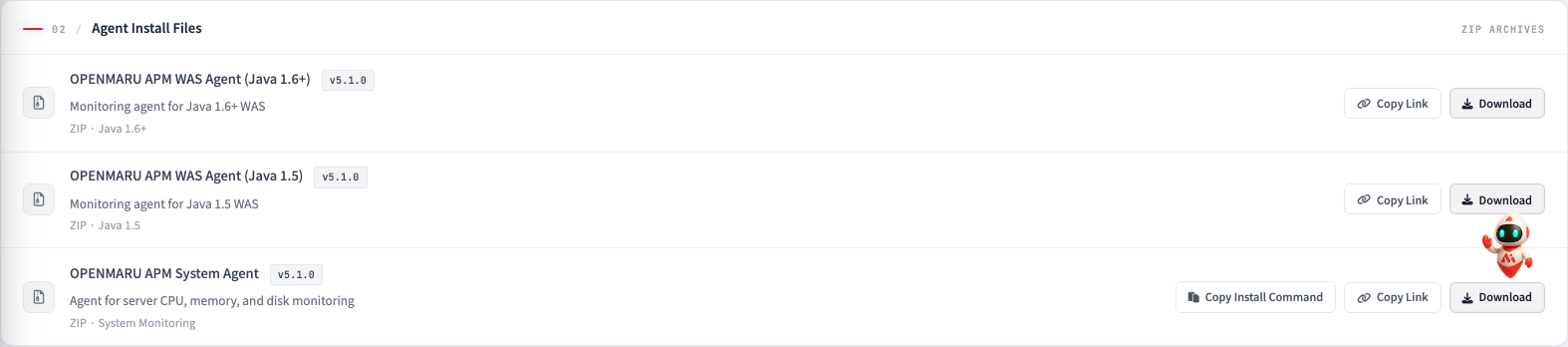
Download it, or copy it to the clipboard with a right-click "Copy link address".
If the Java version is 1.5, download the APM WAS Agent for Java 1.5 Install File - Ver. 5.1.0 file.
If the installation target is a remote Linux server, fetching it there directly with wget using the
copied link address is faster. Below is the command form; use the address you just copied.
- Downloading the WAS agent
$ wget "<the copied link address>"
[Cloud only] Agent Installation Guide > WAS AGENT Tab
With cloud APM, the download location differs.
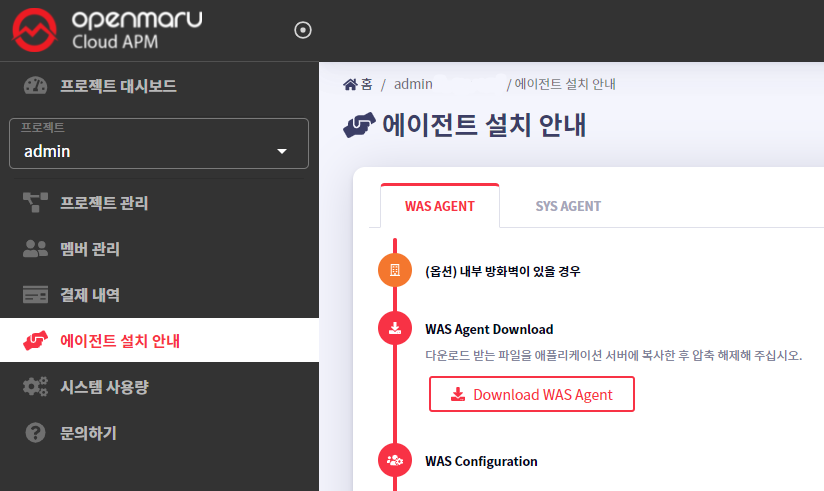
Download it with "Download WAS Agent" on the WAS AGENT tab, or copy the link to the clipboard with the Copy button. From receiving the file onwards it is the same as above.
Installing the WAS Agent
- Unpacking the agent installation file
$ unzip khan-agent-5.1.0.zip
- Creating a symbolic link for khan-agent.jar
Create a symbolic link as below to make upgrading the khan-agent version straightforward.
Have the WAS agent configuration use the khan-agent.jar file, and when upgrading the khan-agent version, remove the symbolic link and create a new one pointing at the new version.
$ ln -s khan-agent-5.1.0.jar khan-agent.jar
Configuring the WAS Agent
How to Set the WAS Server Instance Name
The setting inside the khan-agent.conf file
# WAS Instance's ID
# Can use RANDOM string or IP ADDRESS
# ex: instanceid-${RANDOM:4}  ==> instanceid-qfPb
# ex: instanceid-${RANDOM:4}-s  ==> instanceid-qfPb-s
# ex: instanceid-${IPADDR:3}  ==> instanceid-23-10   (ip=192.168.23.10)
# ex: instanceid-${HOSTNAME:-:2}  ==> instanceid-apm  (hostname=test-apm)
# ex: instanceid-${HOSTNAME:-:2}-${IPADDR:3}-${RANDOM:4}-s  ==> instanceid-apm-23.10-afcg-s  (hostname=test-apm, ip=192.168.23.10)
${RANDOM:4}: generates 4 random characters, upper and lower case letters${IPADDR:3}: adds the third element of the IP address${IPADDR:-1}: adds the first element from the end of the IP address${HOSTNAME:-:2}: adds the string in the second position of the hostname, split on-
The WAS Agent Configuration File
The agent's behaviour is decided by one file in the unpacked directory, khan-agent.conf.
It comes with defaults filled in, so at first only the four items below need changing.
1) What Must Be Changed
application.name=MyGroup        # the application group name shown in the console
khan.host=192.168.0.77          # the APM server address
khan.port=80                    # the APM server port
instance.id=khan11              # the name of this WAS instance (it distinguishes it within the group)
application.name-- instances using the same name appear grouped together. Set it per service.khan.hostandkhan.port-- where the agent sends data. If the values are wrong the WAS starts normally but nothing appears in the console.instance.id-- the name that points at this instance in the console. Set it so it does not clash within the same group. To generate it automatically, see How to Set the WAS Server Instance Name above.
Changing only this much and restarting the WAS starts the monitoring. The rest below are adjusted when needed.
2) What and How Much to Collect -- Transaction Trace
This decides whether to keep the processing path of slow requests, and from what point.
transaction.trace.enabled=true       # whether to use detailed tracing
transaction.trace.threshold=500      # keep detail only for requests over this time (ms)
transaction.trace.max.line=2000      # the maximum number of lines kept per request
The lower the threshold, the more is kept, but storage and load rise with it. Start with the
default 500 ms and adjust when needed.
3) How to Record SQL
sql.capture.enabled=true                        # whether to collect SQL
transaction.trace.sql.parameterize=false        # whether to keep bind values as they are
transaction.trace.sql.parameter.max.size=40     # the maximum length of a kept parameter value
parameterize=false keeps the actual bind values as they are. If values such as national
identification numbers or contact details go in as query parameters, set it to true to hide them.
4) What to Leave Out -- URL Filtering
Counting static files and health check requests as transactions distorts the statistics. The defaults already include the common extensions and the health check pattern.
transaction.exclude.url.suffix=.gif,.css,.js,.png,…   # exclude by extension
transaction.exclude.url.patterns=                     # exclude by regular expression
transaction.exclude.user.agent.patterns=^openmaru-health-check$
5) The Service Satisfaction Threshold -- APDEX
apdex.threshold=3.0 # finishing within this time (seconds) counts as "satisfied"
Anything over four times this counts as "frustrated". Set it to suit the character of the service -- lower for query-oriented screens, higher where batch-like requests are mixed in.
After Changing the Configuration
Most items need a WAS restart to take effect. The items that apply without a restart can be identified in the "Applies immediately" column of the table in the next section.
Every item and its default is organized by topic in
WAS Agent Configuration Details. The same values can also be
given as JVM options (-D) or environment variables, and the priority is
JVM options > environment variables > khan-agent.conf.
For an explanation of each item in the khan-agent.conf configuration file, see the following tables.
WAS Agent Configuration Details
(When using JVM environment variables (-D) or system environment variables (export or set), use the item in parentheses)
Configuration priority: JVM OPTS > OS ENV > khan-agent.conf
Every option in the configuration file can be used as an environment variable by prefixing it with "OMAPM*", upper-casing it, and replacing . (dots) with _ (underscores).
Basic settings (connection and instance)
Setting (khan-agent.conf) | Environment variable | Description | Default | Applies immediately |
|---|---|---|---|---|
| — | OMAPM_AGENT_ENABLE | Whether the agent is enabled (available when using the OPENMARU BASE WAS container image) | ||
application.name | OMAPM_APPLICATION_NAME | Sets the name of the application group shown in the OPENMARU APM console. Instances set to the same name are shown grouped together. e.g. when hostname is "jboss-eap-egov-65-zs95r", eap-${HOSTNAME:-:5} ⇒ eap-65 | N/A | |
khan.host | OMAPM_HOST | Enter the IP of the OPENMARU APM server. Or, when entering a domain, http:// or ws:// (for TLS, https:// or wss://) | ||
khan.port | OMAPM_PORT | Enter the port number of the OPENMARU APM server. | ||
khan.tls | OMAPM_TLS | Whether TLS is enabled | false | |
khan.agent.ip | OMAPM_AGENT_IP | When not set, the machine's default IP address is used. If the IP address is not registered in the /etc/hosts file, 127.0.0.1 is sometimes chosen. In that case, set the machine IP address in khan.agent.ip. | ||
user.key | — | Not currently used | ||
instance.id | OMAPM_INSTANCE_ID | The name of the instance shown in OPENMARU APM. Set it so each instance uses a unique name. | ||
apdex.threshold | OMAPM_APDEX_THRESHOLD | The response time at which the user is satisfied, used when calculating the user satisfaction index (default: 3.0, unit: seconds) | 3.0 |
Transaction trace settings
Setting (khan-agent.conf) | Environment variable | Description | Default | Applies immediately |
|---|---|---|---|---|
transaction.trace.enabled | OMAPM_TRANSACTION_TRACE_ENABLED | Sets whether to use transaction tracing | true | |
transaction.trace.threshold | OMAPM_TRANSACTION_TRACE_THRESHOLD | Sends transactions over the given time to the server (unit: ms) | 500 | |
transaction.trace.sampling.interval | OMAPM_TRANSACTION_SAMPLING_INTERVAL | Sets the sampling of transaction data before sending. Setting it to 10 sends only 1 of every 10 for the same URL. | 1 | |
transaction.trace.max.line | OMAPM_TRANSACTION_TRACE_MAX_LINE | The maximum number of lines collected in a detailed transaction trace | 2000 | O |
transaction.trace.async.thread.enabled | — | Whether asynchronous threads are monitored. Runnable, ForkJoinTask, CompletableFuture. Since 5.1.0-8.8 | false | |
transaction.trace.async.package.exclude.startswith | — | Asynchronous threads to exclude from monitoring (excluded when the start of the string matches the configured package name). Since 5.1.0-8.8.2 | ||
transaction.trace.header.enabled | OMAPM_TRANSACTION_TRACE_HEADER_ENABLED | Whether request headers are collected | false | |
transaction.trace.header.keys | OMAPM_TRANSACTION_TRACE_HEADER_KEYS | The list of request header keys to collect, comma-separated | JSESSIONID | |
transaction.trace.session.enabled | OMAPM_TRANSACTION_TRACE_SESSION_ENABLED | Whether the session is collected | false | |
transaction.trace.session.keys | OMAPM_TRANSACTION_TRACE_SESSION_KEYS | The list of session keys to collect, comma-separated (use the ":" symbol to separate POJO objects, e.g. loginId, user:userId) | ||
transaction.trace.parameter.keys | OMAPM_TRANSACTION_TRACE_PARAMETER_KEYS | Adds URL parameters; give the maximum size after a : (colon), e.g. p1:10,p2:10 |
SQL collection settings
Setting (khan-agent.conf) | Environment variable | Description | Default | Applies immediately |
|---|---|---|---|---|
sql.capture.enabled | OMAPM_SQL_CAPTURE_ENABLED | Sets whether to collect SQL information | true | |
transaction.trace.sql.parameterize | — | An option that removes all ' ' from SQL statements | false | |
transaction.trace.sql.stacktrace.threshold | — | Generates a stack trace when a SQL query has been running for longer than the given time (ms). | 30000 | |
transaction.trace.sql.max.size | OMAPM_TRANSACTION_TRACE_SQL_MAX_SIZE | Limits the SQL query length collected. Since 5.1.0-8.8 | -1: no limit | O |
transaction.trace.sql.parameter.max.size | OMAPM_TRANSACTION_TRACE_SQL_PARAMETER_MAX_SIZE | Limits the SQL query parameter length collected. Since 5.1.0-8.8 | 40 | O |
transaction.trace.sql.parameter.array.max.size | OMAPM_TRANSACTION_TRACE_SQL_PARAMETER_ARRAY_MAX_SIZE | Limits the number of SQL query parameters collected. Since 5.1.0-8.9.7, 10.3.2 | 128 | O |
Database settings
Setting (khan-agent.conf) | Environment variable | Description | Default | Applies immediately |
|---|---|---|---|---|
database.pool.stat.enable | OMAPM_DB_POOL_STAT_ENABLED | Whether connection pool information is collected | true | |
database.fetch.warnings | — | Leaves a warning when the SQL ResultSet fetch count reaches the given value. Several levels can be given, comma-separated -- for example, 10000,20000,30000,40000 produces a warning at 10,000, 20,000, 30,000, and 40,000 rows. | None (has to be set to work) | O |
database.conn_leak.warning | OMAPM_DB_CONN_LEAK_WARNING | Sets whether to print a warning message when a database connection pool leak occurs | true |
URL filtering and error handling
Setting (khan-agent.conf) | Environment variable | Description | Default | Applies immediately |
|---|---|---|---|---|
transaction.exclude.url.patterns | — | Specifies URL patterns to exclude from transaction collection Several patterns can be given, separated by commas (,) e.g. /test/test.**,/abc/test.** | ||
transaction.exclude.url.suffix | — | Specifies URL extensions to exclude from transaction collection It is set to exclude URLs for static content such as JPG and GIF. | ||
transaction.exclude.url.suffix.exclude | — | Specifies whether the setting above (transaction.exclude.url.suffix) is used. | true | |
transaction.exclude.http.status.codes | — | Excludes HTTP status codes from collection. e.g. transaction.exclude.http.status.codes=500,404 | O | |
transaction.ignore.error.status.codes.urls | — | Shows transactions that are errors (by status code) or have a WARN error exception log as normal in the T-Map (also shown as normal in the call statistics) | O | |
transaction.ignore.error.status.codes.urls.message | OMAPM_TRANSACTION_IGNORE_ERROR_STATUS_CODES_URLS_MESSAGE | Shows transactions matching a particular error (status code), URL, and error message as normal in the T-Map (also shown as normal in the call statistics). e.g. transaction.ignore.error.status.codes.urls.message=404:/test/http/rest/target.,404:/error,500:/esvy/.:NullPointerException | O | |
transaction.exclude.user.agent.patterns | — | Browsers excluded from collection | ^openmaru-health-check$ |
Traffic control (Request Traffic Controller)
Setting (khan-agent.conf) | Environment variable | Description | Default | Applies immediately |
|---|---|---|---|---|
traffic.control.reject.enabled | — | Raises a RejectedException when the concurrent request count exceeds the limit for the configured request URL pattern (web.xml error-page) | false | |
traffic.control.thread.dump.enabled | — | Collects a thread dump when the concurrent request count exceeds the limit for the configured request URL pattern | false | |
traffic.control.pattern.INDEX | — | traffic.control.pattern.1=/test/slow., 100 traffic.control.pattern.2=/test/test., 100 |
User behavior tracking (User Behavior Tracker)
Setting (khan-agent.conf) | Environment variable | Description | Default | Applies immediately |
|---|---|---|---|---|
ubt.check.enabled | — | Raises a warning alert when a client (by IP or cookie) makes a given number of requests within a given time. | false | |
ubt.check.type | — | How the same client is identified (ip, cookie) | ip | |
ubt.check.user.count | — | The count checked | 100 | |
ubt.check.time.interval | — | The check interval (seconds) | 1 | |
ubt.check.alert.dup.prevent | — | The period during which duplicate warning alerts are suppressed (seconds) | 30 |
User tracking settings
Setting (khan-agent.conf) | Environment variable | Description | Default | Applies immediately |
|---|---|---|---|---|
user.tracking.v2.enabled | OMAPM_USER_TRACKING_V2_ENABLED | Whether the improved active user counting is used (deduplicated across instances) | true | |
user.tracking.v2.login.enabled | OMAPM_USER_TRACKING_V2_LOGIN_ENABLED | Whether the login ID active user metric is used | false | |
user.tracking.v2.login.key | OMAPM_USER_TRACKING_V2_LOGIN_KEY | # ex) session\ | loginId # ex) session\ | user:loginId - description: user (session key, LoginUser class), loginId (POJO, member variable), class maximum depth: 5 # ex) header\ |
Interceptor / logging settings
Setting (khan-agent.conf) | Environment variable | Description | Default | Applies immediately |
|---|---|---|---|---|
enable.http.interceptor | OMAPM_ENABLE_HTTP_INTERCEPTOR | Whether HTTP request information is collected (REST API calls) | true | X |
enable.http.pool.count | OMAPM_ENABLE_HTTP_POOL_COUNT | Whether the HTTP pool count is collected Since 5.1.0-8.8.13, 5.1.0-10.0.3 | true | X |
enable.logging.interceptor | OMAPM_ENABLE_LOGGING_INTERCEPTOR | Decides whether application logs are collected. Collects errors from SLF4J, Log4j, Log4j 2, and Logback as configured in the application | false | X |
trace.logging.levels | OMAPM_TRACE_LOGGING_LEVELS | Specifies the error levels at which application logs are collected. Give TRACE, DEBUG, INFO, WARN, ERROR, and FATAL separated by commas. | WARN,ERROR,FATAL |
Log / session / other settings
Setting (khan-agent.conf) | Environment variable | Description | Default | Applies immediately |
|---|---|---|---|---|
user.charset.encoding | OMAPM_USER_CHARSET_ENCODING | Sets the user character set encoding. | UTF-8 | |
user.interceptor.file | — | Specifies the user-interceptor configuration file so the execution time of chosen methods can be measured. | user-interceptor.conf | |
log.dir | — | Specifies the directory the agent log file is created in. | ||
log.file | — | Specifies the name of the agent log file. | ||
log.level | — | Sets the agent log level. | INFO | |
log.backup.index | — | Specifies how many agent log files to keep. | 10 | |
log.rotate.size | — | Specifies the size at which the log file rotates. (default: 100MB) | 102400000 | |
khan.session.manager.enabled | — | Enable this when using OPENMARU Cluster. | false | |
active.session.count.enabled | OMAPM_ACTIVE_SESSION_COUNT_ENABLED | Whether the WAS session count is collected | true | |
push.transaction.no.delay | OMAPM_PUSH_TRANSACTION_NO_DELAY | Sends transaction messages straight away | Pure Java cron schedule, exits after Java runs | |
stop.services.after.execute | OMAPM_STOP_SERVICES_AFTER_EXECUTE | Use when pure Java does not exit after running. e.g. when the process does not exit after applying push.transaction.no.delay=true | Pure Java cron schedule, exits after Java runs |
User Interceptor Configuration
The OPENMARU APM agent internally measures the execution time of the main methods of Java EE and the frameworks in common use, and shows them in the transaction detail.
To measure the execution time of an application you wrote yourself, it can be measured through the settings in the user-interceptor.conf file.
If too many methods are configured in the user-interceptor.conf file, the transaction detail data becomes very large and can become a problem. Specify only the methods whose execution time you want to measure.
Beyond this, for use during development, putting only the @TraceMethod annotation above a method measures and shows its execution time. @TraceMethod is used only with the OPENMARU APM agent and is ignored otherwise.
The user-interceptor Configuration Part of the khan-agent.conf File
user.interceptor.file=user-interceptor.conf
The default of user.interceptor.file is user-interceptor.conf.
The file only has to be in the same directory as the khan-agent.jar file.
Keeping the file of hooking pattern definitions separate is convenient.
Define the rules in the file below. It follows the rules of a Java properties file.
# is a comment, and entries are given in the form package/class=method_pattern.
How to Configure the user-interceptor.conf File
- To hook particular methods of a named package and class,
give the method names separated by commas (,).
com/opennaru/package/ABCDEFMethodOnly=abc, def
- To hook every method in a particular package or class
com/opennaru/package/AllMethodsInThisClass=
- To hook methods in a particular package or class that start with a particular name,
a regular expression can be used.
com/opennaru/package/regexpMethodsInThisClass=/set.*/, /get.*/
- To hook every package, class, and method under a particular package
com/opennaru/package/allsubclasses/.*=
- To hook only method names matching a particular (regular expression) name across every package and class under a particular package
com/opennaru/allsubpackagesandclasses/.*=/set.*/, /get.*/
- Both '/' and '.' can be used to separate sub-package names
com.opennaru.allsubpackagesandclasses/.*=/set.*/, /get.*/
- Regular expressions can be used in the class name too
com/opennaru/anyclassesstartwith.*=/set.*/, /get.*/
An Example user-interceptor.conf
Below is an example file that hooks particular methods and classes of the eGovFrame framework to measure their execution time.
# every package, class, and method under egovframework.let
egovframework.let/.*=

# under the egovframework/let/cop/bbs/service package, for classes starting with Board, the methods starting with set and the methods starting with get except those starting with getBbs
egovframework/let/cop/bbs/service/Board.*=/set.*/, /get(?!Bbs.*).*/

# every method starting with get or set across every package and class under egovframework
egovframework/.*=/set.*/, /get.*/

# package names can be found with '/'
egovframework/let/cop/bbs/service/BoardMaster=/setBb.*/,/setRe.*/

# package names can be found with '.'
egovframework.let.cop.bbs.service.BoardMaster=/setBb.*/,/setRe.*/
Configuring the User Interceptor with an Environment Variable
In addition to the interceptor settings configured in the user-interceptors.conf file, extra user interceptors can be configured with the OMAPM_INTERCEPTORS environment variable.
Configuration priority: JVM OPTS > OS ENV > user-interceptors.conf
Enter a string separated by semicolons ( ; ).
Setting (khan-agent.conf) | Environment variable | Description | Default |
|---|---|---|---|
| — | OMAPM_INTERCEPTORS | Measures the execution time of Class.Method in an application you wrote |
How it is actually applied
e.g. com/opennaru/test.=set.;com/test.=get.
## wrap the value in " (double quotes) on both sides
## otherwise the ; (semicolon) is not applied
## without " (double quotes), use \ (backslash)

export OMAPM_INTERCEPTORS="egovframework/let/cop/bbs/service/Board.*=/set.*/, /get(?!Bbs.*).*/;egovframework/.*="
The Agent Options in the Startup Script
Specifying the options as follows when the WAS or Java starts starts the WAS agent.
export JAVA_OPTS=" $JAVA_OPTS -javaagent:/svc/test/khan-agent/khan-agent.jar "
export JAVA_OPTS=" $JAVA_OPTS -Dkhan.config.file=khan-agent-test11.conf"
Give the file name in khan.config.file. The file only has to be in the same directory as the khan-agent.jar file.
The location of the agent configuration and the special options needed differ by WAS type, so the next chapter explains them in detail.