1.2. Key Features
What You Gain by Adopting It
Response Time Holds Up Under Concentrated Traffic
Keeping sessions in the data grid lets you scale storage and WAS processing capacity independently. When more users arrive than expected and sessions increase, you add data grid nodes and widen storage only. There is no need to change WAS settings or redeploy the application.
With the WAS's own replication, sessions occupy the heap memory of each instance, so as traffic grows the application has less memory to work with and garbage collection (GC) pauses lengthen. Moving sessions outside removes that effect.
Sessions Survive When a WAS Instance Stops
Because sessions are stored in the data grid with backup copies across nodes, a user's session is not lost when one WAS instance stops. Another instance receives the request and continues with the same session. Users do not have to log in again, and the load spike from mass reconnection right after an outage does not occur.
Deployment works the same way. Sessions remain in the data grid across an instance restart, so login state is preserved.
No Application Code Changes
The module is built as a standard Java EE servlet filter. You add the filter entry to web.xml and add the libraries; existing code that uses HttpSession stays as it is.
The one condition to check is that objects placed in the session must be serializable (Serializable) — see Part 2.
Less Operational Work
- You do not configure session replication between WAS instances. There is also nothing to reconfigure when you add or remove instances.
- The load balancer does not need to pin a given user to a given instance (sticky sessions are unnecessary), so load is distributed evenly.
- Session counts and memory usage can be checked through MBeans, so when a problem occurs you can tell right away whether sessions are the cause — see Part 3.
Different Applications Share Login State
If you set the session cookie path (path) to /, different web applications see the same session. Users do not have to log in to each application separately, and this works across different WAS products as well.
Features Provided
- Usable on any WAS supporting Servlet 2.5 or later through the standard Java EE Servlet Filter (WebLogic, JEUS, Tomcat, JBoss EAP, and others)
- Session sharing between different web applications
- Duplicate login prevention for web applications
- Monitoring of the memory used by sessions
- MBean monitoring of active session count, session creation/destruction counts, duplicate login count, and per-second session creation/destruction/duplicate login rates
- Filtering so that sessions are not created for common static content
- High stability and session scalability through In Memory Data Grid (IMDG) technology
- SessionStore types
- Library mode — the data grid runs inside the WAS
- Remote data grid mode — the data grid runs on separate servers
Comparison With WAS Session Clustering
OPENMARU Cluster manages sessions through a data grid to secure the stability, performance, and scalability of the WAS. Compared with the session clustering a WAS provides on its own:
| Item | WAS session clustering | OPENMARU Cluster session clustering | ||
|---|---|---|---|---|
| Stability | ○ | * Session data is replicated and synchronized between the owning instance and other instances * Heavy session usage causes OOM memory failures * Session data causes long GC pauses | ● | * Because session data is stored and shared in the data grid, distributed management stays stable and available even as transaction volume grows * On WAS node failure, the mutually shared session information prevents session loss |
| Performance | ◑ | * Performance issues from replicating and synchronizing sessions managed by WAS instances | ● | * Session replication and synchronization are eliminated, so WAS management operations are fast |
| Scalability | ◑ | * WAS instance scaling | ● | * Application memory and session memory are separated, guaranteeing predictable scalability |
| Session management | ○ | * Session synchronization and replication on WAS instance restart * Session synchronization and replication on application deployment * Session information managed per application | ● | * Session replication on WAS instance restart is eliminated * Session replication on application redeployment is eliminated * Session information is shared across multiple applications |
WAS Session Clustering Architecture
This is the approach a WAS product provides on its own. In the diagram below, the red arrows on the right are session replication.
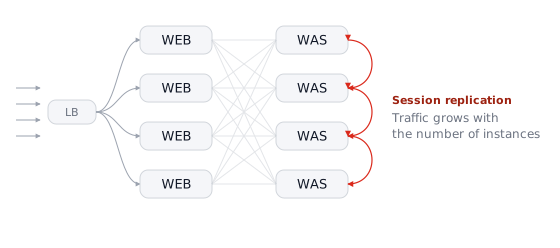
Requests pass through the load balancer to the web server (WEB), and the web server forwards them to one of the WAS instances behind it. The session is created in the memory of the instance that handled the request. Left as is, the session would disappear when that instance stops, so the instances copy sessions to each other.
Two consequences follow.
First, replication grows as you add instances. Every session creation or change has to be announced to the other instances, and the more instances there are, the more places there are to announce to. You add instances to increase processing capacity, but replication traffic grows by the same measure and the benefit shrinks.
Second, sessions use the same memory as the application. Sessions live in the WAS heap, so as concurrent users grow the application has less memory to work with. When garbage collection (GC) runs with session data accumulated, it takes longer and responses are delayed meanwhile. In severe cases the instance stops with an out-of-memory (OOM) error.
Furthermore, this approach does not work between different WAS products or between different web applications. Replication happens only within the same cluster of the same product.
Cluster Session Clustering Architecture
This is what it looks like with OPENMARU Cluster applied. The replication arrows between instances in the previous diagram are gone, and a data grid has appeared on the right.
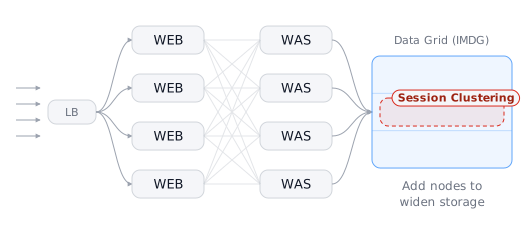
The part where requests pass through the load balancer and the web server is the same. What changes is what comes next. WAS instances do not hold sessions; they read and write them from the data grid as needed.
That removes both of the previous problems.
Replication between instances disappears. Because the session is in one place, there is nothing to announce. Adding instances increases processing capacity by that much, and removing or restarting them leaves sessions intact.
Application memory and session memory are separated. WAS heap usage does not change much as concurrent users grow, so the memory you need can be predicted. When sessions increase, you add data grid nodes and widen storage only.
The result is the same no matter which instance receives a request. The load balancer does not need to send the same user to the same instance, so load is distributed evenly, and different WAS products or different web applications can share the same session.