3.1. Auto-Instrumentation (APM Agent)
Overview
One label is enough for the OPENMARU WAS agent to be injected automatically into a workload. No image change is needed.
1. The Quickest Way to Use It
Add the following to the pod template labels of the Deployment to be monitored, and redeploy.
spec:
  template:
    metadata:
      labels:
        openmaru.io/was-agent: 'true'    # this one line applies auto-instrumentation
The label must go in
spec.template.metadata.labels(the pod template), not in the Deployment's top-levelmetadata.labels.
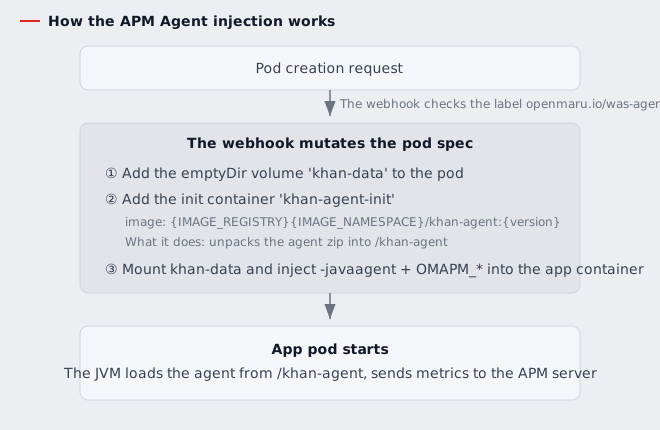
After redeploying, every pod that comes up gets the following automatically.
- The
khan-datashared volume (emptyDir) - The
khan-agent-initinit container (unpacks the agent files) -javaagentand theOMAPM_*connection environment variables in the app container
The init container always carries allowPrivilegeEscalation: false, capabilities.drop: [ALL],
runAsNonRoot: true, runAsUser: 1000 and seccompProfile: RuntimeDefault, so that it satisfies
the Pod Security restricted profile. If the pod already sets runAsUser, that value is used --
the application has to read the unpacked files, so it must run as the same user.
Applying instrumentation again to the same pod adds the init container and -javaagent once,
not twice.
2. Label and Annotation Options
One label is the switch that selects the target; every detail setting is an annotation.
| Key | Placement | Required | Default | Description |
|---|---|---|---|---|
openmaru.io/was-agent | label | required | — | Instruments only when 'true'. Any other value, or unset, does nothing |
openmaru.io/container-names | annotation | optional | (all) | Names the containers to instrument; separate several with commas |
openmaru.io/was-agent-version | annotation | optional | set at install time | The agent version (image tag) to inject |
openmaru.io/was-agent-image-pull-policy | annotation | optional | IfNotPresent | The agent image pull policy. Always is possible |
Keep the placement shown above. Putting was-agent in the annotations means no
instrumentation, and putting the other three in the labels can make pod creation fail depending on
the value (a label value accepts only alphanumerics and -, _, .).
Existing deployments keep working. Workloads that set these three as labels are still read. When the same key is present as both a label and an annotation, the annotation wins.
A full example
spec:
  replicas: 1
  selector:
    matchLabels:
      deployment: testapp
  template:
    metadata:
      labels:
        deployment: testapp
        openmaru.io/was-agent: 'true'                     # required, a label
      annotations:
        openmaru.io/container-names: 'testapp'            # may be omitted
        openmaru.io/was-agent-version: '5.1.0-11.1'       # may be omitted
        openmaru.io/was-agent-image-pull-policy: IfNotPresent
    spec:
      containers:
        - name: testapp
          image: my-registry/testapp:latest
To choose more than one container, separate the names with commas.
      annotations:
        openmaru.io/container-names: 'app,sidecar'
The init container and the khan-data volume are attached to the pod regardless of which
containers are chosen. container-names only decides which app containers receive -javaagent
and the volume mount.
3. The Environment Variables Added Automatically
Once instrumentation applies, the environment variables below are injected into the app container.
An environment variable of the same name already on the Deployment is not overwritten (the user's
value wins). The one exception is JAVA_TOOL_OPTIONS, which is appended to any existing value.
| Environment variable | Example value | Meaning |
|---|---|---|
OMAPM_HOST | openmaru-apm-server.openmaru-apm.svc.cluster.local | The APM server host (the Operator default OMAPM_HOST when unset) |
OMAPM_PORT | 8080 | The APM server port |
OMAPM_APPLICATION_NAME | testapp-${HOSTNAME:-:2} | The application name shown in APM |
OMAPM_INSTANCE_ID | testapp-${HOSTNAME:-:2}-${HOSTNAME:-:3} | The instance identifier |
OMAPM_TRANSACTION_TRACE_THRESHOLD | 500 | The transaction trace threshold (ms) |
JAVA_TOOL_OPTIONS | -javaagent:/khan-agent/khan-agent-5.1.0.jar | Loads the agent (appended after any existing value) |
CATALINA_OPTS_APPEND, JAVA_OPTS_APPEND and JAVA_OPTS are left alone. Whatever the
application sets stays as it is.
To name the APM server per workload, put
OMAPM_HOST/OMAPM_PORTdirectly in the Deployment's containerenv. They win over the Operator defaults.
OMAPM_APPLICATION_NAMEbecomes the application group name in APM. Its default contains the ReplicaSet hash, so it changes on every redeploy. If you autoscale on it, set the value yourself to pin it -- see 302 Autoscaling.
4. Confirming It Applied
Check that the init container and the javaagent went into the new pod.
# check the init container (khan-agent-init) and the volume (khan-data)
kubectl describe pod <pod-name> | grep -E "khan-agent-init|khan-data"

# check the injected environment variables
kubectl set env pod/<pod-name> --list | grep -E "OMAPM_|JAVA_TOOL_OPTIONS"
It is sound once that application and instance appear in the OPENMARU APM console (the WAS dashboard).
5. How It Works
6. When It Does Not Work
| Symptom | What to check |
|---|---|
| The agent is not attached to the pod | Whether the label is in spec.template.metadata.labels, and whether the value is exactly 'true' (a string) |
| The init container image fails to pull | Whether the image path built from IMAGE_REGISTRY/IMAGE_NAMESPACE (the install settings) and was-agent-version actually exists |
| Only some of several containers should be instrumented | Name them in the openmaru.io/container-names annotation (separate several with commas) |
| Not visible in the APM console | Whether OMAPM_HOST/OMAPM_PORT point at the real APM server (including network reachability) |
| An env var set earlier has no effect | That is correct behaviour. An env var of the same name set by the user wins (it is not overwritten) |