3.2. Autoscaling (APM HPA)
Overview
Pods are scaled out and in automatically on an APM application metric (TPS). It lets you scale to the real traffic, which CPU and memory alone find hard to catch.
1. How It Works
APM HPA implements the Kubernetes External Metrics API
(external.metrics.k8s.io/v1beta1). When the HPA asks for an external metric, APM HPA queries the
OPENMARU APM server for that group's metric and returns the value.
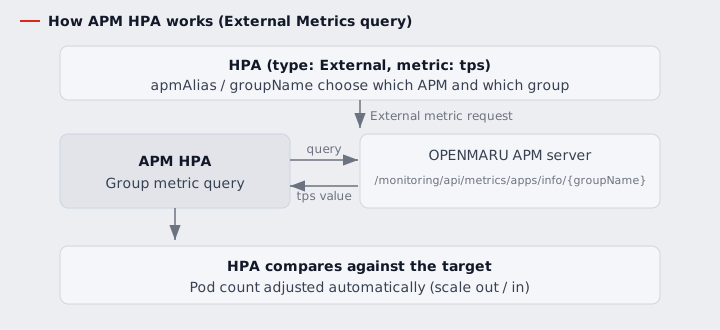
groupName: the name of the application group in OPENMARU APM.apmAlias: the alias that picks which APM server to ask (thenameregistered inenvHpaat installation). An alias that was never registered is rejected with an error, not silently redirected to another server.
Available metrics
| Metric | What it is | Range | target.type |
|---|---|---|---|
tps | Requests handled per second | — | AverageValue |
activeUser | Active users | — | AverageValue |
loginUser | Logged-in users | — | AverageValue |
avgRT | Average response time (ms) | — | Value |
errorRate | Error rate | 0-100 | Value |
apdexDeficit | 100 - apdex. Higher means worse response | 0-100 | Value |
Use the target.type from the table. AverageValue divides the value by the pod count. That
suits tps, which accumulates per pod, but dividing avgRT, errorRate or apdexDeficit -- which
are already averages or ratios -- changes their meaning: a 200 ms response time reads as 50 ms
across four pods.
apdexcannot drive autoscaling. It is higher-is-better, while a HorizontalPodAutoscaler can only express "scale up when the target is exceeded" -- so using it directly adds pods when responses are good and removes them when responses degrade. UseapdexDeficitto scale on response quality.apdexitself is read-only.
Fractions arrive in milli-units: a tps of 27.667 comes through as 27667m.
2. Using It — Creating an HPA
apiVersion: autoscaling/v2
kind: HorizontalPodAutoscaler
metadata:
  name: tomcat-hpa
spec:
  scaleTargetRef:
    apiVersion: apps/v1
    kind: Deployment
    name: tomcat
  minReplicas: 1
  maxReplicas: 3
  metrics:
    - type: External
      external:
        metric:
          name: tps                       # a metric name from the table above
          selector:
            matchLabels:
              apmAlias: APM-SERVER        # which APM server (matches the name in envHpa)
              groupName: TOMCAT           # the APM application group name
        target:
          type: AverageValue
          value: 50                       # scale towards an average of 50 TPS per pod
Applying it:
kubectl apply -f tomcat-hpa.yaml
kubectl get hpa tomcat-hpa

NAME         REFERENCE           TARGETS   MINPODS   MAXPODS   REPLICAS   AGE
tomcat-hpa   Deployment/tomcat   0/50      1         3         1          8s
- The integration is working once the left-hand value of
TARGETS(the current TPS) shows properly.
3. Confirming It Works (a Load Test)
# generate load
ab -n 18000 -c 10 http://tomcat-openmaru-test1.apps.example.local/

# pods grow once TPS passes the target
kubectl get hpa tomcat-hpa
NAME         REFERENCE           TARGETS    MINPODS   MAXPODS   REPLICAS   AGE
tomcat-hpa   Deployment/tomcat   506/50     1         3         3          24m
The external metrics API can also be checked directly.
kubectl get --raw "/apis/external.metrics.k8s.io/v1beta1/namespaces/<namespace>/tps?labelSelector=groupName%3D<group>%2CapmAlias%3D<alias>" | jq .
When the value cannot be fetched, the error message comes through as it is, saying what went wrong.
Error from server: 메트릭 "tps" 를 가져오지 못했다 (그룹 "wrong-name"): ...
Error from server: labelSelector 에 groupName 이 필요하다 (받은 것: "")
Error from server: apmAlias "APM-TYPO" 에 해당하는 환경변수가 없다
3.1 The application group name changes on every redeploy
groupName is the application group name that APM recognised, and it comes from the
OMAPM_APPLICATION_NAME environment variable on the instrumented pod. The default injected by
auto-instrumentation contains the ReplicaSet hash.
Pod name     helloworld-55cb78b54c-7276g
Group name   helloworld-55cb78b54c          <- the ReplicaSet hash is in it
Scaling up and down happens inside the same ReplicaSet, so that is fine. But redeploying the
Deployment changes the hash, so the group name changes and the HPA's groupName no longer
matches.
The HPA then cannot fetch the metric -- and it holds the pod count rather than reducing it. Nothing surfaces the error, so it can go unnoticed for a long time.
To pin it, set OMAPM_APPLICATION_NAME yourself in the pod template. Auto-instrumentation does
not overwrite a value that is already there.
spec:
  template:
    metadata:
      labels:
        openmaru.io/was-agent: 'true'
    spec:
      containers:
        - name: tomcat
          env:
            - name: OMAPM_APPLICATION_NAME
              value: "tomcat-prod"        # unchanged across redeploys
Then use the same name in the HPA.
            matchLabels:
              groupName: tomcat-prod
To see the group name in use, read the environment variable on an instrumented pod, or try the
kubectl get --raw command above and see whether a value comes back.
kubectl get pod <pod> -o jsonpath='{.spec.containers[0].env[?(@.name=="OMAPM_APPLICATION_NAME")].value}'
4. Using Several APM Servers
With several APM servers, register each under a different name (= apmAlias) in envHpa at
installation.
  envHpa:
    - name: APM-INTERNAL
      value: "http://openmaru-apm-server.openmaru-apm.svc.cluster.local:8080"
    - name: APM-SERVER
      value: "http://192.168.80.190"
    - name: APM-INTERNAL_ACCESS_KEY    # pair an access key with every alias
      value: "<APM API access key>"
    - name: APM-SERVER_ACCESS_KEY      # that APM server's API access key (<apmAlias>_ACCESS_KEY)
      value: "<APM API access key>"
Pair <apmAlias>_ACCESS_KEY with every alias. Without the key the APM server answers
HTTP 403 and no metric is fetched.
Then pick between them with matchLabels.apmAlias in the HPA.
            matchLabels:
              apmAlias: APM-INTERNAL    # query the internal APM server
              groupName: TOMCAT
If
apmAliasmatches nonameinenvHpa, the request is rejected with an error (apmAlias "..." 에 해당하는 환경변수가 없다). It is never redirected to another server, so a typo surfaces immediately -- match the name exactly to use the server you intended.
5. The Key Settings at a Glance
| HPA field | Value | Meaning |
|---|---|---|
metrics[].type | External | Scale on an external metric |
metric.name | tps | The metric to use. See the table in section 1 |
selector.matchLabels.apmAlias | e.g. APM-SERVER | The alias of the APM server to query (the envHpa name) |
selector.matchLabels.groupName | e.g. TOMCAT | The APM application group |
target.type / target.value | AverageValue / 50 | The target TPS per pod |
6. When It Does Not Work
| Symptom | What to check |
|---|---|
TARGETS shows <unknown> | Run kubectl describe hpa <name> and read Events. The reason comes through as a message |
| Scaling stopped after a redeploy | The group name has most likely changed. See 3.1 |
HTTP 403 | Check that <apmAlias>_ACCESS_KEY is paired with the alias |
apmAlias ... has no matching environment variable | Whether apmAlias matches the name in envHpa exactly (case included) |
labelSelector needs groupName | selector.matchLabels.groupName is missing |
| Always reads zero | Whether the group really has traffic and APM is aggregating the metric |
Scaling on apdex moves the wrong way | apdex is higher-is-better and cannot be used. Use apdexDeficit |
| Response time or error rate reads too small | target.type was left as AverageValue. Use Value as in the section 1 table |
| It does not scale | Review minReplicas/maxReplicas and whether target.value is too high |